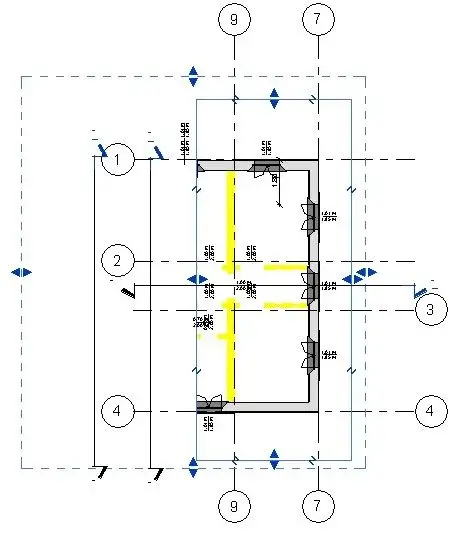
1) a cutting region for annotations completely cuts the annotation elements when it touches any point of such elements, consequently there is no partial annotation. annotations, such as symbols, labels, key notes and quotas, which refer to hidden or cut pattern elements are not displayed in the view, even if they are located within its cutting region. For example, if a door has been cut from the view with the cut side of the model, the door label will not be visible even if it is located inside the cut side of the annotation.
to make visible within the cutting edge of the annotation the reference elements (grills and levels) that cross the cutting region by model, the ends are displayed. reference elements are not resized. when you turn off the cutting region (option not crop view), they are displayed with the original size with which they were created.
the cutting edge of the annotation is not displayed by default when viewing cut regions in a primary view. the cutting edge of the annotation is displayed by default when viewing cut regions in dependent views. for more information on primary and employee views, see duplication of employee views
2) if in a view you draw a definition pane, you can associate the view cutting region to that pane, so that the cutting region is visible and corresponds to the definition pane extensions. this property is only available for views of plant, prospectus and section. when for this property you choose as a value definition pane, the properties cutting region and visible cutting region become read-only.
I honestly can't understand the instructions of the guide.
So let's try to proceed by order, let's analyze the 'notation cut':
in an active view the 'notation cut' and I find myself a nice contour around the 'cut region'.
this perimeter can be enlarged or narrow, but what are its effects on design? should cut the reference elements i.e. grids and levels, but how?
I feel like nothing changes.. .
Mar
No. if an element is associated with a annotation (description/information), and this element is included in the cutting region, the annotation even if external to the cutting line will be visible.
then you will have a "written" (annotation) external to the cutting line that "does not bind" with any element.
by activating the option "notation cut" the writing disappears.
Basically, all external notes to the cutting line are made invisible.
Sorry but I still don't understand:
in the proof that I attach below it is seen that between the 'cutting region' and the 'notation cut' appear annotations, in order to make them disappear I have to reduce the perimeter of the 'notation cut' (?)
what is the usefulness of all this?
I don't think programmers put this function randomly.
Mar