
Ilario
Guest
Bye to all,
It is a question that I have always asked myself, but that I have never deepened, but I would actually be comfortable.
I have begun to look at us, but I have not found an answer, I ask you if you have ever served and if you have come out.
in the .idw environment style editor, if you go to see the "quote" area, tab "notes and directors", you can set the various automatic annotations reported (in this case) to the recognition directors of the holes and threads.
I have set myself, as many of you I imagine, the various annotations for the different types of holes or threaded holes, but I have always seen some voices that I have never been able to understand how kale make them jump out with automatic recognition...... the infamous "prefig holes".
you can well set the automatic note of a pre-fitting hole, but how do you do to model it in 3d environment so that then at the table it is recognized as such?
I'll work you out to clarify what I mean.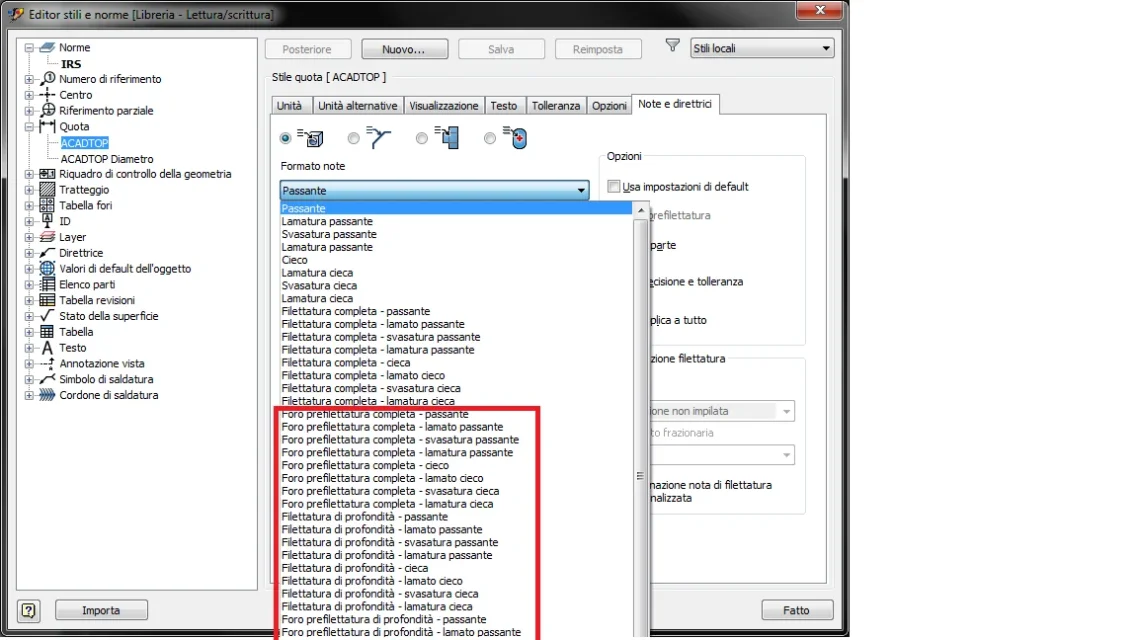 p.s.: so that in 3d environment (.ipt or .iam that is) there is the setting in "document settings" tab "modelling" -> "diameter threaded hole" where you can set the method of modeling the threaded holes, but also setting it in that way, the note does not recognize it to me however as a prefixing hole in the table... .
I hope I have explained, otherwise I will try to clarify better. . .
It is a question that I have always asked myself, but that I have never deepened, but I would actually be comfortable.
I have begun to look at us, but I have not found an answer, I ask you if you have ever served and if you have come out.
in the .idw environment style editor, if you go to see the "quote" area, tab "notes and directors", you can set the various automatic annotations reported (in this case) to the recognition directors of the holes and threads.
I have set myself, as many of you I imagine, the various annotations for the different types of holes or threaded holes, but I have always seen some voices that I have never been able to understand how kale make them jump out with automatic recognition...... the infamous "prefig holes".
you can well set the automatic note of a pre-fitting hole, but how do you do to model it in 3d environment so that then at the table it is recognized as such?
I'll work you out to clarify what I mean.
p.s.: so that in 3d environment (.ipt or .iam that is) there is the setting in "document settings" tab "modelling" -> "diameter threaded hole" where you can set the method of modeling the threaded holes, but also setting it in that way, the note does not recognize it to me however as a prefixing hole in the table... .I hope I have explained, otherwise I will try to clarify better. . .