
• This forum is the machine-generated translation of www.cad3d.it/forum1 - the Italian design community. Several terms are not translated correctly.

applicare texture

  • Thread starter Thread starter felix32
  • Start date Start date

felix32

Guest
hope that this is the right section I ask the question:
I have to realize the rendering of a sound recording studio, in the environments it is expected of instrumentation.
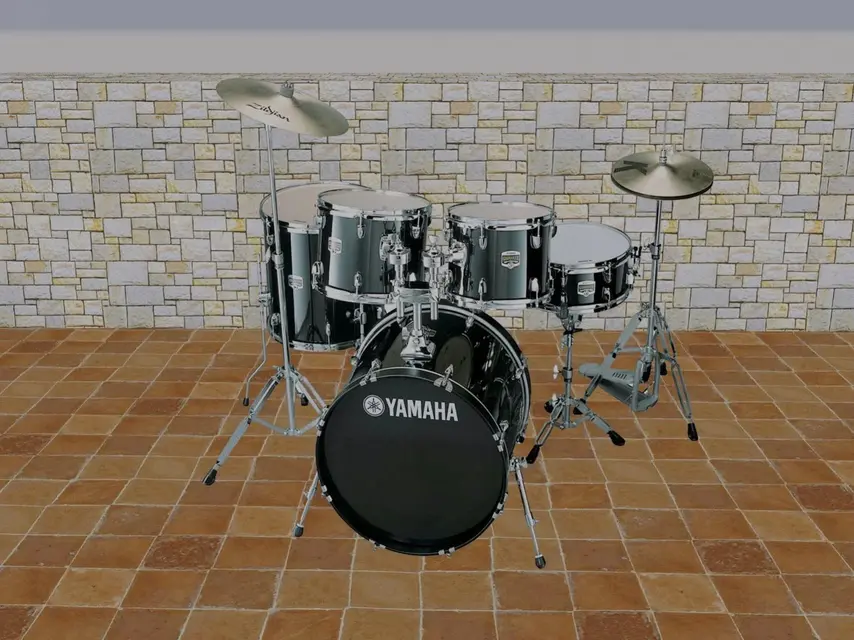
For example, the battery I downloaded high-quality images in jpeg format, I should cn the latter insert it in a context to simulate an object 3 d.. to the course now dated, I remember that we created a kind of retino cn a photo editing program, afterdiche cn , sembra , the negative used it as texture and applied the photo and gave me the idea of an object 3. if any of you have understood the intentions could explain to me step by step the correct procedure?? thanks to all
 
You probably refer to bump maps or displace maps, but surely that method they told you about the course does not work on a complex object like a battery! !

:36_1_10:
 
You probably refer to bump maps or displace maps, but surely that method they told you about the course does not work on a complex object like a battery! !
Of course you have to forget about the shadows, for the rest depends on the result that you want to get.

felix, see in the help the procedure for setting the opacity map (from 2011 transparency) and attach the material to a 3dface, not to a solid.
 

Attachments

  • 318a.webp
    318a.webp
    224.7 KB · Views: 21
Hei gp, that's exactly what I was trying to do. As a result, I feel better:-) listen to me how to get it with a step? my version of autocad is 2007... thank you very much:finger:
 
This is a test piece but very fast to make... I was wondering why the battery picture I used was so bad?? Unlike the original that is the ltop????. bah,, cmnqe is a gif nn a jpg.. Does anyone know why?
 
This is a test but very fast to render.. .
Where is she?? I do not see attachments.. .


for the step-by-step with 2007 (but didn't use 2010?) I managed to put my hands on a 2008, if I don't remember bad the interface was identical.

creates a new material in the card folder folder folder there. map of diffuse composition assigns the battery image, such as this: yamaha-gigmaker[1].webp there. map of opacity assign the discounted image, for example this:
yamaha-gigmaker[4].webpin the card scale and material flanking assign:scale unit -> suitable for gizmo
mosaic u -> none
mosaic v -> none
attach the material to a 3dface, in some cases it may be necessary to change the values of the mosaic in order to make the image fit perfectly.

the results are displayed only in renders, unlike the 2011/2012 versions, where you can already appreciate in the realistic visualization style.

:smile:
 
So .. I downloaded the image, I selected the object (battery) and saved it in png format, then I did or same cn the ocontorno lsol for which I have 2 png. in the material section of autocad 2007 I correctly followed the procedure that you explained to me this is the result. . .
I'd like you to design a line, extrude it, stick to the map you created. . .
will I be wrong to use 2 png? is a png file you use or a jpg file?
 

Attachments

some game of shadows you can still get, even if they are not accurate.. .
in this case I used 2 cruise spots tending to yellow
 
It's true. in this case it is better not to insert shadows
Alternatively you can perfect in ps (if you have good familiarity with sw)
 
Greetings to you all boys.. Here I put what I got, I always remain the form of the extruded line, I ask for assistance for the error, thank you very much:finger:
 

Attachments

  • prova render drum.jpeg.webp
    prova render drum.jpeg.webp
    30.3 KB · Views: 5
another test.. So here would seem to have understood why he never gave me the black cut.. was wrong the negative.. But now I hope to ask, why does the battery become blue when it is natural wood? and why is it transparent to the point from afr to transpire what is behind it?. .we who had posted you were certainly better. . Help me:-)
 

Attachments

  • prova render drum trasparente.jpeg.webp
    prova render drum trasparente.jpeg.webp
    51.5 KB · Views: 6
Alpha must be completely black, otherwise with shades of gray you get semi transparency effects

you have to crush a little more the image. in your example it is clear that the back elements do not "touch" the floor
 

Forum statistics

Threads
44,997
Messages
339,767
Members
4
Latest member
ibt

Members online

No members online now.
ciao
Back
Top