• This forum is the machine-generated translation of www.cad3d.it/forum1 - the Italian design community. Several terms are not translated correctly.

application texture

  • Thread starter Thread starter genale
  • Start date Start date

genale

Guest
Hello, everyone. .I'm new to the forum and I just started using rhino
I wanted to know if you can apply on a solid but only make a material I don't know if you understand! Thank you
 
Hello, everyone. .I'm new to the forum and I just started using rhino
I wanted to know if you can apply on a solid but only make a material I don't know if you understand! Thank you
hello genuine and welcome in the forum.


I don't think it's possible to assign an image to a single face of a parallelepiped.
what you can do is change the default setting of the texture mapping of an object, so that the image you chose is replicated on each face of the solid.

to do so you must select the object and then press the f3 button that opens the property window of the object.
from the drop-down menu choose the item texture mapping, and change from surface to box

the attached images should clarify better than many words
 

Attachments

  • mapping_1.webp
    mapping_1.webp
    26.5 KB · Views: 42
  • mapping_2.webp
    mapping_2.webp
    39.8 KB · Views: 32
Okay.. very clear.. the problem is that I have to apply various textures on different surfaces of the same solid..the solution that comes to me is to create a superimposed surface on every face of the solid..I don't know if it was me if it was me but it was possible to extrude surface and not solid:-(
 
Okay.. very clear.. the problem is that I have to apply various textures on different surfaces of the same solid..the solution that comes to me is to create a superimposed surface on every face of the solid..I don't know if it was me if it was me but it was possible to extrude surface and not solid:-(
or...

After changing from surface to box the property' of the mapping texture, explode the solid with the _explode command and check each surface a different texture.

If you need to keep the various faces together as if they were a single object, you can always use the _group command, and its reverse _ungroup when you need to have them separated again.
 
hello genuine and welcome in the forum.


I don't think it's possible to assign an image to a single face of a parallelepiped.
what you can do is change the default setting of the texture mapping of an object, so that the image you chose is replicated on each face of the solid.

to do so you must select the object and then press the f3 button that opens the property window of the object.
from the drop-down menu choose the item texture mapping, and change from surface to box

the attached images should clarify better than many words
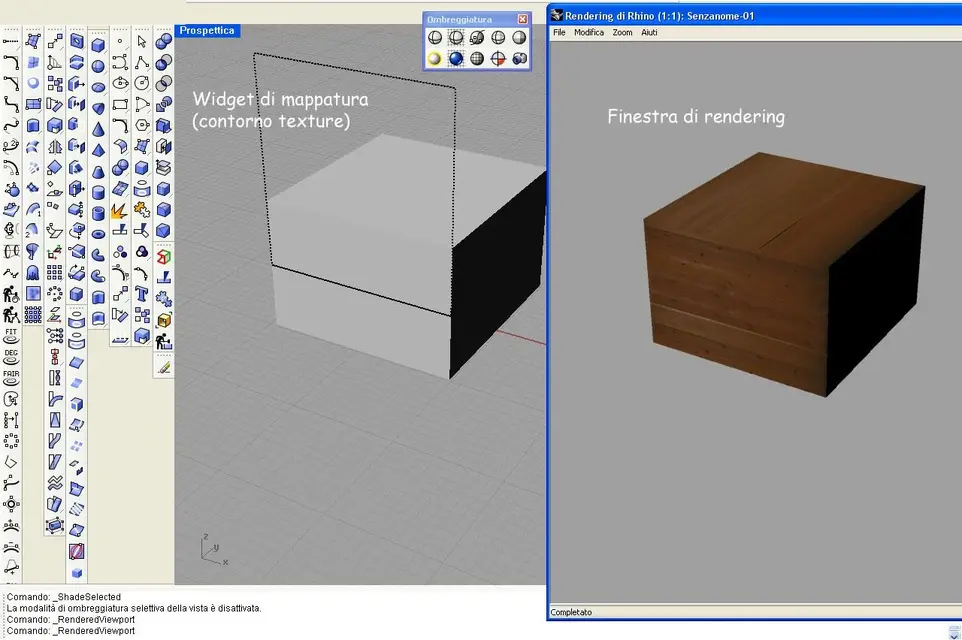
hi, if I may also ask you something about it ... I have another kind of problem always in the texture mapping , that is that I apply the texture , I see the mapping widget , but pèer see the actual texture applied to the piece I have to launch the rendering , while I see that you have the texture applied to the solid already in the view of rhino .
I can practically visualize the texture only with the rendering, not in "temporeale " in the normal screen of rhino, in the rendering comes perfectly, but in rhino you see only the contour of the mapping widget . ... you know if there is a variable to set?

Thank you
 
hi, if I may also ask you something about it ... I have another kind of problem always in the texture mapping , that is that I apply the texture , I see the mapping widget , but pèer see the actual texture applied to the piece I have to launch the rendering , while I see that you have the texture applied to the solid already in the view of rhino .

Thank you
You should give me some extra information.
I use rhino v4 r7
as an engine to make use of the inner one of rhino - rhinorender

If you're using flamingo, vray or others it's possible that you don't see the textures in real time.
 
I also work on rhino 4 r7, for rendering I am learning vray and also in the vray manual (at least until I arrived) where the mapping texture is explained in the photos shows only the mapping widget but not the real texture .
but in this regard I tried to go into the rhino rendering drop-down menu and set the current rendering module >rendering of rhino (in place of vray) but the result remains identical , but it seems absurd, because you go much better if you can adjust to eye the layout of the textures.. .
If it were autocad I could set the variable vsmaterialmode that from the same identical problem , i.e. the not display of rendering on solid , but here I wouldn't know which side to take (also because I tried rendering options, display, the help ..ecc) ...
 
I also work on rhino 4 r7, for rendering I am learning vray and also in the vray manual (at least until I arrived) where the mapping texture is explained in the photos shows only the mapping widget but not the real texture .
but in this regard I tried to go into the rhino rendering drop-down menu and set the current rendering module >rendering of rhino (in place of vray) but the result remains identical , but it seems absurd, because you go much better if you can adjust to eye the layout of the textures.. .
If it were autocad I could set the variable vsmaterialmode that from the same identical problem , i.e. the not display of rendering on solid , but here I wouldn't know which side to take (also because I tried rendering options, display, the help ..ecc) ...
attention, once you have changed the engine to render, the vray materials are not recognized by rhinorender so that you do not see the textures.
Unfortunately each engine has its own materials and rarely (almost ever) are interchangeable with others. remember that textures are part of the definition of materials.
 
hello genuine and welcome in the forum.


I don't think it's possible to assign an image to a single face of a parallelepiped.
what you can do is change the default setting of the texture mapping of an object, so that the image you chose is replicated on each face of the solid.

to do so you must select the object and then press the f3 button that opens the property window of the object.
from the drop-down menu choose the item texture mapping, and change from surface to box

the attached images should clarify better than many words
attention, once you have changed the engine to render, the vray materials are not recognized by rhinorender so that you do not see the textures.
Unfortunately each engine has its own materials and rarely (almost ever) are interchangeable with others. remember that textures are part of the definition of materials.
In the meantime, thanks to the answer, the fact is that unfortunately I do not believe this is the question, because after each passage from vray to the other, for all the countless attempts, after every change, after all, I have always reassigned the textures, changing all the settings that I managed to find, yet nothing ... the situation remains that the textures are seen only in the rendering window, not in the usual view of rhus
 

Attachments

  • per3dc.webp
    per3dc.webp
    109.2 KB · Views: 19
In the meantime, thanks to the answer, the fact is that unfortunately I do not believe this is the question, because after each passage from vray to the other, for all the countless attempts, after every change, after all, I have always reassigned the textures, changing all the settings that I managed to find, yet nothing ... the situation remains that the textures are seen only in the rendering window, not in the usual view of rhus
Sorry, but what procedure do you follow to apply the textures? ... and what would be mapping widget?

pressing f3 (after selecting the object) opens a window with a combo box.
one of the options is "material", selecting that you access the definition of the material in which I can activate and load a texture.
then for mapping (always from combo box) select "texture mapping" and change from "surface" to "box" the type of mapping.

How do you do that?
 
I practically do the same system as you do, with f3 open the properties, hang with material etc, this when I do not with vray that there is different law, but not much.
the mapping widget also see it with this method , as long as you are in texture mapping, ideas show advanced ui, create a mapping channel and at that point click on mapping exhibition . I think I can define the widget as the skeleton of the texture , what you see in yesterday's posted photo is the widget , on which you can intervene if you want to scale , rotate different textures, to be tightened for example
how do you change the layout of a texture?


As far as my problem is concerned, I don't know what a saint to call, because I think it's really a problem with PC ...boh. .
 
As far as my problem is concerned, I don't know what a saint to call, because I think it's really a problem with PC ...boh. .
I tried following the steps you described me, and I confirm that I see the textures in real time (of course the viewport must be in modalita renderd).

check in the document properties if your graphics card supports opengl (command _documentproperties) ... see attached image.

Maybe it's just a driver problem, download the latest versions of the video drivers for your card on the manufacturer's website.
 

Attachments

  • widget.webp
    widget.webp
    85.5 KB · Views: 7
  • opengl.webp
    opengl.webp
    48.6 KB · Views: 6
I'm sure there's something wrong, because I can't even see the transpreciation of glass in real time in all possible options of viewport shaded, maked, etc., and this time ago I did it ... (before installing vray to tell the truth ...)

for open gl is supported by the geforce 7600gs/pci/sse2 card
It's just that unlike your I see my version is 2.0.3, while yours is 3.2.0 that's the problem?
I try to download the drivers like you said... and hopefully...
 
Nothing to do, I downloaded the drivers, now the open gl is 2.1.2 but for the texture we are still at the point of first.
If I try to cry you say something improves?
 
Nothing to do, I downloaded the drivers, now the open gl is 2.1.2 but for the texture we are still at the point of first.
If I try to cry you say something improves?
bhe! even a candle to the Madonna would help:smile:

if everything worked first, try to uninstall the last plugs you installed in rhino (including vray).
I had problems with rhino w5 in modalita renderdshaow because of a plugin that somehow burst.
taken away that everything worked wonderfully
 
I don't have a candle to the Madonna, because now I've tried them all... It could also be that it was vray's fault, I will see if disintall or not, but I have a job to finish and I have to keep it as it is because I feel that the loser is in agguato, and if I touch something happens (you know, for the law of murphy) ... I think it's really a big break, having to throw the render every time to see how it went ...

Listen, I've seen that you're a vein, too, I'm a good-grandfather, how's your job going, here a half famine, until there was a freelance job and now they laugh at me because "we don't even have a job for us, do you want us to give it to you?"
 
Listen, I've seen that you're a vein, too, I'm a good-grandfather, how's your job going, here a half famine, until there was a freelance job and now they laugh at me because "we don't even have a job for us, do you want us to give it to you?"
I answer in the matter of famine .... briciole regarding 2008 :mad:

but fortunately the "nano" assures us that the crisis is over:biggrin:
 
ah well... for the cursed dwarf the crisis lasted 12 hours, because until the day before the crisis there was and the day after the crisis had passed, so for him it is easy, but no it seems to me that ... :angry:

cmq I have taken a look at the link of your company and I have seen that you are in the area of asolo , I am of felt , but look at you, with all the Italian available ...cmq I think that there things go much better.
I have seen the models on the homepage and are really beautiful, between model and rendering I must say that the integral helmet is really cool, with what program do you do?

Finally I may have understood something about rhino ... I installed it on a test laptop and without vray the textures apply in a moment and without any problem... but look at you, add a module and find yourself worse ... the cases of life ...
 

Forum statistics

Threads
44,997
Messages
339,767
Members
4
Latest member
ibt

Members online

No members online now.
Back
Top