
IronMike87
Guest
Hello everyone,
I would need clarification on the use of levels, as per title.
I press that I have never deepened this functionality without ever needing it until now.
I would like to know if you can select a single function to bring it to a level.
I tried to do some tests, but the results as you can see were bad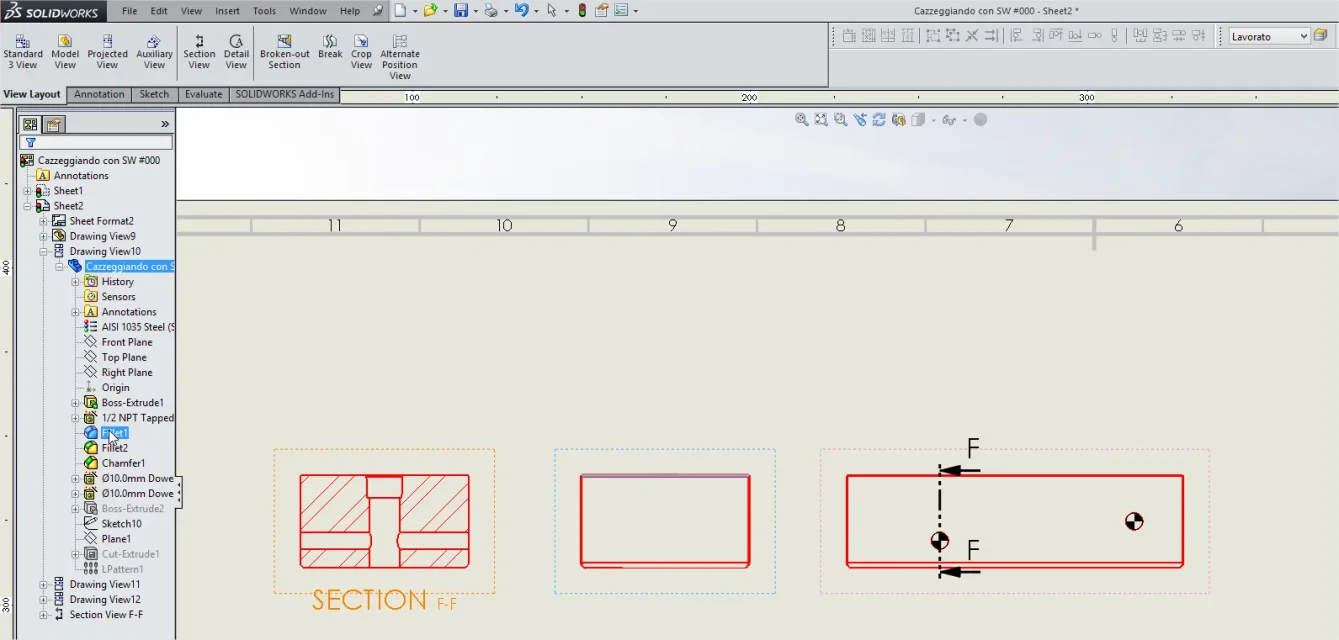 the ultimate purpose would be to graphically highlight the parts that are processed.
work for a company that realizes all the machining and grinding processes on behalf of third parties. I have been in the hands several times of the processing tables of large oem (fca, gm, etc...) and in every single view and detail the parts worked on the piece were highlighted in red.
I imagine that on catia this function is easily implemented ....
for now, the only solution I see, would manually select the various lines and change the color..... It is difficult to say:
I would need clarification on the use of levels, as per title.
I press that I have never deepened this functionality without ever needing it until now.
I would like to know if you can select a single function to bring it to a level.
I tried to do some tests, but the results as you can see were bad
the ultimate purpose would be to graphically highlight the parts that are processed.work for a company that realizes all the machining and grinding processes on behalf of third parties. I have been in the hands several times of the processing tables of large oem (fca, gm, etc...) and in every single view and detail the parts worked on the piece were highlighted in red.
I imagine that on catia this function is easily implemented ....
for now, the only solution I see, would manually select the various lines and change the color..... It is difficult to say: