• This forum is the machine-generated translation of www.cad3d.it/forum1 - the Italian design community. Several terms are not translated correctly.

archicad - material samples in 3d

  • Thread starter Thread starter Silver71
  • Start date Start date

Silver71

Guest
Good morning
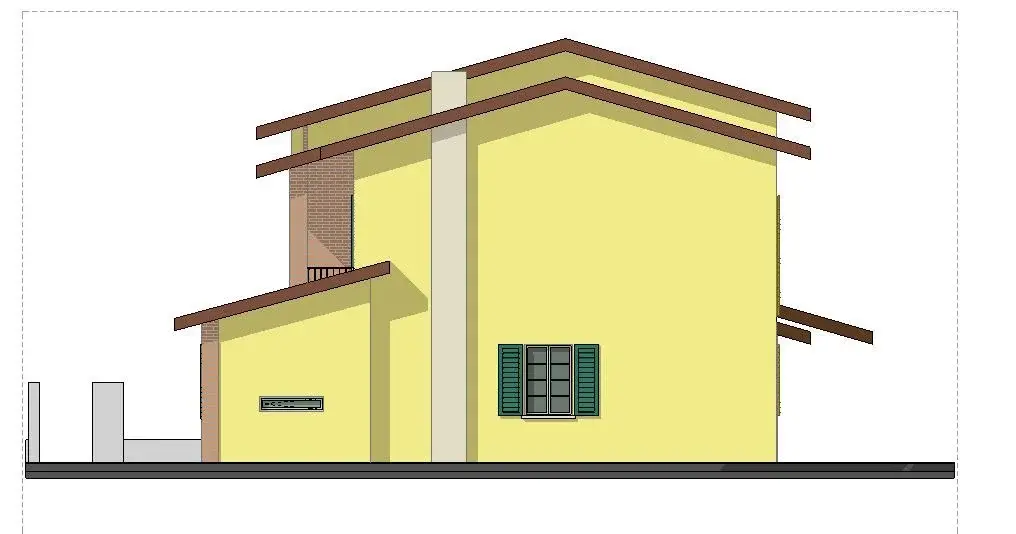
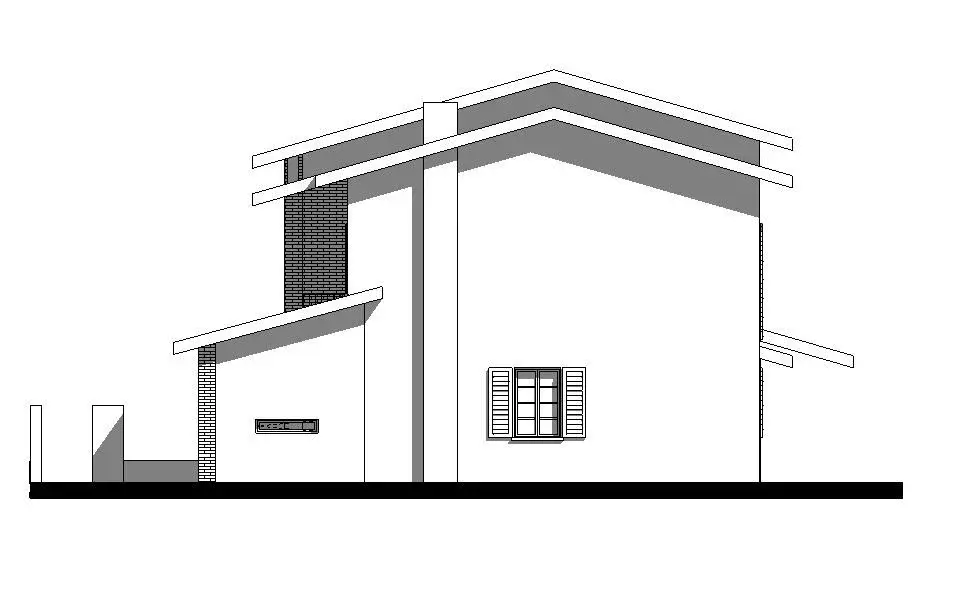
I am new to the forum and self-taught by archicad. I can't togle the gray color in the views that archicad attributes to the materials that should be white. failed attempts: a) saving the window in the "document 3d" -> all the design on white background with shadows and vector nets but not colored -see alleg.01. b) saving the view directly in the "layout" -> all design with colors of materials but white elements are coloured in grey- see alleg.02. How can I do that? thanks for every help.
01.webp02.webp
 
Good morning
I am new to the forum and self-taught by archicad. I can't togle the gray color in the views that archicad attributes to the materials that should be white. failed attempts: a) saving the window in the "document 3d" -> all the design on white background with shadows and vector nets but not colored -see alleg.01. b) saving the view directly in the "layout" -> all design with colors of materials but white elements are coloured in grey- see alleg.02. How can I do that? thanks for every help.
View attachment 34531View attachment 34532
I forgot the archicad14 version. Thank you.
 
Bye.
the net is associated with the material. if you don't need you can just go to the material and delete the associated retino. relative to the visualization there are views of archicad that consider the material, others not.
for example if you try to make a section before your building, do not view retini, if you do the rise you. This is because archicad is set like this. In your case, you used 3d windows to lift.
I believe that from the settings of these 3d views you can choose whether to display or not textures. if it didn't work, do a section before the building and you solved
 
Bye.
the net is associated with the material. if you don't need you can just go to the material and delete the associated retino. relative to the visualization there are views of archicad that consider the material, others not.
for example if you try to make a section before your building, do not view retini, if you do the rise you. This is because archicad is set like this. In your case, you used 3d windows to lift.
I believe that from the settings of these 3d views you can choose whether to display or not textures. if it didn't work, do a section before the building and you solved
Thanks, but what do you mean, "you used 3d windows as lifted" because for a prospect, you don't use a 3d fin?? the problem is that the material that should be white ( plaster) in 3d is represented with a gray color: Is there no way to make it softer?? Thanks again.
 
Thanks, but what do you mean, "you used 3d windows as lifted" because for a prospect, you don't use a 3d fin?? the problem is that the material that should be white ( plaster) in 3d is represented with a gray color: Is there no way to make it softer?? Thanks again.
no, generally to make a prospectus you use the command raised. in the bar that I attach the second command below after the sichte writing. also with this you will visualize the textures that are retini, but also colors. to have a view "flat" - use the command section - the icon before the lifts - and do a section "before" of the building so as not to cut it and have everything in projection ;-)
 

Attachments

  • Bildschirmfoto 2014-03-07 um 12.02.58.webp
    Bildschirmfoto 2014-03-07 um 12.02.58.webp
    9.8 KB · Views: 10
no, generally to make a prospectus you use the command raised. in the bar that I attach the second command below after the sichte writing. also with this you will visualize the textures that are retini, but also colors. to have a view "flat" - use the command section - the icon before the lifts - and do a section "before" of the building so as not to cut it and have everything in projection ;-)
Sorry eux if I insist. I attach the result of the "high" command and what I usually use "parallel projections" of the views. with the "high" command despite changes to the settings I do not see the color of the materials but only the vector fields (e.g. bricks). with the command "parallel projections" I see all the colors but the objects that should be white represents them gray and I cannot correct them (e.g. fences or chimney).
Thank you:
 

Attachments

  • vista proiezioni parallele.webp
    vista proiezioni parallele.webp
    25.6 KB · Views: 14
  • alzato.webp
    alzato.webp
    23.4 KB · Views: 15
in fact we are saying both that that of the parallel projections is the wrong method;-) if you use the lift you see the colors and/or the samples - which according to me is right - a prospect normally, being a design more thin (poor odds or none) usually gives us information about the material - in ancient times these were retinal - today are colors.
in your case you want to see all white surfaces - use the section command - not raised.
in the third case you are seeing in three dimensions but placing yourself in a particular way. this however leaves the view a three-dimensional view. archicad (also right here), thinks that the 3d is a type of representation less "technical" and more "popular", therefore leaves us colors, shadows, etc...
try with the tool section - do what you want
 
ah - moreover - in the view that you have attached I do not see anything gray that should be white. if some surfaces are gray, that is the shadow - you can exclude or change from the sun settings
 
ah - moreover - in the view that you have attached I do not see anything gray that should be white. if some surfaces are gray, that is the shadow - you can exclude or change from the sun settings
I try to get back then I won't break you +
the prospectus (in attachment "view parallel projections02") I got it with the commands "sign projection 3d- parallel views" (see attachment "commands"). the problem that I can't solve is that some parts (smooth and fence) are represented in gray color and I can't correct them/scrare them despite the material is set as white. I don't even solve this problem by using the "lift" command or "section" command. the problem of the gray color I solve it by making a view with the usual way "setting projection 3d- parallel views" and "saving it" with the command "capture window for document 3d". In this case, however All the colors are varied (see attachment "West_02". thank you and forgive your insistence.
 

Attachments

  • vista proiezioni parallele02.webp
    vista proiezioni parallele02.webp
    27 KB · Views: 10
  • comandi.webp
    comandi.webp
    123.8 KB · Views: 11
  • ovest_02.webp
    ovest_02.webp
    112.2 KB · Views: 9
with the "high" command despite changes to settings I do not see the color of the materials but only vector sampling (e.g. bricks).
you have to activate "colors of the surface" in the settings of the lift or section (from this point of view are equal).Schermata 2014-03-08 alle 11.40.50.webp
 
Sorry, I don't understand. in your comment yesterday of 16:53, second image - what would these gray surfaces not have to be gray?
 

Forum statistics

Threads
44,997
Messages
339,767
Members
4
Latest member
ibt

Members online

No members online now.
Back
Top