• This forum is the machine-generated translation of www.cad3d.it/forum1 - the Italian design community. Several terms are not translated correctly.

aspects

  • Thread starter Thread starter TECNOMODEL
  • Start date Start date

TECNOMODEL

Guest
I can't understand where I'm wrong.:frown:

I have a part where some areas look like cast iron and other worked cast iron.
I put the part in a set and it looks all like cast iron:confused:
 
usually happens because it is inserted with "master" representation.
to change, button dx -> representation -> ....
 
usually happens because it is inserted with "master" representation.
to change, button dx -> representation -> ....
Okay, I'm here.
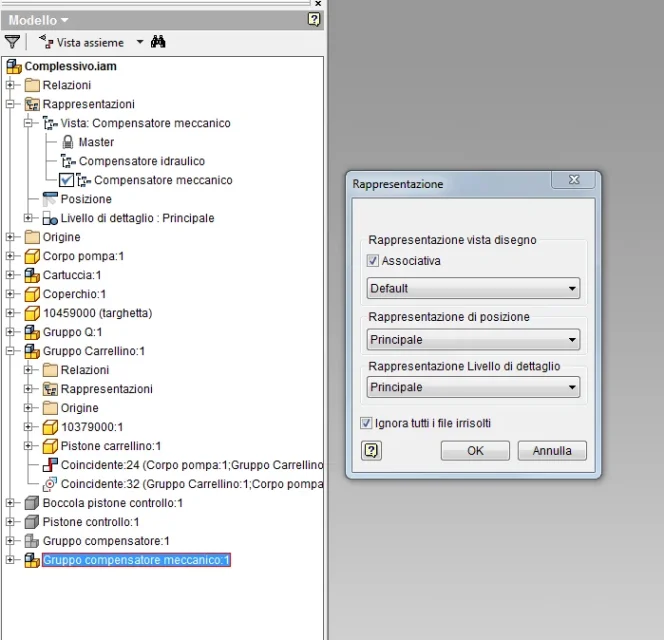
but now I have the axieme inserted in a further set and here it is not displayed as in the first set.
I have activated the right representation but do not change the aspects of the faces I have modified.
 
strange because the concept is always the same.. .
can be because in the second together I have 2 representation views in addition to the master, in the part and in the first together I have the master and a view named default that is the one in which I changed the aspects?

I attach an image of the browser and the window of the first setCattura.webp
 
It's not about that.
First, did you do the offending part, or is it downloaded from the internet? those downloaded can give a lot to tribulate from the point of view of the aspects.

second : the incriminating part has like iprop material "cast" and only on some face you have given the appearance "work", or the material is "default....generic" and by hand you have changed the appearance in " cast" and on some face "work" ?
 
It's not about that.
First, did you do the offending part, or is it downloaded from the internet? those downloaded can give a lot to tribulate from the point of view of the aspects.

second : the incriminating part has like iprop material "cast" and only on some face you have given the appearance "work", or the material is "default....generic" and by hand you have changed the appearance in " cast" and on some face "work" ?
I did the part, set a material with its appearance created by my predecessor.
on some faces, those worked mechanically, I modified the look in worked cast iron.
 
I've been cuffing a little bit in my computer and I think he's doing well. I don't know.
You should try with your files.
 
I resume this post because with the aspects I still have some doubts.

I have two parts, cast iron material with its appearance.
in some surfaces I changed the look in worked cast iron, in others I assigned a color.

I make the table where I have two views render, no problem. the aspects are there.

Now I put the two parts in a set, one keeps the other not.
left button on the part, representations, I choose the view 1 which is the one in which I have the aspects.

no change, one has the aspects and the other does not.
In addition to the axieme every time I remove the visibility to the part eliminates me the association with the views, when the visible relay I have to change the representation.

Can someone clear my ideas on how the representations in inventor work?

in
 
I resume this post because with the aspects I still have some doubts.

I have two parts, cast iron material with its appearance.
in some surfaces I changed the look in worked cast iron, in others I assigned a color.

I make the table where I have two views render, no problem. the aspects are there.

Now I put the two parts in a set, one keeps the other not.
left button on the part, representations, I choose the view 1 which is the one in which I have the aspects.

no change, one has the aspects and the other does not.
In addition to the axieme every time I remove the visibility to the part eliminates me the association with the views, when the visible relay I have to change the representation.

Can someone clear my ideas on how the representations in inventor work?

in
no one who wants to dispel the clouds I have in my head? :wink:
 

Forum statistics

Threads
44,997
Messages
339,767
Members
4
Latest member
ibt

Members online

No members online now.
Back
Top