• This forum is the machine-generated translation of www.cad3d.it/forum1 - the Italian design community. Several terms are not translated correctly.

autocad 2010 and ltscale and dimscale

  • Thread starter Thread starter reggio
  • Start date Start date

reggio

Guest
Hi, for reasons I didn't explain... I got rid of the old acad and hit on acad10... and I feel lost. .

first for example I had some icons that allowed me to command ltscale and dimscale without having to always type from command bar... Now I'm not there and I can't recreate them...: How are you doing? Is there a button to activate or anything?
 
if you want you can return to the classic display of icons, without displaying ribbons, or you can create new icons by assigning the commands ^c^c_dimscale and ^c^c_ltscale
 
Last edited:
you can return to the classic view, as lattu says, through the work area, selecting "classic autocad".
I recommend, however, to take confidence with the new ribbon bar...
 
ok thanks, but in the ribbons, there are the buttons "ltscale" and "dimscale" :confused:
..ah and there is also the command that updates the style and height of the quotas?
 
ok thanks, but in the ribbons, there are the buttons "ltscale" and "dimscale" :confused:. .
as no buttons.
..ah and there is also the command that updates the style and height of the quotas?
Yes, the command that updates them to the current style is there.

but any lack of buttons are not a problem.
or add them, if they already exist, or they are created.
 
as no buttons.


Yes, the command that updates them to the current style is there.

but any lack of buttons are not a problem.
or add them, if they already exist, or they are created.
...andh, but how do you create new buttons and customize ribbons?
I looked at the help but I lost... :
I would like to create the two ltscale and dimscale buttons, and then be able to display both linear and aligned and angled in the ribbon quotas or annotation to avoid always going into the curtain. .

Do you want to explain how to do these two things?
 
I try to explain briefly to you the general concept, as I'm a bit taken from other things...
Then, what you don't understand, let's deepen.
if you give the user interface customization command.
on the left, in the customizations of which, you find "multifunction bar", which in turn contains "cards" and "groups".
the cards are practically "start, insert, annota, pametric... etc.". if you notice each tab contains groups.
groups instead are the various panels you have for each board (drawing, editing, snap, property, etc.).
inside the groups you can insert the various commands, just drag it into the group.
as well as just drag the groups by adding them to the cards.

to create a new command (or button) you will find in the command list a "stellina" "creates new command". in the options that appear on the right you can enter the command syntax.
 
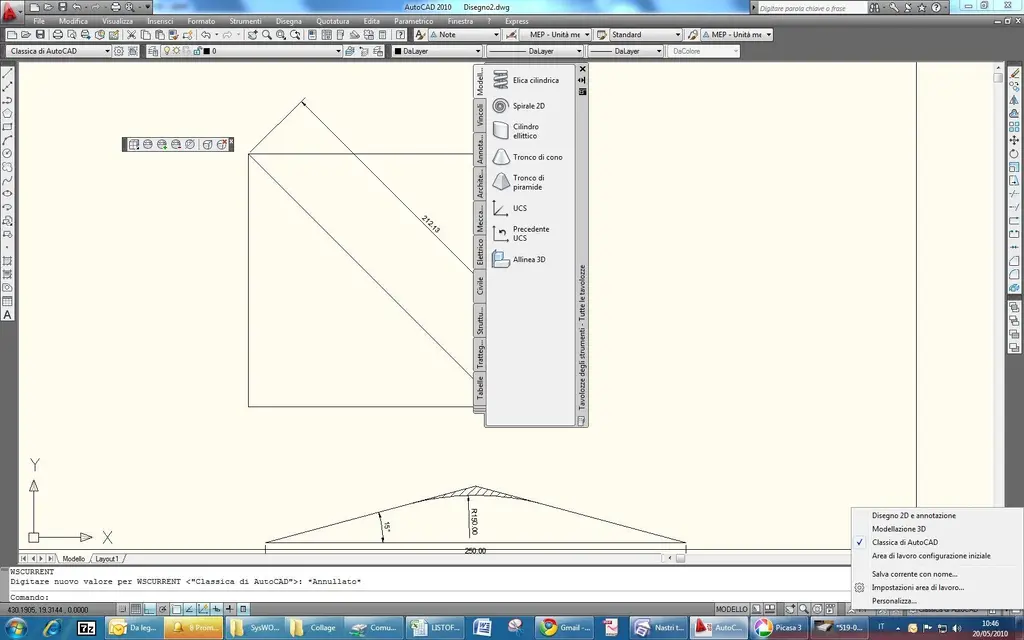
Turn on the workspace bar (low right of the acad window is a "pop" triangle), click and between the various options (paz, zoom, steering wheel, etc) there is workspace.
a new pop will appear on the bottom of the window identified by a gear icon.
click them and choose autocad classic
 
thanks, from me the button is called "passage from work area to another"
and I chose "classic autocad".

perfect :d
 

Attachments

  • passaggio da area di lavoro ad un altra.webp
    passaggio da area di lavoro ad un altra.webp
    84.9 KB · Views: 3
  • classica di autocad.webp
    classica di autocad.webp
    104 KB · Views: 2

Forum statistics

Threads
44,997
Messages
339,767
Members
4
Latest member
ibt

Members online

No members online now.
ciao
Back
Top