• This forum is the machine-generated translation of www.cad3d.it/forum1 - the Italian design community. Several terms are not translated correctly.

autocad mechanical - tip & trics

  • Thread starter Thread starter pietro46
  • Start date Start date

pietro46

Guest
:cool:this setting alleges when working with axonometric projetion type: isometries, dimetries, cavalry etc.
when you set the snap and activated with f10 you see that a boys' yocho. you just have to turn with the mouse and find the desired angle and give the necessary lungezzes.

well note these settings are tarate by isometria.

for the rest it is enough to pre-define the various angles.

or l x line lumghezza e.g. 46 mm < angle 45 grad and goes as well
 

Attachments

It happens that you have drawings with wrong lines, there are various ways to reorder. the easiest is to select the object and then from the mechanical layer to change.

I just do this: clikko on property correspondence then on the line that I need the property and then all the segments that will be involved take the property of the primary.
 

Attachments

  • proprieta.webp
    proprieta.webp
    2.7 KB · Views: 74
  • a4.dwg
    a4.dwg
    128 KB · Views: 22
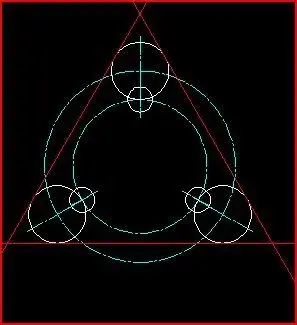
what we want to build and.kostruzioni cerchi.webp...activate the lines function gave preciseLinee d'asse intersecanti sul cerchio completo.webpspecify hole diameter in our case 70 enter
quantity lines in our case 3 enter
specify rotation angle in case 90 enterotteniamo.webpwe repeat x contures. Linee d' asse.webp diameter 1o enter
quantity lines in our case 3 enter
specify rotation angle in case 90 enterotteniamo2.webpwe clikk on construction lines and continue as the fig.
handle I uploaded 5 continuous image in the next post.


Continue
 
clikkiamo construction lineskostruzioni.webp We click on tangent external circles.
like fig. and we getotteniamo3.webpClick on property matching corrispondenza di prorieta.webpthe first clik goes on the white circle and then another 3 cliks on red constructions and become white like that.otteniamo4.webpNow we have to cut what does not belong to our fig.
now from the command Edita.webp we need
phony (cut) command published and very important soon I launch some allrial to explain accurately, if you will like my allrials I am sorry for grammar.
 
topic dedicated exclusively to tips, tutorials, tricks, tip&trics, shortcuts... In short, everything that can serve to improve working experience with mechanical.
indicate the release with which the "Council" definitely works (to avoid trying it with older releases that maybe do not have a particular function).
any questions/corrections/duchies must contain exclusively to the tutorials posted.
 
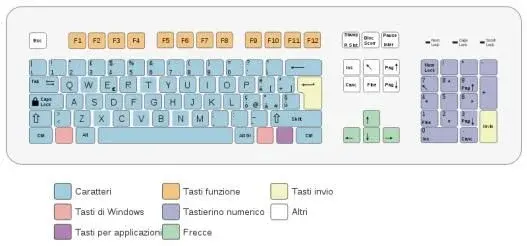
:36_9_2:tastiera.webp
if you click 5 times the arrow on the left near the ctrl key
a function is activated: that facilitates when marking more lines
simultaneously and one you want to leave just click the arrow
once and is not taken, when you cut, property changes, delete construzioni etc.
I will make an explanation with e.g. with the program in it.

I have to work.
I am building a cylinder with many side and cross holes

hi italia
 
release would be the command name
like amver to see what service pak we have intuitively. :confused:
 
release is the version of the program (2009, 2010, etc.) maybe with indication of service pack and/or subscription pack.
 
:rolleyes:tasti aiuto.webpafter 5 clik of the left arrow
you can activate the function.
and always the left arrow that activates the command.
 
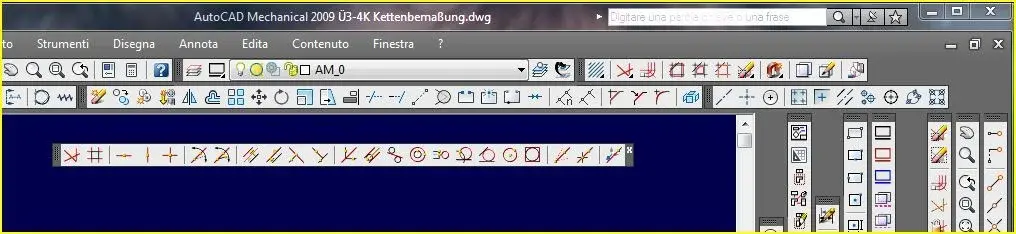
to add the commands we need most how to remove them from the already planned bars do so:personalizza.webp this and a standart setting of autodesk, we want to add a command, to pleasure I choose the point. I go with the mouse where you can place the controls bars in the blank but gray space and with right opens a window where you can add the switches for autocad both x mechanical is written customize and we get the window look for the command you need in this case the point per punto.webp you hold down with the left and take it to the bar where you want. and you get punto agg.webp to eliminate do the procedure again elimina punto.webp find where you have added from me and on block/point above and eliminates. you have commands
change type faces, smiles, signatures, but this does not need.:4441:
 
Well, I don't want to embark on a bigger wave than I am, so you too aren't?
I received the standard profile of the school and then with time I worked it (set) according to my needs.
what I would like to tell you and the following:
essential commands settings occupying less place possible on the screen.

Well a real mess
all autocad mechanical controls without autocad additionAutocad m tutti comandi.webpall avoidable.tutti evitabile.webpRecommended structure bar you can place it where you want.Strutura.webpconstructions in construction tools we find many commands type
costruzioni.webpquotas and other are avoidable. niente doppia quotatura.webpHowever this tutorial needs more interventions.
It's a shame that I can't touch it again.
I'm gonna go shopping for the weekend.
 
customization of toolbars is very useful both to insert commands that are normally accessible only from menus, and to group the most used commands in one toolbar


First we go on any of the toolbars we press the right mouse button and choose customization.
in the panel customize user interface customization in all files
go to the toolbar, right-click and choose new toolbar

We name the toolbar

in the control list panel we find listed all autocad commands
browse the list and find the command we want to insert in our new bar

We pull the command over the toolbar without releasing the left mouse button, we do the same with all the commands that interest us.
once finished we close the panel with ok
 
autocad cycle function
when you have overlapping entities (in 2d it happens by force of things) you can activate the selection "cycle" by combining shift+bar spacer and left click, in this way are selected all the overlapping entities in the clikkato point that will be cycled with the space bar, when you arrived to the desired one you press "to send"
 
Right-click function
a tip that I want to give to all autocad users of any level and experience is to try the timed right button function, which allows to activate multiple functions:
if I click fast by right-click normal, if I click slowly by sending, fast and slowly are defined with a settable limit time
example: polylinea-first point- second point- right-click fast to exit from the slow right-click (pressed a little more) to repeat the command
example: polylinear-first point- second point- right-click pressed a bit to open the drop down- arch- made the right-click as sending
think about it because it is really convenient
tools-options-user options or something similar
Hello everyone
 
default powerdim editor:from the 2010 version (proven on 2016)ampowerdimeditor = 1 set the ribbon as a power-quote editor.ampowerdimeditor = 0 re-set as editor that "classic of mechanical
Open drawing tab:mditab18.arx (available for a long time) seems to work with 2012 (just tried)... definitely no problem until 2011...
 
Last edited:

Forum statistics

Threads
44,997
Messages
339,767
Members
4
Latest member
ibt

Members online

No members online now.
Back
Top