
fsts
Guest
Good evening,
after some research (unsuccessful) I hope to find help here.
suddenly in the design of autocad appeared, on the lower left, this command:
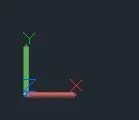 since this command appeared the design is extremely slow. How can you remove it? It seems to me that the design has become 3d (not voluntarily...) but I can't find the way back to the 2d.
friendliness
after some research (unsuccessful) I hope to find help here.
suddenly in the design of autocad appeared, on the lower left, this command:
since this command appeared the design is extremely slow. How can you remove it? It seems to me that the design has become 3d (not voluntarily...) but I can't find the way back to the 2d.friendliness
