• This forum is the machine-generated translation of www.cad3d.it/forum1 - the Italian design community. Several terms are not translated correctly.

automatic insert layer name into attributes

  • Thread starter Thread starter lorenzo94
  • Start date Start date

lorenzo94

Guest
Hello. is it possible somehow to automatically "write" the layer name on the upper face of a 3d block?

 
Yes, edit the block and enter an attribute, in the default box enter a field with
category fielded: objects
data fields names: placeholder block
block reference properties: layer

the layer name will be displayed at the time of insertion of the block, while in case of copy of the same and subsequent change of layers you will need to regenerate.
 
Yes, edit the block and enter an attribute, in the default box enter a field with
category fielded: objects
data fields names: placeholder block
block reference properties: layer

the layer name will be displayed at the time of insertion of the block, while in case of copy of the same and subsequent change of layers you will need to regenerate.
I tried and actually works, but it returns the active layer. I would need to "read" the layer on which I want to place the placeholder and indicate it to me. Thank you:
 
Yes, yes. but a dialog box comes out to me, with preset the current layer, but not that of the solid on which they place it
 
If you use the procedure described, when inserting the text indicates the current layer because you are entering the block on that layer, if you then change layers to the block, the text updates with rigen.

the name of the layer is the one on which positions the blocking, not the solid, as from your request in the first post, confirms if it is actually what you need.
 
Sorry, as I design blocks, I confused the terms. In fact, I would need it to indicate the layer of solid 3d on which they possess it
 
if it is not a block, but a solid, enter a field with

Name samples: object
type of object: <seleziona il="" solido="">properties: layer</seleziona>

 
if it is not a block, but a solid, enter a field with

Name samples: object
type of object: <seleziona il="" solido="">properties: layer</seleziona>
I did but I always return the same result, i.e. the first time it works, but the next one is indicated the same layer of the solid on which I had placed it before.
 
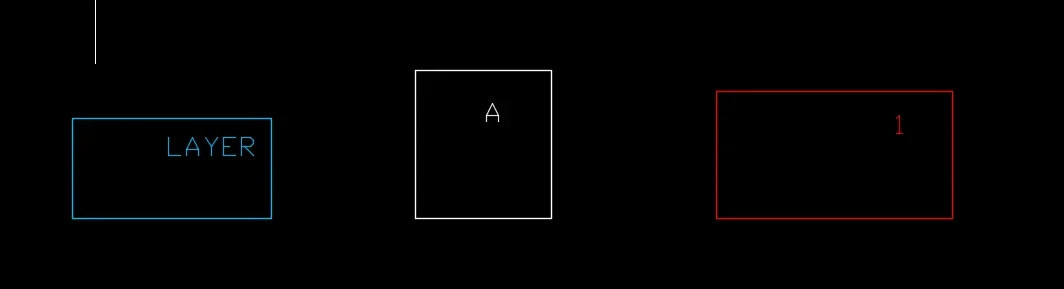
I try to explain. I have various solids, each with different layers, and in the table I have to insert a text string containing the layer name above each solid, so I immediately identify the solid (in fact the layer name is exactly the solid name). I would need a way to ensure that this is automated, i.e. I select my solid and automatically exit a text string with the name of the selected solid layer. allego 2 images of how it is and how it should become, taking into account that the layers are called "layer", "a", and "1"
as it is nowPRIMA.webphow should it be
DOPO.webp
 
nothing to do with the block [emoji4] I was wrong because I defined the solid as a block being parallelepiped, but block in the sense of cube haha. I don't know if we understand each other but by block I mean solid 3d
 

Forum statistics

Threads
44,997
Messages
339,767
Members
4
Latest member
ibt

Members online

No members online now.
Back
Top