cen82
Guest
Can anyone help me? Is there a method to print all tables of a set?
to today open component-component and mold every single table......... :-(
to today open component-component and mold every single table......... :-(

Thank you very much. I saw that you can do several operations. I'll study it a bit.with "programming operations" you should succeed. we get from start--> all programs-->autodesk-->autodesk inventor--> tools-->programming operations

I am trying to export various idw boards in dwg. I tried first to select one or more files but export them zippatiThank you very much. I saw that you can do several operations. I'll study it a bit.

Hello everyone!! already bradypo from a bit of time to my post when I go to export idw files zipping them to me too. But it happened from one day to another...isn't you know how I can tell me?? ? ?I am trying to export various idw boards in dwg. I tried first to select one or more files but export them zippati
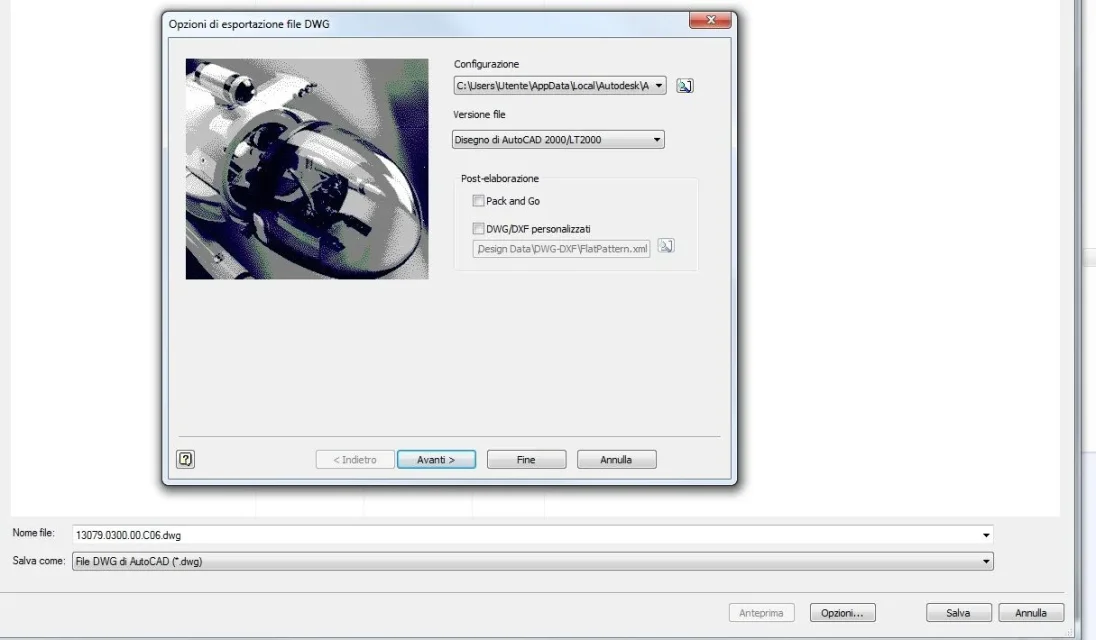 and then I never did anything again, the settings never changed me. . .
no no the problem of zipping arises when I carry out with "planning utility". . .If I didn't misunderstand the problem.. .
when I exported from idw to dwg autocad the first time I have:
> export to autocad dwg (other than inventor dwg) > options
set the options so:
View attachment 33845and then I never did anything again, the settings never changed me. . .
But in fact I have never tried with planned operations. . .
(edit) tried, I don't zip anything... It keeps me the settings of the last "manual" export I made.