• This forum is the machine-generated translation of www.cad3d.it/forum1 - the Italian design community. Several terms are not translated correctly.

automatic search toolbox components

  • Thread starter Thread starter eugi
  • Start date Start date

eugi

Guest
Good morning.
I would be grateful if you could give me a solution for the following problem:
I formatted the computer and reinstalled solidworks 2009, but at the opening of the assemblies the system does not find the toolbox components "original":eek:;the types are the same but the sizes vary.

Is there any option for automatic search of toolbox components?

thank you for any suggestions. :redface:
 
toolbox uses two methods to create screws.
one, create variants as a configuration of the father who is the default and in your case would not have created problems, as I find that from the 2008 version, recreate the configuration if missing.
in your case, you probably decided to create a part for each variant.
even if the installation of the toolboxes has been default for a couple of years in c:\solidworks data and therefore should not have given you problems, in case you did not erase c:\solidworks data or you maintained it and re-installation generated c:\solidworks data (2).
please give us extra data.
 
Bye to all,
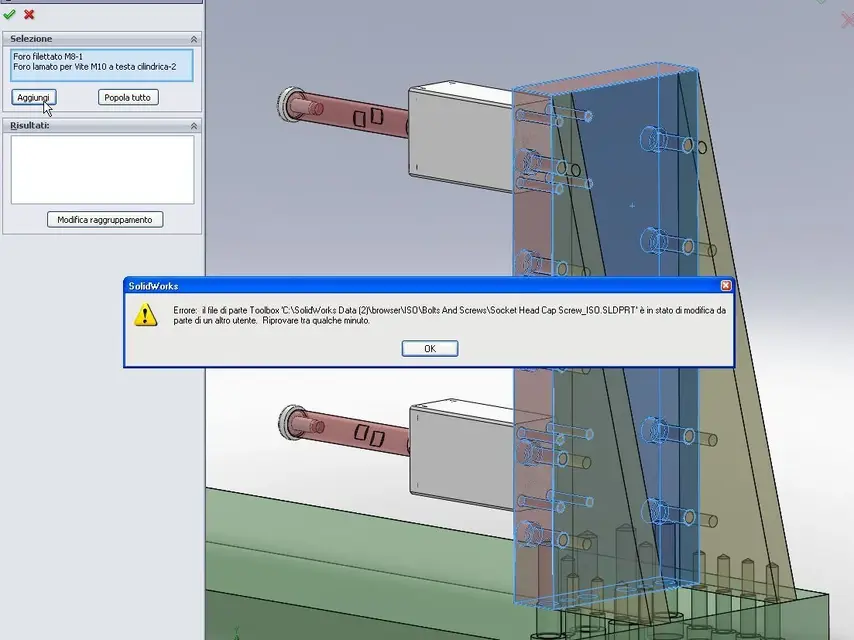
I hook up to the above because having to use smart fastners and not having deleted c:\solidworks date, the re-installation has generated c:\solidworks data (2).
At this point, however, it creates the attached error message. I press that the pc I only use it myself and is not shared with anyone.
use sw2009 sp4.0 ... what can you do? ? :confused:

thanks in advance
maurials
 

Attachments

  • SolidWorks Office 2009 - [Assem1.webp
    SolidWorks Office 2009 - [Assem1.webp
    67 KB · Views: 16

Forum statistics

Threads
44,997
Messages
339,767
Members
4
Latest member
ibt

Members online

No members online now.
Back
Top