• This forum is the machine-generated translation of www.cad3d.it/forum1 - the Italian design community. Several terms are not translated correctly.

axis on structural elements

  • Thread starter Thread starter MARCOC
  • Start date Start date

MARCOC

Guest
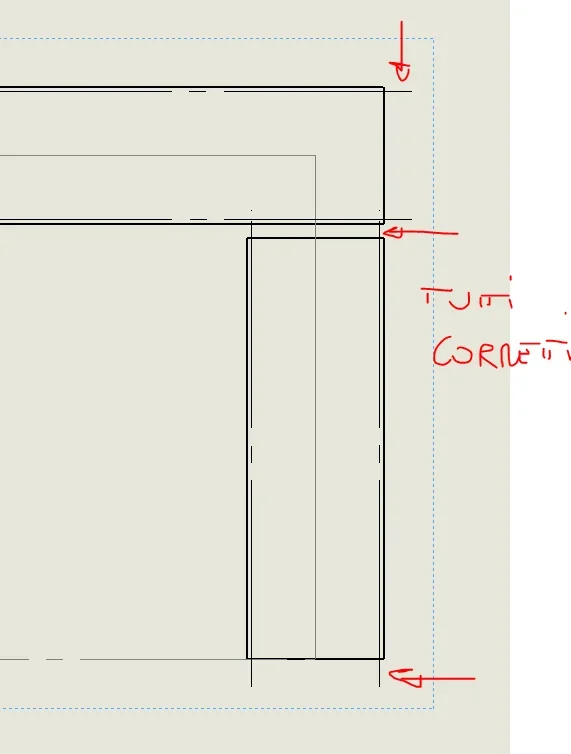
good evening, using the command " strurrurale element" when I make the table and put the boards on the fittings I better being active the automatic importation of the axes, if the structural element to the treatment of the corner edge, the axes come out packed image for clarity

1521659854498.webpand he only does it with that kind of edge, and a kiss solid???? ? Can you fix it? ?

Thank you very much
 
Where are they going? I think it's right. the only thing you will have in the settings that the length of the axes exceeds the geometry of an excessive amount.
 
go out of the box to different sizes
what does not do if the boxers do not have the angle joint1521712615095.webp
 
I don't have to represent them, but I wanted to figure out why it kicks them on that kind of edge, or better if someone ever notices I'm wrong and if he knows how to be a solid bug.
 
normally in carpenters break only those boxes there. I don't know what company you work or who your boss is, but there are already too many lines on those profiles. I to the maximum toll the light rows on the radius center that do not arrive at the ends of the right tube to show that it is curved but the axis just do not stand it. Think of that poor carpenter, who doesn't give a damn and doesn't see a snitch on the sheet. .

However on all versions are "balled" as you say. depends a little on the type of profile and the treatment of edge...but not having sense to be...the problem does not arise.
 
ok meg mechanics, and what I needed to know and a solid error that doesn't handle that kind of edge well.

the question was addressed to the pure command of solid, does not center anything the fact that it serves or does not serve in the work, if there is a command and that command does something strange I ask to understand, only this.

Thank you very much
 
I don't have to represent them, but I wanted to figure out why it kicks them on that kind of edge, or better if someone ever notices I'm wrong and if he knows how to be a solid bug.
I don't understand why you have to brag about something you have to delete. it will also be a bug, but it is a totally useless thing, indeed it would be to ask that you can exclude from the automatic insertion of the lines of half-way certain types of rays.
 
to the perfectly caught in the massive sign, if one thing is useless because they do not eliminate it, instead of letting it work badly in part
 
eliminate it if you need it you can't use it. eliminating it means no longer having aces for any object....see you
 
no exclude how massive it said through a check the recognition of the fittings on the struttrali elements and the ability to activate them manually only as where and when needed
 
It is not a useless thing because automatic insertion of axles is important. Unfortunately all the rays present are considered and it is not possible to discriminate them.
 

Forum statistics

Threads
44,997
Messages
339,767
Members
4
Latest member
ibt

Members online

No members online now.
Back
Top