• This forum is the machine-generated translation of www.cad3d.it/forum1 - the Italian design community. Several terms are not translated correctly.

axis position not updated

  • Thread starter Thread starter danij68
  • Start date Start date

danij68

Guest
Hello everyone,
on the table masses of a welded frame, i.e. of a multibody part, I have the problem that does not update the position of the mid-range axes of the holes after a possible shift of the hole. I try to explain myself better: I created the frame in a file part, then I make the table of the frame on the drawing file with all the axes of the holes and until here everything well, suppose I have to stretch the frame of 50mm and therefore also the position of the holes of 50mm: I go to the file part and do the desired modification, when I return or reopen the drawing file with the masses in the table I find the updated frame design as it must be, but the mid-range axes of the holes are left in the space position before, i.e. 50mm out of the hole. I tried to do up-to-date views, reload files, on the 3d do the regression of the features and then reactivate them nietes to do, the only is to delete the axes out of place and put them back, the thing bothers me very much!:angry:
Can you help me?
Thank you very much:
greetings danilo
 
mm to me these problems do not occur, if I move the holes then also move the axes. I think you're wrong.
 
as always on sw sometimes things funzinano and sometimes not.

I use sw 2010, but the same thing happened to my colleague with a different welded and with sw 2011.
It should be noted that the axis has not changed colour to indicate that it is not released.
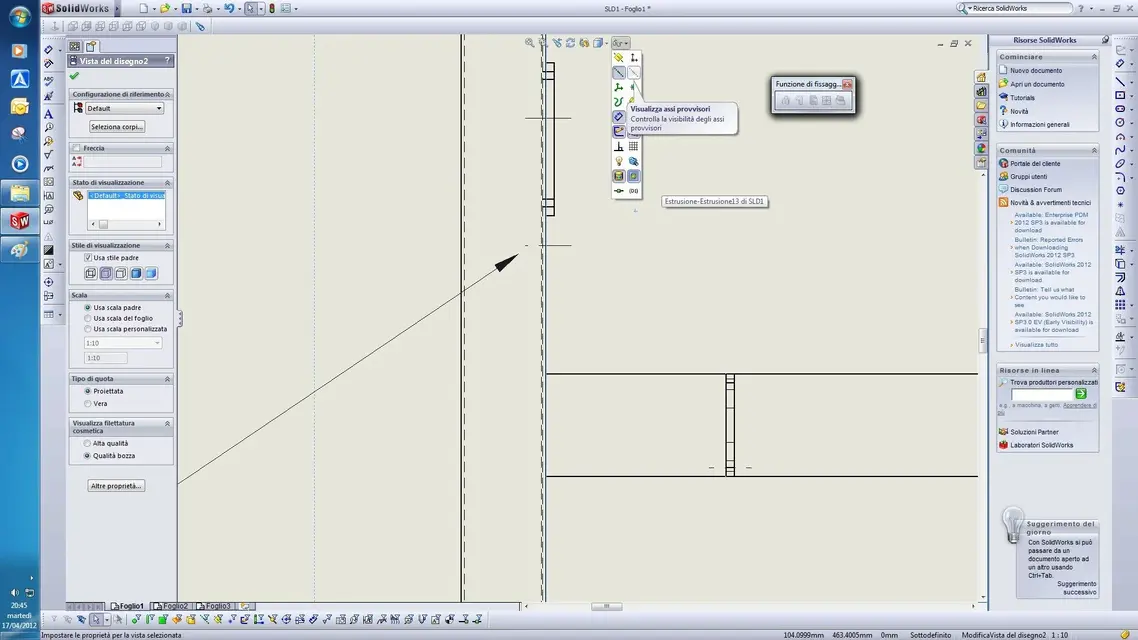
I attach a print of the incriminating area.
At first sight it would seem a problem not so serious, but it is not so because sometimes we have to put quotas related to axes and in these cases I find the wrong quotas and it is serious!

I am so sure we are in front of another kiss of solidworks:bekle:

greetings to all
 

Attachments

as always on sw sometimes things funzinano and sometimes not.

I use sw 2010, but the same thing happened to my colleague with a different welded and with sw 2011.
It should be noted that the axis has not changed colour to indicate that it is not released.
I attach a print of the incriminating area.
At first sight it would seem a problem not so serious, but it is not so because sometimes we have to put quotas related to axes and in these cases I find the wrong quotas and it is serious!

I am so sure we are in front of another kiss of solidworks:bekle:

greetings to all
with sw 2012 sp 2.0 everything ok, later I will try with 2010 sp 5.0

What service pack do you have?
have you manually added the axes (disks) or with the appropriate function ?
Are the provisional axes updated?
 
First of all, I apologize for not being able to answer immediately.
Then I sw2010sp0 my colleague with sw2011 I don't know what sp has; however the behavior of the provisional axes I can't say because in this particular it is unproven since I don't need it.
the axes were automatic.
but now it went all right after I erased plates from welded ie for extrusion sw, to be noticed both before and after the cancellation of the extrusions (the plates) on the 3d did not give me errors on the feature tree; and the axes that were not updated were all features, that is that they were on the feature tree both before and after the erased ones.
mystery!:confused:
Thank you.

Danilo
 
...follows from previous comment.
However I learned that you can't "trust" solidworks, at first glance it seems all right and then it is not; as it happened to my colleague that the move was only 5mm on a scale of 1:5 at first sight impossible to see... then they realized in the workshop now to mount the pieces that were not mounted!:

instead of always making new versions with more functions that create more and more problems, those of sw stopped one year with news and solve all problems would be better!:bekle:

greetings
Danilo
 
bye danij68,

First of all if I can give you advice avoid using the versions sp 0, it is known that they are quite unstable and all the times I used them I am bitterly sorry.
Secondly, I never happened to have the unscrupulous axes if not removing and adding the holes, if any parametric would lose the tacca-foro association.
the problem could therefore have been generated by the acerbo service pack as well as by an incorrect process (I do not have the file and I cannot judge).
Keep in mind that in swx you can design in topdown or make holes simply with the comnado series holes, which will keep aligned with certainty all the holes involved.
is there a command to verify the concentricity of the holes, was it used to check if it was okay before launching the production?
Concluding: I think swx is altogether the best midrange on the market and I find it very stable, I think these problems are not to be attributed to the cad...
without controversy, eh:finger:
 
I agree with King...
and then, without controversy.. .
you must first learn the cad well before giving judgments.
What do you mean your piece has no provisional axles? :eek:
 
I also fully agree with King... then I learned that knowing fully this tool is almost impossible, almost always I learned about my skin that error, is rarely of the tool, but more frequently than the user. and to do one thing there are for every right and correct solution at least 100 wrong ^^^
 
what you mean by temporary axes does not know, but for me the temporary axes are the construction axes, since the help of the program if you type "provisional axes" come out the construction axes, well my 3d is without it because I do not see the need.
I make the part and draw available for the evaluation, as you can admire, changing the length of the wireframe 3d of the tubular construction at the beginning and then going to see the table masses the axes are updated only on the section but not on the left view! for me is a nice good error of the program.
I also attached the pdf so you can see what my pc does, maybe on your does not.
Let me know if I'm wrong
 

Attachments

for clarity, for temporary axes are those visible in the image.

I put the file, I added a projected view, like yours, and the axes
They're perfectly up to date, I've done several tests.
in your view there is something that doesn't go very well but I can't tell you what, maybe deleted jobs.. (actually a little questionable to use normal lines to divide the holes) but not so.
I opened and saved the file with swx 2010 sp 5 with 64-bit w7.
Try to project a view like I did and let me know if it works, maybe try both on your original file and on this that you uppo.
Hi.
 

Attachments

  • SLD1-Mike.zip
    SLD1-Mike.zip
    3.9 MB · Views: 1
  • Immagine.webp
    Immagine.webp
    128.2 KB · Views: 5
Secondly, I never happened to have the unscrupulous axes if not removing and adding the holes, if any parametric would lose the tacca-foro association.
Dear enrico here I contradict you, with a certain cad you never lose the associations ... even if you cut the piece, if you roll a edge or the bevel.
You've got it. Do two tests.
 
Dear enrico here I contradict you, with a certain cad you never lose the associations ... even if you cut the piece, if you roll a edge or the bevel.
You've got it. Do two tests.
I mean, you do the table with his axes, then go to the 3d, delete the hole and put another one, and pro/e reads you in the thought that moves the axle and puts it on the added hole? post video please! :rolleyes:

It's more likely that you cancel the axis and do it again, but in that case you most likely lose the association with the quota that was pointing to the canceled hole and then rejoined, but miracles do not do them.
 
I also fully agree with King... then I learned that knowing fully this tool is almost impossible, almost always I learned about my skin that error, is rarely of the tool, but more frequently than the user. and to do one thing there are for every right and correct solution at least 100 wrong ^^^
Yes, but the work tools should have a certain "resilience" and prevent at least the most trivial errors... .
 
I mean, you do the table with his axes, then go to the 3d, delete the hole and put another one, and pro/e reads you in the thought that moves the axle and puts it on the added hole? post video please! :rolleyes:

It's more likely that you cancel the axis and do it again, but in that case you most likely lose the association with the quota that was pointing to the canceled hole and then rejoined, but miracles do not do them.
no wait... here we were talking about entities that are graphically erased by an added feature, or is it wrong?
If I have a corner on which I make a rounding, the reference to the edge remains.
 
read well from the beginning, the axes are not released.
I am not saying to erase a feature and create another; but simply vary a portion of the structure that consequently moves me some holes in space, the axes of these holes in the table remain in the same spatial position as before. and more precisely the axis of the same hole in the view in section but that does not cut the hole in question (section with visible hidden lines) the position of the axis is updated, while in the simple orthogonal view the position of the axis is not updated.
from the fact that in a view the axis position of the same hole is updated and the other view is not, I just have to think of a program error.

and then there are no excuses for the program, admitting to have made mistakes in building part 3d in the feature manager or in the reconstruction of the object should indicate errors and in this situationzine I can understand that it does not update the axis position, but since in the feature manager or in the reconstruction of the object it does not indicate any error and I assume that it is all in place and of consequence the masses in the table are correct and everything has to function well! to the bottom, but apparently for sw is not so
 
thanks mike1967

I know if I create a new view, but suppose the view is already quoted and for project needs I have to change the total length of the structure, what do I do? I'm going to take the old view. I'm going to get the view and the requote? absurd!

I checked sw2010 sp4, w7 64bit, 12gb ram

Hi.

Danilo
 
I want him anche se, a normal thing I believe.
if you have a edge, the quoti and then add a swx connection you lose the decrease to the quota since the edge is quoted and not the face.
I have seen a lot of them, it is quite normal.
 

Forum statistics

Threads
44,997
Messages
339,767
Members
4
Latest member
ibt

Members online

No members online now.
Back
Top