
• This forum is the machine-generated translation of www.cad3d.it/forum1 - the Italian design community. Several terms are not translated correctly.

Barriers

  • Thread starter Thread starter Giacomanu
  • Start date Start date

Giacomanu

Guest
Good morning to all, I just finished a project of various components, but ask me the centerpiece of each piece (plastic and metal material) and the whole set, but I do not know exactly what command to use. . Can anyone help me? ? ?
by the way I use nx 6 in Italian.

thanks for the help

Hello everyone
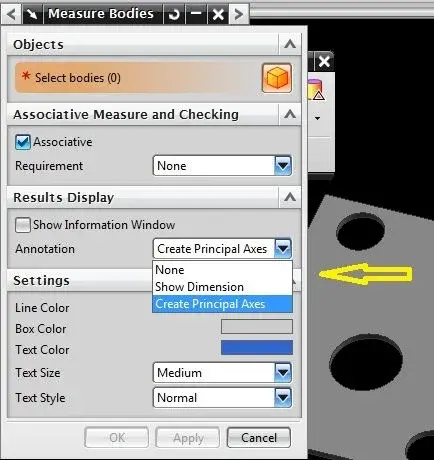
 
you must assign to every detail the appropriate density and then use the command 'measure bodies' (I work with nx in English) you find it under analysis.
and set as in the figure.

attention: the center of gravity is always related to the coordinate system, you must also provide those. Can I explain?

hello and good work.
 

Attachments

  • pm.webp
    pm.webp
    24.9 KB · Views: 52
First of all I apologize for the late answer, but I could not do before, thank you for the command, but I would have another question, but in table 2d it is possible to quote the center of gravity? and how?

hello and thanks again
 
if you used the command you will have noticed that it creates the main axes (inertia) with a point that represents the center of gravity.
this you can quote from a reference that must be unique to you and your customer.
in the example in figure (very simple piece) establish a reference and from that quote the center of gravity.
for more complex pieces or 'strans' (typically plastic pieces) maybe refer to the center of a hole or other entities.
 

Attachments

  • BARI.webp
    BARI.webp
    10.9 KB · Views: 34
Thanks again for the answer, I did everything you're telling me, but I can't see the boards in my table, do I have to poke something?? ? I only see the boards in model 3d, when I go to the table I can't see the boards.... how do you do?? ?


Hi.
 
I did everything you're telling me. .
If the work is okay we do half each... If it goes wrong, they are your own....:rolleyes:

If you are working in master model, you must also put the axes in the reference set. put them in a layer other than that of the model and then, in the drafting, with the visible command in view (under format) you also see this layer in the view where you quoti il baricentro .

Hi.
 

Forum statistics

Threads
44,997
Messages
339,767
Members
4
Latest member
ibt

Members online

No members online now.
ciao
Back
Top