• This forum is the machine-generated translation of www.cad3d.it/forum1 - the Italian design community. Several terms are not translated correctly.

beginner!! quotation of diameters

  • Thread starter Thread starter otrebor81
  • Start date Start date

otrebor81

Guest
Hello, everyone!

I press that I am a beginner of solidworks...work for years with other cad, but from Monday I am approached with solidworks
the first impact is good, simple and intuitive. . .
I'll take the course soon.

I ask you for help as I do not find the option

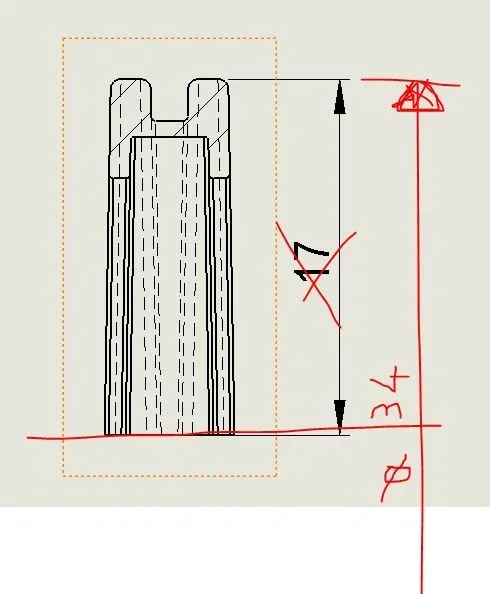
If you want to quote diameter 34 instead of quota 17 how do I do it? ? ? ?
It's stupid... but I can't find

(see Annex)diametro.webpThank you very much
 
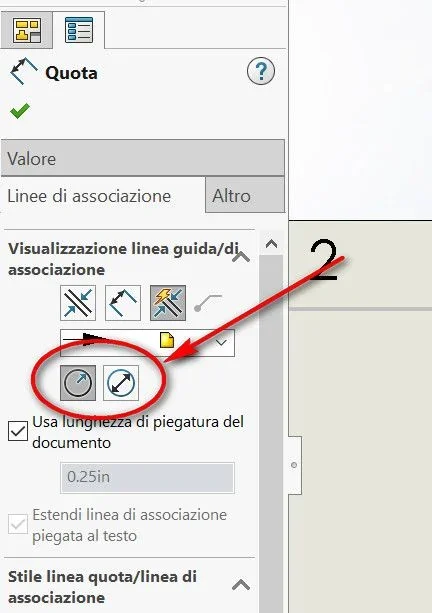
try to open the property manager of the quota again by selecting it. in the tab association lines you should be able to choose between radial and diameter quota. 2017-05-17_164501.webpNow this possibility appears to you if the quota has an extreme on a line of construction or axis, as you want to call it. then, perhaps, draw the axis first with a line of half-carry and then the quota
 
in design environment it is possible only by drawing an axis with a construction line. draws the line, bound to the axis of the object and do what malf said
 
Thank you so much!
Can't I draw the axis "bidimensional" from the 3d automatically?
Thank you.
 
You can't. to insert a diametrical quota if you do not select the extremes or, the diametric board (which can only be done if you have a live edge) you need a construction line (as when you quota a sketch). the line the constraints using the sketch made in the part or activating the provisional axes and putting it to the one that interests you
you can recover the quota by inserting template elements
remove those hidden lines that in a section only make confusion, especially those tangents
 

Forum statistics

Threads
44,997
Messages
339,767
Members
4
Latest member
ibt

Members online

No members online now.
Back
Top