
• This forum is the machine-generated translation of www.cad3d.it/forum1 - the Italian design community. Several terms are not translated correctly.

binding 2 cursors

  • Thread starter Thread starter Shaba
  • Start date Start date

Shaba

Guest
Hello everyone
Sorry the question but I'm naked sw

I have to bind 2 100mm sliders with a race of more or less 200mm each
but such sliders must stay at least 50mm between them
cursors are located between them at a distance of 200mmCURSORI.webpI tried to use couple space limit
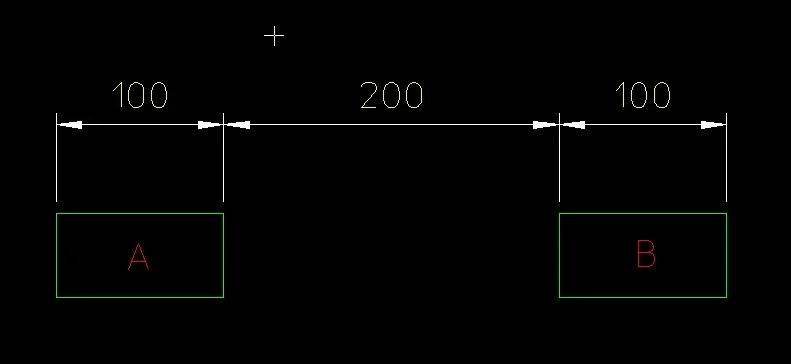
but if I put 3 of these constraints tells me that the system is overdefinite
How can I solve this?
Thank you!
 
Hello everyone
Sorry the question but I'm naked sw

I have to bind 2 100mm sliders with a race of more or less 200mm each
but such sliders must stay at least 50mm between them
cursors are located between them at a distance of 200mmView attachment 32644I tried to use couple space limit
but if I put 3 of these constraints tells me that the system is overdefinite
How can I solve this?
Thank you!
:confused:
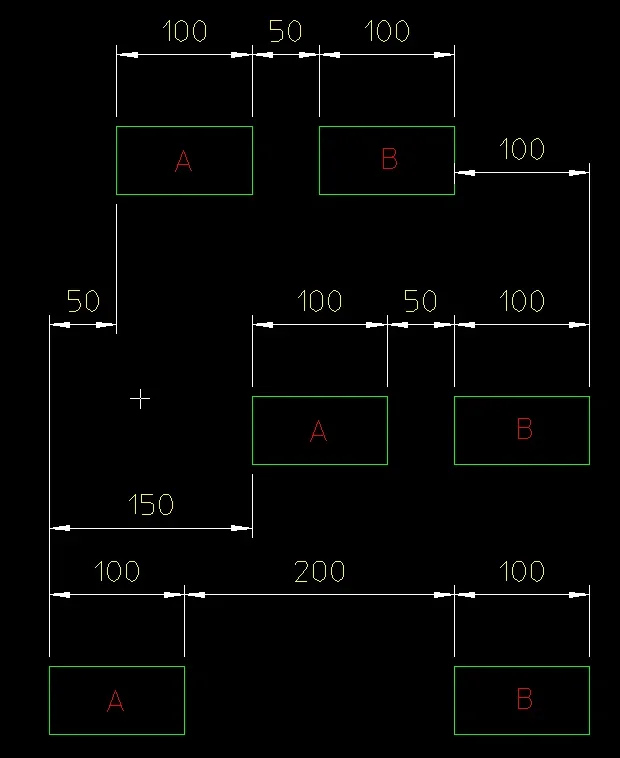
I think I have not understood a patch of how they have to move so, as always in the case of nebulae questions but in the least clear compensation :rolleyes:, I allegiate how much has suggested the crystal bowl... the cursors move +/- 200 mm compared to the front and between them the internal faces have as a movement limit from 50 to 200.
 

Attachments

thanks to the answer, it is not what I meant
I felt bad

cursors move on one axis
realize that they are 2 skates running on a linear guide

If b is in the stop in his 0 then he can run a race of 150 towards b
If b is 100 advanced, then you can run a race of only 50 towards b
so between a and b remain at least 50mm of space
CURSORI2.webp
 
thanks to the answer, it is not what I meant
I felt bad
cursors move on one axis
realize that they are 2 skates running on a linear guide
If b is in the stop in his 0 then he can run a race of 150 towards b
If b is 100 advanced, then you can run a race of only 50 towards b
so between a and b remain at least 50mm of space
View attachment 32646
Okay, now it's clear. in effect by putting all the limits that would serve is overdefined. I smell circular references.
if you try the attached axieme, with a limit constraint in less, funzine as you would like provided that the gray cursor, the left one (front view) is always moved to the right, or towards the yellow cursor. the yellow cursor instead you can sopstarlo both right and left indifferently.
View attachment guide.rar
could you do with a formula?
even if I don't know how....
if you identify the relationship between the various sizes then you can do it with a formula, but then from the cinematic point of view the axieme works correctly only by regenerating (not in real time therefore) after moving one of the two sliders. alternatively leave it rigid, bound by quotas, and update only with ctrl+q
In the past, I have had to manage a movement between two components that had to follow a somewhat rognostic rules. with the equations I had not come out of it and I had solved by building a simple cinematism of "support", then hidden, that allowed the handling of the plots according to the rules that I needed
 
In these cases I also consider "the option" to make me more configurations of the various positions that must have, or various configurations with the movements that I have to make the same component perhaps with different acc.
 
with limit mating you can do.
in your case you have to use multiple limits couplings. (videos available soon)
[video=youtube_share;_Dg4aNBnYP8]http://youtu.be/_dg4anbnyp8[/video]
 
with limit mating you can do.
in your case you have to use multiple limits couplings. (videos available soon)
I had tried... need three limit couplings and adding the third the axieme became overdefinite.
I also tried to give the constraints in different order and changing without result, so much so that I posted the file with only two limit constraints.
did you manage to make it work as shown in the schema to the post #3?
 
I had tried... need three limit couplings and adding the third the axieme became overdefinite.
I also tried to give the constraints in different order and changing without result, so much so that I posted the file with only two limit constraints.
did you manage to make it work as shown in the schema to the post #3?
No, actually the degree of freedom from 200 I couldn't change it.
I don't have time to try, but maybe that value can be "command" by an equation that detracts the value of the b displacement.
 

Forum statistics

Threads
44,997
Messages
339,767
Members
4
Latest member
ibt

Members online

No members online now.
Back
Top