foxanto
Guest
Hello!
I have a problem opening the layer management shovel, in particular:
in the version downloaded from my university, in the pcs of the faculty, opening the worksheet of autocad 2013,
by clicking "the + sending" or the "management layer" button
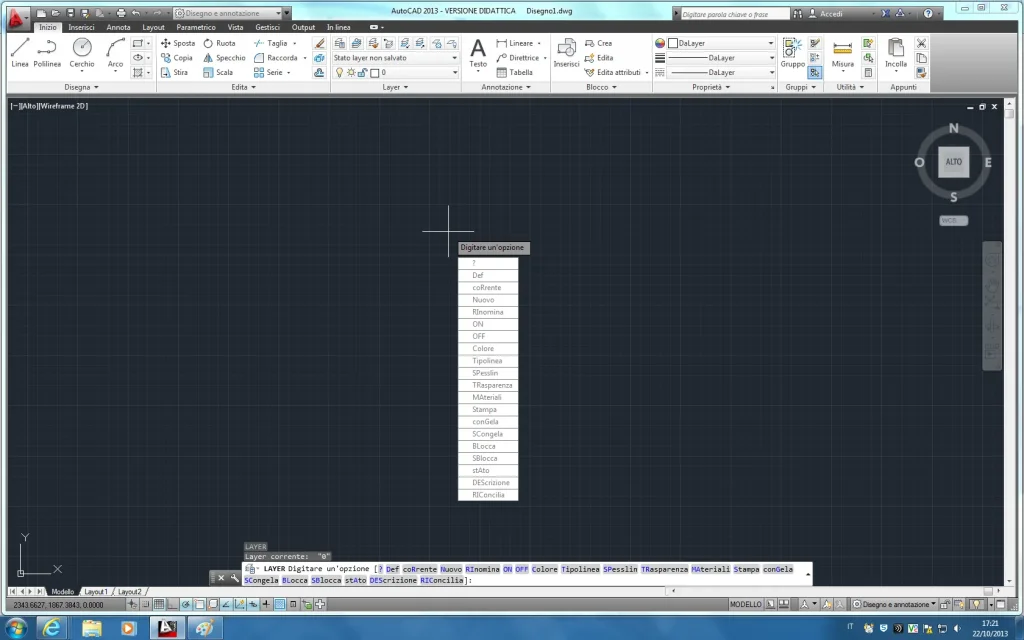
does not open the typical layer management shovel
but a fast choice drop-down menu
(but only when I pass the mouse in the worksheet and not when they are acora in the commands)
And I don't know how to do... Please help me!
in this version the "he" command does not open - how do you open it?
I also tried with the "layerdlgmode" command both with the "0" and "1" parameter but nothing!
instead downloading it from the site of the autodesk, the same version "autocad 2013" works everything perfectly in my pc!
igo image
I have a problem opening the layer management shovel, in particular:
in the version downloaded from my university, in the pcs of the faculty, opening the worksheet of autocad 2013,
by clicking "the + sending" or the "management layer" button
does not open the typical layer management shovel
but a fast choice drop-down menu
(but only when I pass the mouse in the worksheet and not when they are acora in the commands)
And I don't know how to do... Please help me!
in this version the "he" command does not open - how do you open it?
I also tried with the "layerdlgmode" command both with the "0" and "1" parameter but nothing!
instead downloading it from the site of the autodesk, the same version "autocad 2013" works everything perfectly in my pc!
igo image