
• This forum is the machine-generated translation of www.cad3d.it/forum1 - the Italian design community. Several terms are not translated correctly.

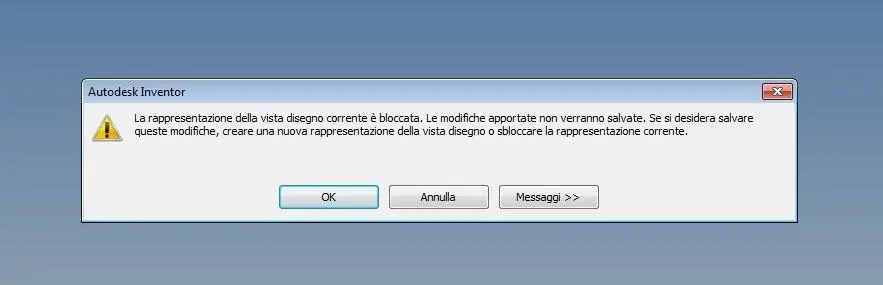
blocked view representation message

  • Thread starter Thread starter Il Mauri
  • Start date Start date

Il Mauri

Guest
good morning to all (to all those who are not in vacation obviously).
Sometimes it happens to me that while I model a part, when I go to save, I get the message I attach to you.
the only way to save is to create a new design view.
Is there anyone who knows why this is happening?

Thank you.
 

Attachments

  • Immagine Mauri.webp
    Immagine Mauri.webp
    12.6 KB · Views: 56
no no, created a normal part with only extrusions.
yesterday happened to a colleague of mine and he didn't know why this message was.
 
I remember. in the tree of the parts right at the top there must be a tag with written representations. inside there is a view that is the main with a lock and one with default writing. Try to click on default so you can activate it.or dx button and see if in the context menu there is a check next to something that says blocked.
Unfortunately I have the workstation out and can't control.
Alternatively, look at what explains how to create representations of blocked addiritture views that is your case.
http://wikihelp.autodesk.com/invent...604#guid-2aa76158-7f62-404a-bee1-d63dafd4aa78
 
to me it happened with the 2016 version. I solved by going to the browser where there is a folder called view. right click and then new. :) I came out of notice after I used the tool "view in section". Somehow maybe I erased some view, in the browser only remained the one called master.
 
to me it happened with the 2016 version. I solved by going to the browser where there is a folder called view. right click and then new. :) I came out of notice after I used the tool "view in section". Somehow maybe I erased some view, in the browser only remained the one called master.
This is the right solution. autodesk, for some reason, changed the management of views from previous versions to the last. if the error appears, the only way is to go into the part, select view and then new. At this point an unlocked view is created and there are no problems.
 

Forum statistics

Threads
44,997
Messages
339,767
Members
4
Latest member
ibt

Members online

No members online now.
Back
Top