
• This forum is the machine-generated translation of www.cad3d.it/forum1 - the Italian design community. Several terms are not translated correctly.

bookcase inventor

  • Thread starter Thread starter luigi sante zulian
  • Start date Start date

luigi sante zulian

Guest
Good morning.
I wanted to know if possible, share the content center, doing it directly on the nas. Of course I have inserted the path, on the project file, but when they place the files together, it goes to refer to c:. I have to use the vault, to make the library consultable to all pcs?


Thank you.
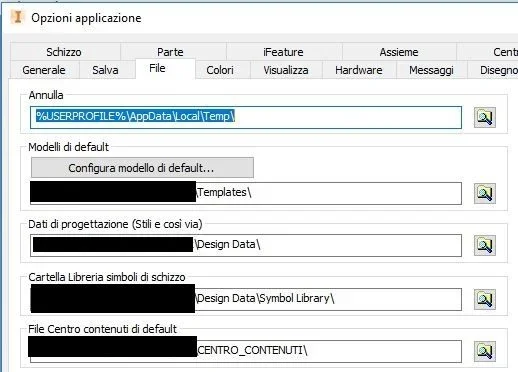
 
I have it on server the cc, but I also have vault, but I think you can put it on server even without vault, check that the folder under application options->file->file center default content is mapped where you put the cc.
 
on the project, I entered the path in the folder options, file center content, but it always refers to c:. I see this because in the start screen clicking on the project the path of the libreiria and on c.

Thank you.
 
I'm sorry, I didn't understand, I meant that it should be mapped here as well as in the project the network folder
 

Attachments

  • Cattura.webp
    Cattura.webp
    19.6 KB · Views: 10
do you mean where you highlighted or where there is the written default content center?

Thank you.
 

Forum statistics

Threads
44,997
Messages
339,767
Members
4
Latest member
ibt

Members online

No members online now.
Back
Top