• This forum is the machine-generated translation of www.cad3d.it/forum1 - the Italian design community. Several terms are not translated correctly.

bring more dxf/dwg to the same layer

  • Thread starter Thread starter MARCOC
  • Start date Start date

MARCOC

Guest
Hello everyone.. .I am asking for help...I have a set of dwg or dxf all in a folder...I should carry all their content on the layer 0 white color type of continuous line.. and then perform cleaning with the command "elimina"
Is there a macro or something like that that allows me to sutomatize this without opening files??? I talk about barrels of 100 files at a time

Thank you very much
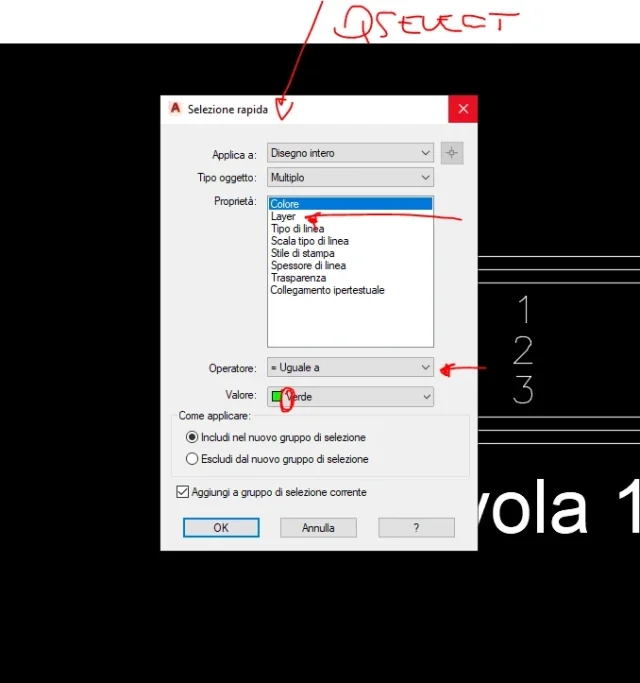
 
Make a script.
find an excel, updated recently by the way, which automatically generates the code to be inserted in autocadhere. the explanation of scripts
 
commands, which I have no way to verify, for the script should be (red any comments):
open (to be used only in writing the script)file name (to be used only in writing the script)selraps (serves to select objects)everything (check the correct wording in the command bar)uniscilay (serves to move everything to the preference layer)name starting layer (check the correct risk in the command bar)Name target layer (check the correct risk in the command bar)
purge (check the correct wording in the command bar)everything (check the correct wording in the command bar)save
Shut up!

before completing the script do the command line steps to know the exact writing of commands and any options of each of them; when with the various steps you get the resulate wanted to report them to the script and verify them. sometimes the script should be optimized because the launched command behaves slightly differently; Remember that if in autocad the command opens a selection window in the command log, a _ (underscore) must be used to activate the options.
 
Thanks massive, but I have no idea how to create scripts... I tried to take a look at the excel you said, but I didn't understand anything
 
Would the script be a txt file with the command list to run??? if you once created where you will be loaded into aurocad? ?
 
another thing... how do I tell him that the script is applied to all the files in a folder?? (you wouldn't be able to give me a very simple example even with just one command of your choice...in mdo that I can understand...for example that you carry layer 0 on the red color to all the files contained in a folder????) thank you very much
 
on the page I linked to post#2 there is a pdf explaining what a script is and there are other tutorial links; the excel file serves to facilitate the work.
However the script is a text file with scan extension and to load it just drag it inside autocad having an open blank design. are things looking for in google come out easily
another thing... how do I tell him that the script is applied to all the files present in a folder? ? ?
with the excel file; in the excel file write your commands and then with the appropriate button, select files, as written in the discussion linked to the post #2
 
Thanks massive. I'm starting to understand something.

I ask one thing, I need after opening the file
_
_

tell him to selezinate in all the design what is on the layer 0
1616004355849.webpHow do I make it to the script?? How should the passages be written? ? ?

Thank you very much
 
First of all, I have two points:
the underscore serves to use English commands in versions in other languages then in English or use the open command or _open (as you have done); If you're using autocad in English the underscore doesn't need.
to not open the windows (like the qselect) you have to set the variable filed a 0 and use the least - in front of the command (trying to launch the -layer command)
I want to point out that I have no way to use autocad to do tests, so I'm just on memory and research.
I noticed that the pdf present in the linked discussion is no longer available, you could point it out, so the allego
I add other autocad inerent material, but not scripts
 

Attachments

inpostando filedia a 0 non aapare is more the window, but not as possible select the layers1616012305274.webpthen giving in1616012335714.webp
 
instead of the qselect command tries to use select (selez in Italian) with option all
 
you write it..without the dialog box...s skipping qselect...he automatically switches to pselect...and from them there are no options like color layer etc...
 
no Italian
I also tried select and pselect, when from script I tell him to select everything
I return unsuitable selection, because it wants a point in the graphics area

how do I give it for example 0.0 so that it works? ? ? ?

(if you type them from command bar, after select just write t and send) but from script you want a point

1616048756434.webp
 
someone knows why from command line
select, send,t, send and work (I only noticed that in the second post after the "t", I believe that in automatic selections the point where and placed the cursor, because it appears for a few secobdo the wheel around the crucine...instead of script wants it to give it...any knows how to do it? ? ?
 
with the option everything (t) does not have to do with where the cursor is located because it selects everything in the drawing area.
maybe wrong to write the script, add it to your message
 
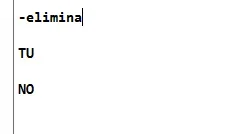
Guys, even the command -elimina gives me trouble
from command line -elimina sending you no sending and all okkk
knows scripts - delete and then the command you do not know how to write it, I write it so
but it doesn't work
1616089431138.webp
 

Forum statistics

Threads
44,997
Messages
339,767
Members
4
Latest member
ibt

Members online

No members online now.
Back
Top