• This forum is the machine-generated translation of www.cad3d.it/forum1 - the Italian design community. Several terms are not translated correctly.

cad zw3d

  • Thread starter Thread starter Lucky66
  • Start date Start date
no just the inner one of the fold (then depends on the piece sometimes you have to use the outer one)
Hi.
Okay with one I managed (thank you so much) now I have another fold but with some bevels just on the bent rays and on one side only, I attach a file to make you understand, this only closes the corner on one side without spying on it
View attachment Piega.pdf
 
Okay with one I managed (thank you so much) now I have another fold but with some bevels just on the bent rays and on one side only, I attach a file to make you understand, this only closes the corner on one side without spying on it
View attachment 41136
the bevel must erase it before developing it (so a bevel so does not change the development)
 
the bevel must erase it before developing it (so a bevel so does not change the development)
ok that I had imagined, but I can't, I tried with the commands "repair" close gap or sew edges but it doesn't make me. What command would you use?
 
ok that I had imagined, but I can't, I tried with the commands "repair" close gap or sew edges but it doesn't make me. What command would you use?
you have to use the command that you find in the file-model-wireframe!!! go to the simplified command and touch the faces to be deleted.
will ask you face or feature (if it is an imported model you have to use face)the selection you find in the string near color icon with funnel.
 
you have to use the command that you find in the file-model-wireframe!!! go to the simplified command and touch the faces to be deleted.
will ask you face or feature (if it is an imported model you have to use face)the selection you find in the string near color icon with funnel.
done..:finger:, I had to first bring to zero also the fold radius in order to eliminate the bevels, it is seen that for some reason he could not calculate.
then I made the radius and everything worked.

Now I just miss exporting it to dxf for the cam, the operation I can do but I can't export the view I want you know how to do it?

then I think I'm done (for now:redface:)

thanks for everything
 
done..:finger:, I had to first bring to zero also the fold radius in order to eliminate the bevels, it is seen that for some reason he could not calculate.
then I made the radius and everything worked.

Now I just miss exporting it to dxf for the cam, the operation I can do but I can't export the view I want you know how to do it?

then I think I'm done (for now:redface:)

thanks for everything
If you have to export the dxf first you have to make the table. third mause key opens a menu (click on drawing and takes you in 2d)
create the view you need and then expose it.
 
If you have to export the dxf first you have to make the table. third mause key opens a menu (click on drawing and takes you in 2d)
create the view you need and then expose it.
I don't have the third key, can you do from menu? (You may not have the 2d module, I installed the professional)
 
I don't have the third key, can you do from menu? (You may not have the 2d module, I installed the professional)
in the string of icons that you see in the working space, next to the omino the first icon clicks and gives you the option cam/drawing (click on drawing) you open the table templates, choose the one you want and enter the 2d.
Hi.
 
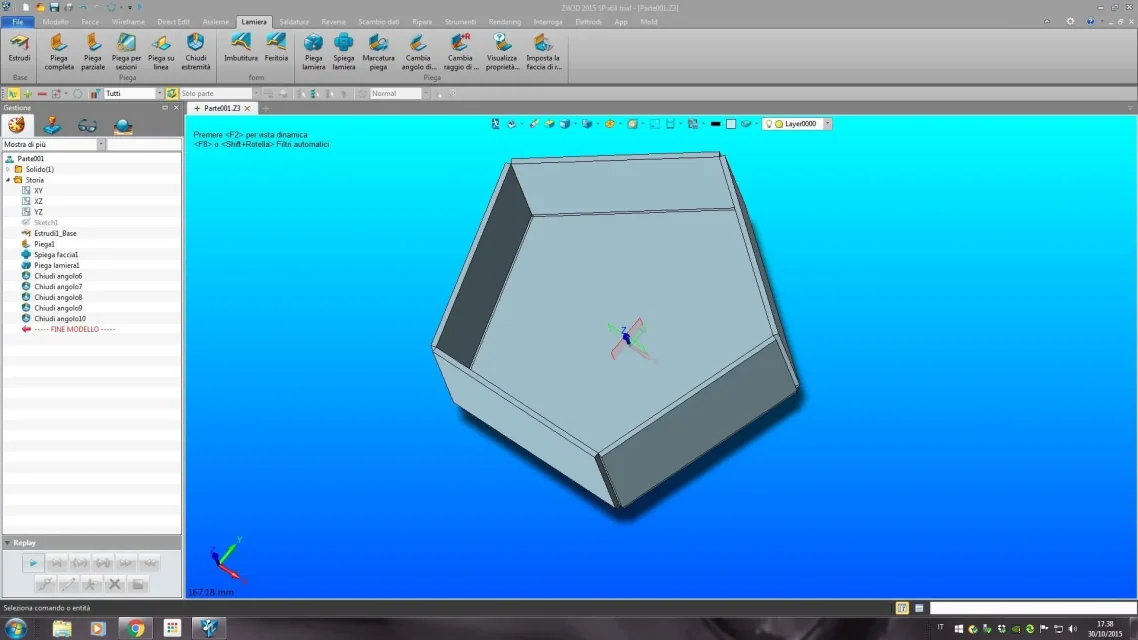
hi to all, these days also I am doing some tests with the sheet metal module of zw3d in its latest version 2015 sp. while the hybrid modeling module is, in my opinion, the best in absolute under any point of view, I can not say so far the same thing for the sheet form on which I am doing several tests to see if it can make me forget that of inventor, which for me represents the state of art :) with zw3 zw3d strangely fails if they select all 5 sides, while with 2 single sides does not automatically generate me (which instead inventor does) the gap of detachment at the intersection of the 2 flanges, and not even the discharge at the base of the flanges. Clearly I'm wrong, can you tell me what? Thank you. Bye! ;)
sm.webp
 

Forum statistics

Threads
44,997
Messages
339,767
Members
4
Latest member
ibt

Members online

No members online now.
Back
Top