• This forum is the machine-generated translation of www.cad3d.it/forum1 - the Italian design community. Several terms are not translated correctly.

calandered sheet, perforated and then developed? ? ?

  • Thread starter Thread starter reggio
  • Start date Start date

reggio

Guest
Hi, I have a doubt about how to proceed, I have to make a "c" calandrato frame,
easy start with the sketch in section (magari in multibody because the "c" will actually consist of 3 pieces welded and not calandrata), sign the axis and then revoluziono my 90°... then hole where it serves .. here it is done! I'm done.
..but now I can't develop the vertical sheet (the other 2 bases of the "c" are cut by laser and are already good) to give it to the thiefist... :
We say he will be able to develop it, but he will have to redesign it. . .

How would you do that?
 
Hi, I have a doubt about how to proceed, I have to make a "c" calandrato frame,
easy start with the sketch in section (magari in multibody because the "c" will actually consist of 3 pieces welded and not calandrata), sign the axis and then revoluziono my 90°... then hole where it serves .. here it is done! I'm done.
..but now I can't develop the vertical sheet (the other 2 bases of the "c" are cut by laser and are already good) to give it to the thiefist... :
We say he will be able to develop it, but he will have to redesign it. . .

How would you do that?
You don't understand much.. but is it wrong or not?. 90° revolutions? (but how did you do the sketch and what section did I profile? ).
If I could post a pattern would be useful.

Anyway,
in the multibody if you put the sheet together with solids then you can no longer flatten it.
You could do it in a set with the individual parts, the sheet would remain a unique part and you would have no problem.
if you just want to make a multibody because there would still be a single welded part (with only one code) you can make a second configuration where you suspend all the functions of other solids and keep only the sheet active, so you can develop it, get the tables for cutting and drilling etc.

greetings
Mar
 
yes, but eye to the result, because if sheet metal parts directly or if you turn into sheet metal after modeling the final result could be different.

if you need the sheets because you have folded leaves the multibody or thinks otherwise, and that is, you do the sheet of the side, alone and insert it into the multibody.

However a set is called so because they put together components, the part is a component. a traditional set is always better than a multibody, under many points of view.
 
then I attach what I did (for the moment I am satisfied with this and I shoot to finish the project, but I wanted to understand for the next time... )

then I said, a and c i had to do separately cut to the laser point and just, x the b instead I will draw a bow to which I will go to give the height and thickness from sheet so then I will be able to pierce it and wanting to develop correctly:d

OK clear, only one thing left me a little stone doing the test: after developing the "calandrate" sheet (so it was a flattened rectangle) I tried to squirt a rectangle and apply an extruded cut... that came correctly, only once flattened (called as from the initial sketch) the gap does not remain... :

I didn't need this test, but in general I was sick... Can't you bring him back? Where did I go wrong?

Thank you.
 

Attachments

  • telai curva-0000.webp
    telai curva-0000.webp
    6.4 KB · Views: 60
OK clear, only one thing left me a little stone doing the test: after developing the "calandrate" sheet (so it was a flattened rectangle) I tried to squirt a rectangle and apply an extruded cut... that came correctly, only once flattened (called as from the initial sketch) the gap does not remain... :

I didn't need this test, but in general I was sick... Can't you bring him back? Where did I go wrong?

Thank you.
and yes, because if you want to do work (cuts/holes) on the developed sheet you do not have to open it with the command flattened (o attivando la flat repetition from the tree), but you have to use the distendi (incl. sheet > spread). do all the extruded cuts you need and return to the calandrato/piegato with the reverse command fold (always in the sheet menu). in this way it works and the "spray" remains.

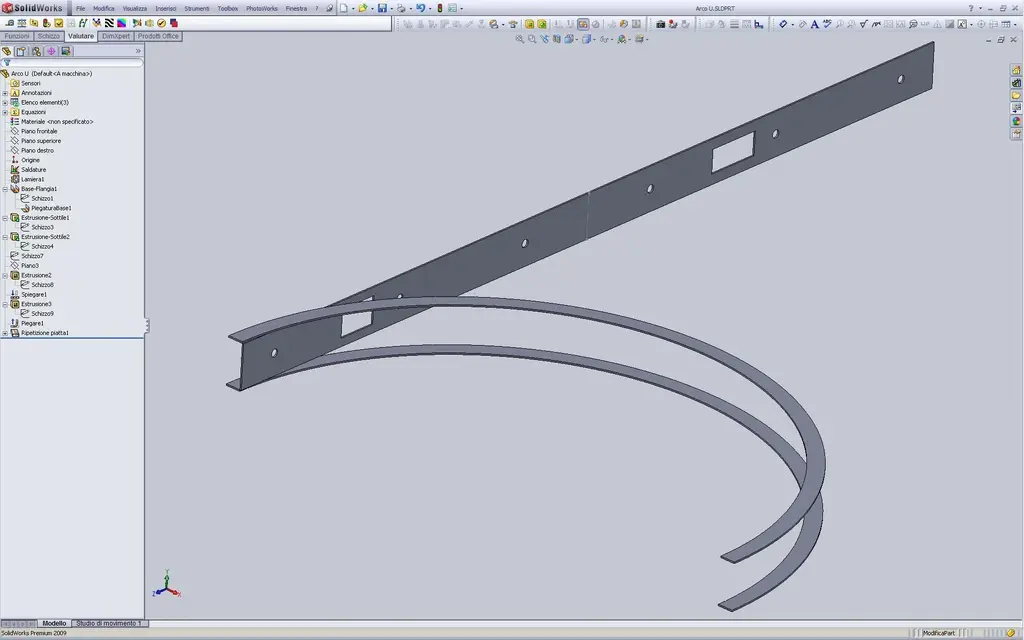
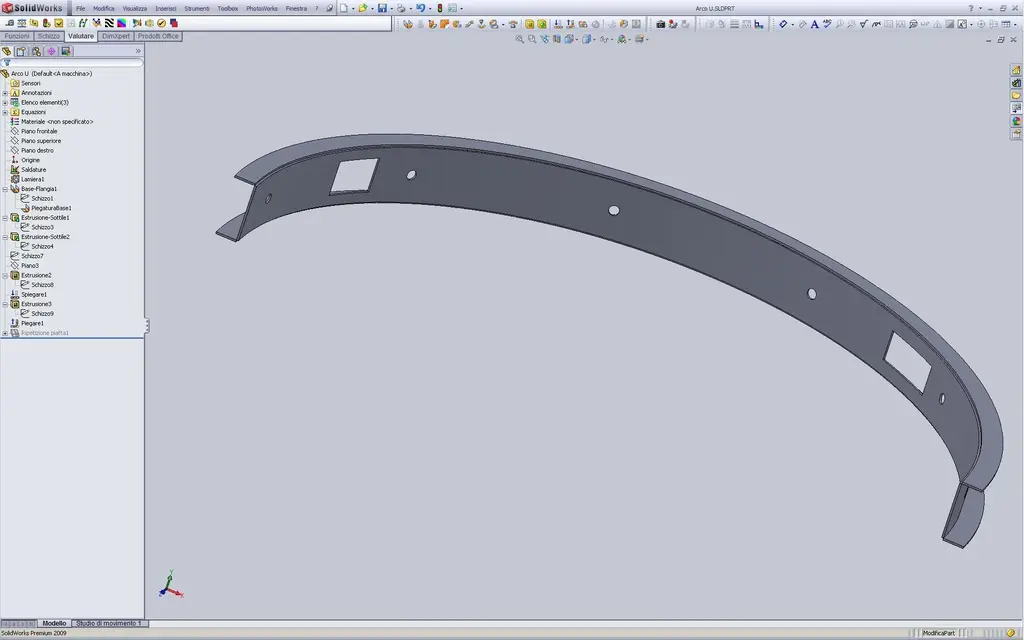
in the previous post I was not precise in the answer because 2009 allows to flatten a sheet in a multibody where there are other solids (as long as modeled "correctly"); look at your "c" for example:View attachment CALANDRATA.rar
Immagine01.webpImmagine02.webpthe vertical coast is a strip of metal wired put the 2 horizontal fins are "solid" extrusions (as are your laser cutting arches).
When you put on the table the flat repetition, if you just want to see the development of the sheet, for that view you hide all the bodies you don't need from the tree... open the files, follow the process from the features manager and you will be clear.

greetings
Marco:smile:
 
then I attach what I did (for the moment I am satisfied with this and I shoot to finish the project, but I wanted to understand for the next time... )

then I said, a and c i had to do separately cut to the laser point and just, x the b instead I will draw a bow to which I will go to give the height and thickness from sheet so then I will be able to pierce it and wanting to develop correctly:d

OK clear, only one thing left me a little stone doing the test: after developing the "calandrate" sheet (so it was a flattened rectangle) I tried to squirt a rectangle and apply an extruded cut... that came correctly, only once flattened (called as from the initial sketch) the gap does not remain... :

I didn't need this test, but in general I was sick... Can't you bring him back? Where did I go wrong?

Thank you.
So how'd it go? Did you make it?
..no, because if you tell us every now and then if and how you solved it would not be bad and could also come useful to other users with the same problems (:mixed:).

greetings
Marco:smile:
 
So how'd it go? Did you make it?
..no, because if you tell us every now and then if and how you solved it would not be bad and could also come useful to other users with the same problems (:mixed:).

greetings
Marco:smile:
hi marco, as I said for that "turn" I "tired to finish" the urgent project "how it comes", I must put into practice these vs councils + those you gave me here http://www.cad3d.it/forum1/showthread.php?t=13649 I will show you what I have done.

for now I thank you so much, soon

I have already prepared 1000 other questions. .
 

Forum statistics

Threads
44,997
Messages
339,767
Members
4
Latest member
ibt

Members online

No members online now.
Back
Top