• This forum is the machine-generated translation of www.cad3d.it/forum1 - the Italian design community. Several terms are not translated correctly.

cartilage update

  • Thread starter Thread starter il disegnatore
  • Start date Start date

il disegnatore

Guest
Good evening to all,
I would like to update my current cartiglio by adding additional editable cells from tab builder.
I managed to change the template and then from the 3d model I for example added a new editing note called revision 5 with its date and signature.
I can't, however, be able to associate everything in the cartiglio.
I modified the propertise.txt file by adding fields that interest me as you can see below; I can't however perform the link operation to have the tab builder that automatically compiles rev5, datarev5 and signv5

weight
Description
revision
material
surfaces
size
model
checked
datecontrol
designed
project
Group
treatment
hardness
rev.
rev.
rev.
rev.
rev5
date
date
date
date
date 5
signv1
Signing
signv3
signv4
signv5


you should do everything from linking to property, right?

Thank you.
 
I have not understood clearly what you did, the best practice is this:

create a part or a set with the necessary properties already compiled. at this stage you do not need to have a working tab builder, just edit the properties from file->propriety and create all the necessary properties.
insert the part/assieme compiled in the cartiglio, just a view, change the sheet format and insert the notes. once you insert the note with the right character and the right size connect it to the desired property by pressing the "connect to the property" button in the proprety manager of the note. at this point the note is connected and works. the way you compile it (tab builder, pdm or property by hand) does not change the result.
 
I did not understand if in the table cartiglio you created the annotation with the link to rev5 etc.
if you did not do this you must do it or if you did it is not connected correctly.
You should attach the 3d model of a fictitious part and the table template to help you.

Hi.
 
I did not understand if in the table cartiglio you created the annotation with the link to rev5 etc.
if you did not do this you must do it or if you did it is not connected correctly.
You should attach the 3d model of a fictitious part and the table template to help you.

Hi.
I have already created all the notes, my problem is in the connection of the properties.
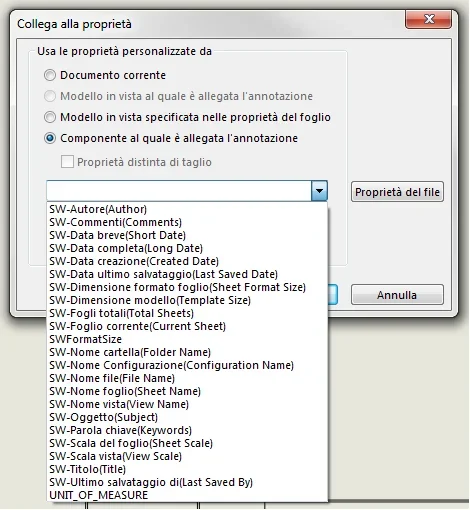
Just click on the property link icon comes out a window where it says, uses custom properties from
- current document
-model in specified view in sheet properties
-component to which the annotation is attached

I had updated the txt file previously posted, I see correctly rev, datarev5 and signv5, but if I click on pattern in view specified in the properties of the sheet-ownership of the file....it comes out a table where I have si the column with the properties but in the cell value/expression of the text and also of the result, the fields are empty.

I hypothesize they're to fill....how?
Am I wrong with something and I have to follow another procedure?


I attach a screenshot


Thank you.
greetings
 

Attachments

  • riepilogo informazioni.webp
    riepilogo informazioni.webp
    56.5 KB · Views: 32
component to which the annotation is attached
ok okay, I guess after you have to click the property button of the file.
inside opens the attached table.
if I click in cell 2 opens the curtain and find rev 5 but in cell value/expression text what should be put?

I think that's the lack of everything.

Thank you.
 

Attachments

  • riepilogo.webp
    riepilogo.webp
    29.3 KB · Views: 18
no, press the curtain and choose the property from the list.
usually I:
- I carry out a table of a part that has all its properties compiled and saved.
- I create all the notes connected to the properties as explained, the seleziono and the copio (ctrl+c)
- open the template file (.drwdot) and take off, and the game is made

the notes that connect your colleagues to
- component to which the annotation is attached
- choose her from the curtain.

I hope I haven't confused you

Hi.
 
no, press the curtain and choose the property from the list.
usually I:
- I carry out a table of a part that has all its properties compiled and saved.
- I create all the notes connected to the properties as explained, the seleziono and the copio (ctrl+c)
- open the template file (.drwdot) and take off, and the game is made

the notes that connect your colleagues to
- component to which the annotation is attached
- choose her from the curtain.

I hope I haven't confused you

Hi.
Maybe I didn't explain well.
going to select component to which the annotation is attached, from the curtain do not come out the voices that are part of my txt...in practice I see only sw-author, sw-comments...etc.... but I do not see anything of those things that we personalised on the first day.

at that point, since there is nothing from the curtain, I click on file properties.
inside as I said before, if you open the curtain appears instead rev5, in the next cell you more choose between text, date, number, yes and no....in the cell value/excession of the text I have no chance to choose anything.. .

I believe that only this last step is missing to make everything work... and that then as a tab builder you also update the 2d cart.
 
Forgive me,
from what you wrote, if I didn't get it wrong, the tab builder uses it to associate the properties to the model, then in the part.
if I don't see the wrong picture you have attached shows the table information summary table table table table table table table table table table table, it's not model 3d; It's two different things.
I think you can't connect them for that.

I take back here what I usually do and see if it matches what you want to do, because you know there are many ways to work and everyone is right.
- to model 3d (part) I fulfill my custom properties (by hand, with tab buider, with pdm, etc.)
- I create the table of the model and save
- I create a note and connect it to the property "component to which the annotation is attached", the curtain should find it full with all the properties of the 3d model present in the view.
- I create all my related notes, scripts, open the template file (dwrdot) and take them into the cartilage and place them where you need them
- save the file and close the file
- I create another table from the same model 3d using the dwrdot previously updated with the related notes, and everything should be fine from here forward.
 
thank you for the answer jenuary but unfortunately not exactly so.
I'm trying to explain my best on your ladder.

- to the 3d model (part) I fulfill my custom properties (I do it in fact by tab builder, updating in fact the file that loads every part from the property tab builder.)
in parallel I also modified the txt file called "properties" (at that time they told me that within this file were present the fields that would then be connected to the custom properties of the cartiglio)

-I grow the table of the model and save (ok for safety I created a new table and saved in another place)

- I create a note and connect it to the property "component to which the annotation is attached", the curtain should find it full with all the properties of the 3d model present in the view. (here, I can't find the values in 3d.. but only those attached by photos)

I'm wrong something... you know what could be?


Forgive me,
from what you wrote, if I didn't get it wrong, the tab builder uses it to associate the properties to the model, then in the part.
if I don't see the wrong picture you have attached shows the table information summary table table table table table table table table table table table, it's not model 3d; It's two different things.
I think you can't connect them for that.

I take back here what I usually do and see if it matches what you want to do, because you know there are many ways to work and everyone is right.
- to model 3d (part) I fulfill my custom properties (by hand, with tab buider, with pdm, etc.)
- I create the table of the model and save
- I create a note and connect it to the property "component to which the annotation is attached", the curtain should find it full with all the properties of the 3d model present in the view.
- I create all my related notes, scripts, open the template file (dwrdot) and take them into the cartilage and place them where you need them
- save the file and close the file
- I create another table from the same model 3d using the dwrdot previously updated with the related notes, and everything should be fine from here forward.
 

Attachments

  • cattura.webp
    cattura.webp
    40.5 KB · Views: 53
Could you attach the model and table you created?
so I try to link them to them and see what happens.
 
igo part and drw
await any developments

Thank you very much
Hi.
for simplicity I created a video in .flv so you see the steps I made.
however both from an existing note connected the copi\incolli and the changes the name of the property with which it is linked and the game is made.
copy and paste your note into .dwrdot files
I hope that's enough
 

Attachments

Hi.
for simplicity I created a video in .flv so you see the steps I made.
however both from an existing note connected the copi\incolli and the changes the name of the property with which it is linked and the game is made.
copy and paste your note into .dwrdot files
I hope that's enough
Hi.
thanks for the instructions.
By doing so (I have to select model in view specified in the properties of the sheet and not component to which the annotation is attached) it works...but with the manual insertion of the properties of the part.

with the board builder does not work.

I also tried the bad to copy all fields of string 4 in string 5 ($prpsheet:"rev4" becomes $prpsheet:"rev5"...ecc etc for date and signature...but it only goes with manual compilation.


So thank you for the support given to me until now, can you however by chance find the problem that does not allow the proper functioning of the tab builder?

Thank you.
Hi.
 
hi the designer,
I do not use the buider tab, I am sincere, but I do not see and do not understand the difference in entering the value of the property in the hand part or with the tab builder.
in reality the link of the annotation to the property should not give it less than who or what and how it was compiled.
This is intriguing me... .
 
hi the designer,
I do not use the buider tab, I am sincere, but I do not see and do not understand the difference in entering the value of the property in the hand part or with the tab builder.
in reality the link of the annotation to the property should not give it less than who or what and how it was compiled.
This is intriguing me... .
It is definitely the same....but maybe it is the setting that was given to us and then the habit of using the tab builder!
I have just tried it anyway, even reassociating the revision notes, from 1 to 4 it works both from tab builder and from edict of the properties.
revision 5 instead only works by edit.

What can that be?
 
sincerely I have difficulty understanding not using the tab builder.
I ask you to verify that the name of the properties are equal between the text file of the tab buider and the property you want to enter, it can only be that until the revision4 everything works and then no.
I think that the name of the property has a space at the end (which you do not notice), while you serve without space, or attention to the uppercase and lowercase, custom properties are sensitive to this.
 
Last edited by a moderator:
sincerely I have difficulty understanding not using the tab builder.
I ask you to verify that the name of the properties are equal between the text file of the tab buider and the property you want to enter, it can only be that until the revision4 everything works and then no.
I think that the name of the property has a space at the end (which you do not notice), while you serve without space, or attention to the uppercase and lowercase, custom properties are sensitive to this.
rechecking everything I noticed that in the board builder did not fish from rev5 but from text box...that's why.
now works properly.
I'm updating the graphics of the files, I hope the copy pastes from sheet a2 to a3 does not give problems.
I don't have to set anything right?
because custom properties are always the same being unique tab builder
 
copy-paste is a gift of god and works well in cartilages, go for sure.
It had to be something like that or a kiss, fortunately it is not the second.
 

Forum statistics

Threads
44,997
Messages
339,767
Members
4
Latest member
ibt

Members online

No members online now.
Back
Top