
• This forum is the machine-generated translation of www.cad3d.it/forum1 - the Italian design community. Several terms are not translated correctly.

cartilage

  • Thread starter Thread starter doriano
  • Start date Start date

doriano

Guest
Good morning to all
I would like to know if it is possible to copy the cartiglio from solid edge st5 to catia v5 r19.
However the problem is this: I have to make solid boards created with st5 and these tables have to bring back the station cartiglio.
Thank you all.
 
Good morning to all
I would like to know if it is possible to copy the cartiglio from solid edge st5 to catia v5 r19.
However the problem is this: I have to make solid boards created with st5 and these tables have to bring back the station cartiglio.
Thank you all.
Hi.
you can, as long as you turn your cartiglio into dxf or dwg and import it into the catdrawing
 
Good evening.
I'm going back to this discussion. ...
I tried, but I didn't find anything about the insertion of the properties into the cart.
Once imported from dxf and placed in caia v5 , I would like to insert properties automatically as component code, weight, etc...
Thank you.
 
Good evening.
I'm going back to this discussion. ...
I tried, but I didn't find anything about the insertion of the properties into the cart.
Once imported from dxf and placed in caia v5 , I would like to insert properties automatically as component code, weight, etc...
Thank you.
you can
in inserting text.. with "link of attribute"
 
you can
in inserting text.. with "link of attribute"
Okay.
Thank you 1000.
I managed to figure out how to insert weight, material, etc.
It remains to be understood if the links entered, once saved the cartilage relate to the parts I will go to put in the views, but this I will see it later trying.
Now I can't insert the link to the piece code.
Would you be so kind to make me understand better?
 
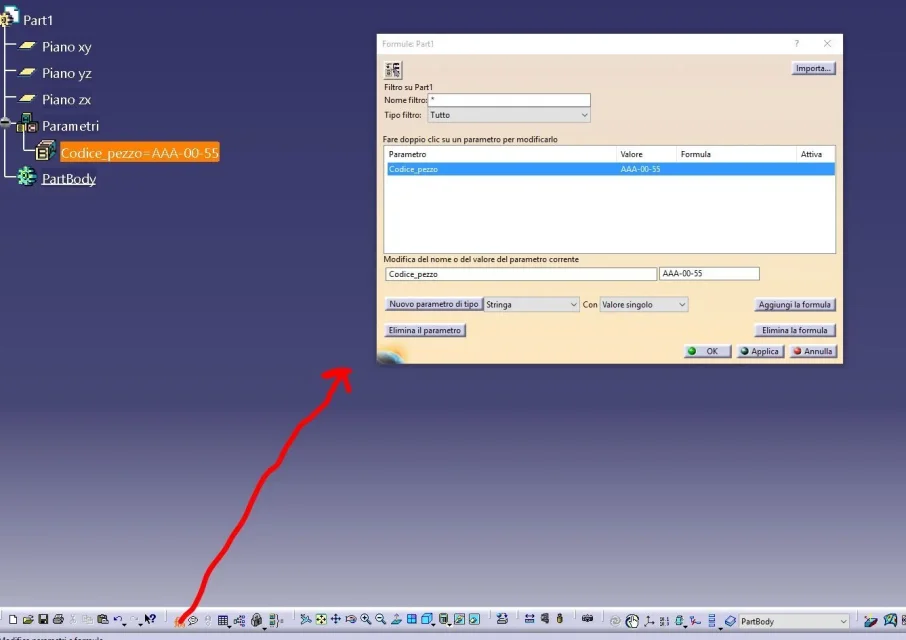
1) in the catpart you must insert a string variable and assign the piece code (see attached image)
2) open your catdrawing and make the table of your catpart
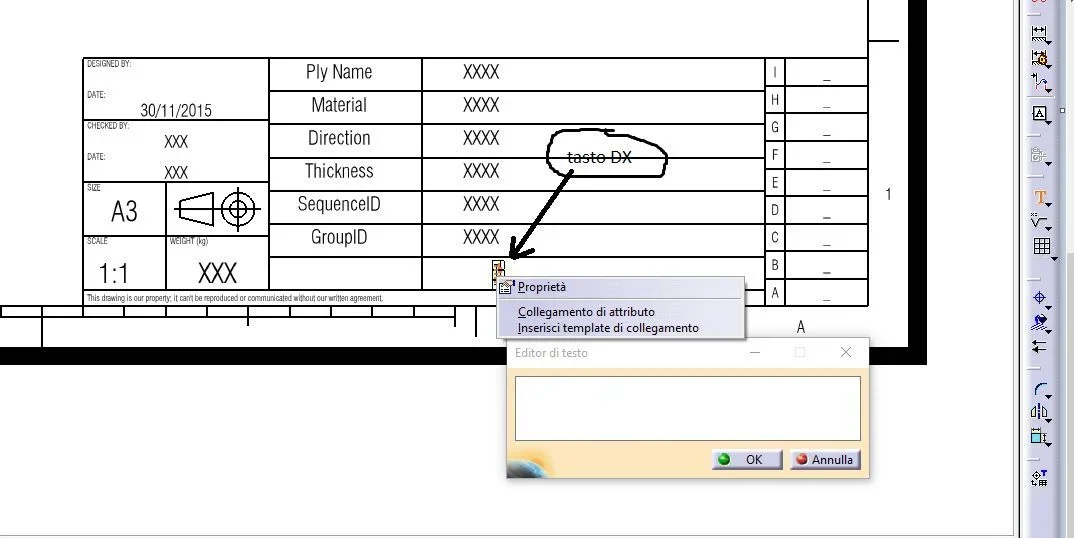
3) in the background of the sheet, where you put the cartilage and the square, enter the text in the box dedicated to the piece code
4) and when inserting the text, right click (see attached image) and choose "admitted connection"
5) at this point go to the window of your catpart and click on the variable you created

if you change the code_piece in the catpart.. the design updates

ps. This is a very questionable method... but I don't know exactly what you want to do and so I explained the simplest method. The correct method is with xls tables to be associated with the distinct "bom" materials.
 

Attachments

  • Cattura.webp
    Cattura.webp
    32.5 KB · Views: 40
  • Cattura2.webp
    Cattura2.webp
    52.6 KB · Views: 47
ps. This is a very questionable method... but I don't know exactly what you want to do and so I explained the simplest method. The correct method is with xls tables to be associated with the distinct "bom" materials.[/QUOTE]Thank you for your answer. I'm trying to enter the code tomorrow and I think I won't have a problem.
what I want to do is to create a cartiglio by inserting it from dwg and add all the properties that I will then go to call back every time I make the table.
 
Okay.
Thanks, it works.
However it is a method not usable to create a standard cartilage, as inserting the same string into another part. and reopening a new drawing of a previously saved cartiglio, with all attributes, with "new from" and inserting a view, the parameters are not updated. :36_1_26:
 
Okay.
Thanks, it works.
However it is a method not usable to create a standard cartilage, as inserting the same string into another part. and reopening a new drawing of a previously saved cartiglio, with all attributes, with "new from" and inserting a view, the parameters are not updated. :36_1_26:
the procedure is this:

1) create a base.catpart and insert all your variables. weight, material, code. etc.
2) create a base.catdrawing and in the voices of the associ the value of the variables of the base.catpart with "link to attribute"
3) from the file---> save, save base.catpart and base.catdrawing with different names appropriate to your use

summary: every time you create a new catpart and a new catdrawing . open the two "base" files and change name with "saving management"

I hope I've been helpful.
then there is the method with xls tables, but it is a little complicated to explain
 
Okay. Thank you victorious.
As soon as I try and let you know.
I have one doubt...
in rescue management do I have to activate the option "independent saver enabled ? "
then it would be interesting to also understand the system with xls tables.
 
Okay. Thank you victorious.
As soon as I try and let you know.
I have one doubt...
in rescue management do I have to activate the option "independent saver enabled ? "
then it would be interesting to also understand the system with xls tables.
Bye. no...without enabling independent rescue
 
I'm going back to this discussion. . .
once I create my cartilage I open it, with new command I make my table.
in the end except as dxf the table and 2 dxf are created automatically.
one contains my table and another of the details belonging to the background of the sheet that every time I have to go to delete.
Does anyone know how to solve this problem?
Thank you.
 
menu/instruments/options/general/compatibility/dxf/sources exported/current only (instead of all)

Of course if you have multiple sheets you have to export them 1 at a time
 

Forum statistics

Threads
44,997
Messages
339,767
Members
4
Latest member
ibt

Members online

No members online now.
Back
Top