
• This forum is the machine-generated translation of www.cad3d.it/forum1 - the Italian design community. Several terms are not translated correctly.

cartridge

  • Thread starter Thread starter Geppetto82
  • Start date Start date

Geppetto82

Guest
Bye to all,
I ask you another question.
I updated the solid works version from 2007 to 2010.
when I open the tables made with the old version, all the texts and quotas appear in yellow and I have to change one by one.
How can I fix this?
Thank you.
greetings
b)
 
Can you post an example file?
I have 2010 and I don't have this problem, even when
I passed from 2007 to 2009...
 
Hi, mike.
excuse for example file what do you mean?
Do I have to post the part and the design?
 
Hi, mike.
excuse for example file what do you mean?
Do I have to post the part and the design?
Yeah, even if I think I know what's going on with you.
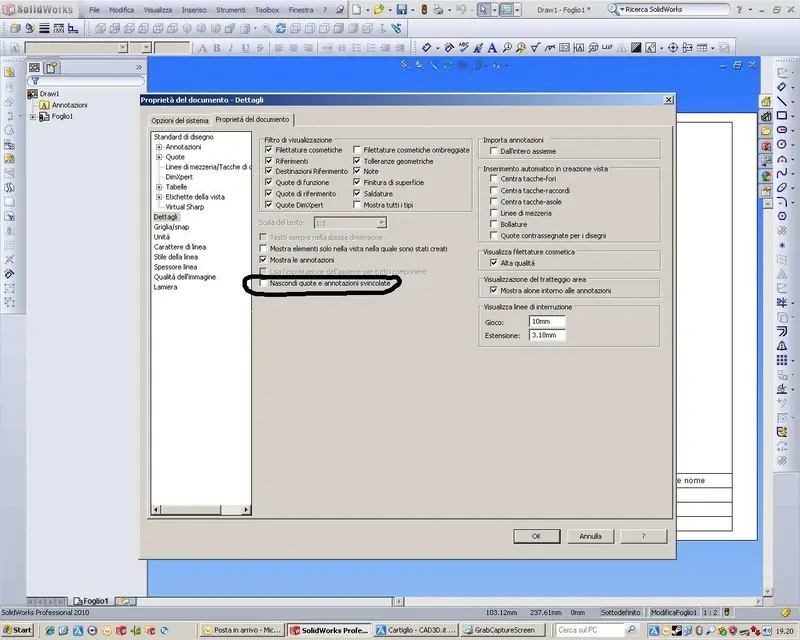
Check this option:
In practice, if you check, you will see all the notes and odds released.
 

Attachments

  • 2010_003.webp
    2010_003.webp
    126.1 KB · Views: 58
View attachment 901502002.ziphi mike I tried to do as you said but nothing.... .
I have noticed that opening the drawing by not even half a decondo the quotas and the cartiglio are in straight then become yellow immediately. . . .
Thank you.
 
I think he loses references. Unfortunately, during transactions, it happens. to avoid it as much as possible it is good not to skip multiple versions at a time, but to pass all intermediate versions and perform the wizard conversion of files. If you do not do this procedure you create several of these errors.
this is my experience after several steps.
 
the strangest thing is that the black color just doesn't take me:
When I click on every single text to change the color I have to assign them brown because the black just doesn't want to know.
It's so weird.
the other day I was at a client's place we printed a color design and it was clearly seen that the notes were brown and not black! !
It wasn't very nice....
but I have no other solutions! ! !
 
hi, on the cartiglio if it was created as a block, do "change sheet format, change block and then deselectionate the flag "link to the file", while for quotas and notes select them all dragging the mouse as a window zomm and then try to go on the levels and select the blank space.
Also the cartiglio can have taken a level with different color.
last attempt is to go to change system colors from the command "system options - colors".
 
Bye, baigua.
Thanks for the answer.
Then:
1. the cartilage is not a block;
2. I selected the odds and notes and selected the blank space, but nothing!
3. I have browsed one by one the voices of the color schemes and all the yellows I have
I met them in black, but nothing! !
 
Bye, baigua.
Thanks for the answer.
Then:
1. the cartilage is not a block;
2. I selected the odds and notes and selected the blank space, but nothing!
3. I have browsed one by one the voices of the color schemes and all the yellows I have
I met them in black, but nothing! !
If you want, post a file, maybe you never want to publish it.
 
Hi, mike.
the file I published a few posts up....
ops... you know I was reading between a drawing and the other...:biggrin:

However, yes, it's a big problem, I tried, but it seems that
the colors of the quotas were set on that color in the original file.
the strange fact is that they are not released, in practice they do not have errors
of anchorage or other.
If I can try tomorrow on a pc where I still have 2009.. .
Meanwhile I try on what I have at home (2010)...:wink:
 
hi mike at a distance of 10 years holding this discussion.
I had to format the pc, reinstall solidworks and punctually I got this situation back.
I clicked on the link of the line guide you posted but gives error.
It will be old age, I'm still slowed down by lockdown but I can't solve this problem.
Thank you.
 
That's the page you asked for the link.
if you press on the icon
tool_color_display_mode_line_format.gif
Active color display mode and disable color display.

why the writings are yellow and black we cannot know for psychic osmosis
 
I repeat I will be late but I can't figure out where to find this massive icon 1590131158770.webp......
I don't know what it's like to say I asked something kindly. ...
 

Forum statistics

Threads
44,997
Messages
339,767
Members
4
Latest member
ibt

Members online

No members online now.
Back
Top