• This forum is the machine-generated translation of www.cad3d.it/forum1 - the Italian design community. Several terms are not translated correctly.

catia v5 no deduction in sections

  • Thread starter Thread starter tony-bisceglie
  • Start date Start date

tony-bisceglie

Guest
Bye to all,
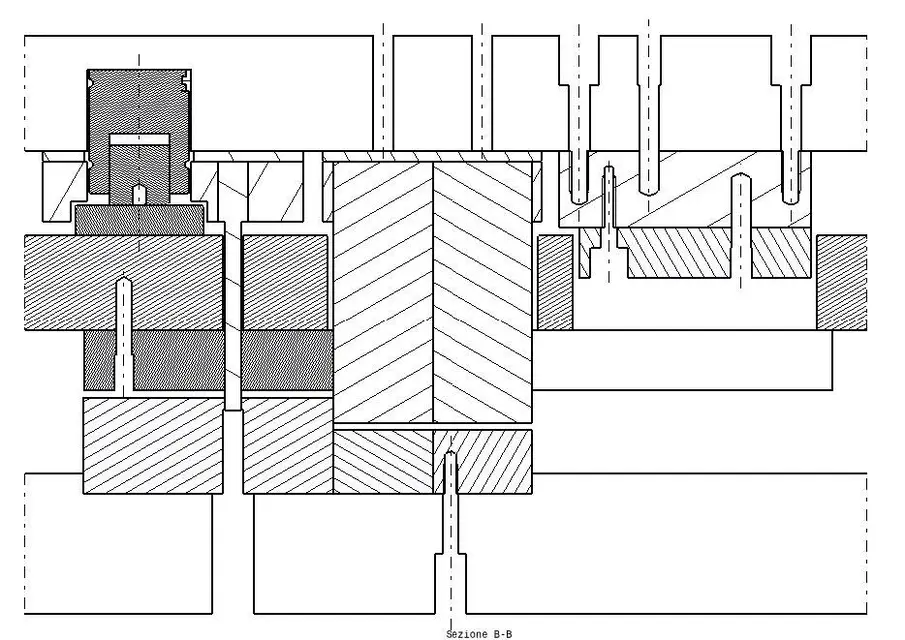
I would like to know how you can set default the option that does not insert the dash when creating sections. in my case every time I generate a section of the mold, each part has a different restraint. one is at 45° the other at 60°. So someone can tell me how to have the sections immediately without restraint?
thanks and good day
 

Attachments

  • sezione.webp
    sezione.webp
    93.7 KB · Views: 17
Bye to all,
I would like to know how you can set default the option that does not insert the dash when creating sections. in my case every time I generate a section of the mold, each part has a different restraint. one is at 45° the other at 60°. So someone can tell me how to have the sections immediately without restraint?
thanks and good day
I assume that I don't know... but that still catia follows a technical design rule. the restraint, of the sectioned parts, has different inclinations if reported to different parts. Otherwise, you know the mess.
However I do not know how to set a dash with two always equal corners.
Hi:
 
Then:
- theoretically to each catpart you have to assign matter. therefore this would already contain the correct deduction and the other various properties that will then be repercuated in the sections of the 2d (01.jpg)
- usually in the 2d cylindrical components (e.g., screws, trees etc.). for having them without section you have 2 possibilities:
a) in the logical tree in the catproduct selections the affected component and under the properties you should find the option that says not to dissect in the drawing (02_a.jpg)

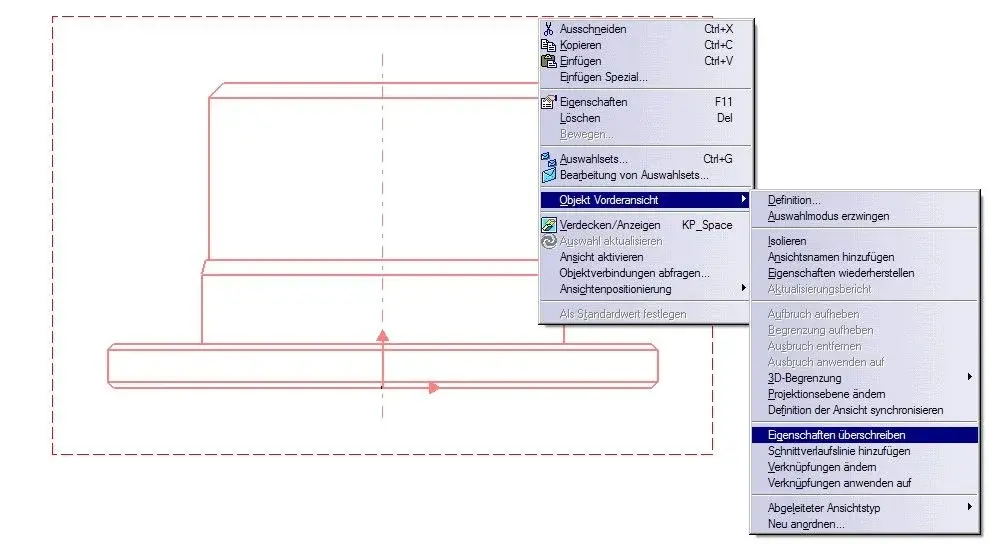
b) go to the drafting on the property of the view (02_b1.jpg) -> right-click -> property ... -> select the object you do not want to select -> pick the option (02_b2.jpg)

3) in the xml-standard way admin you define not to detain by default sections (03.jpg)
 

Attachments

  • 01.webp
    01.webp
    8.3 KB · Views: 43
  • 02_a.webp
    02_a.webp
    22 KB · Views: 56
  • 02_b1.webp
    02_b1.webp
    42.4 KB · Views: 44
  • 02_b2.webp
    02_b2.webp
    30.4 KB · Views: 35
  • 03.webp
    03.webp
    36.2 KB · Views: 56
under tools - standard I found nothing to set up to undo the restraints, and anyway it would only be relative to the open geometry.

I would definitely delete by default sections, and this should be in the general settings, but I found nothing.
Mar
 
after searches on the web and other forums I think I have understood that you can not set by default the deletion of the restraints in the sections.
among the many palliative solutions proposed, the only valid is a macro that does the job: Obviously after an update the restraints reappear and you have to run the macro again.
is not radical but still useful and quick.

----------------------------------------------------------------------------------------------------------------------------------------------------------------------------------------------------------------------------------------------------------------------------------------------------------------------------------------------------------------------------------------------------------------------------------------------------------------------------------------------------------------------------------
language="vbscript"

sub catmain()
set udocument = catia. active document
set uselection = udocument.selection
set uvisproperties = uselection.visproperties

uselection.search "catdrwsearch.catearlygenshape,all"
uvisproperties.setshow catvispropertynoshowattr
uselection.clear
end
----------------------------------------------------------------------------------------------------------------------------------------------------------------------------------------------------------------------------------------------------------------------------------------------------------------------------------------------------------------------------------------------------------------------------------------------------------------------------------------------------------------------------------
copy notes and save as .txt, then change the extension in .catscript

Mar
 
but if you enter as admin and setts not to treat you don't do first? I don't understand all this ogiro to get the same result in programming! ! ! !
 
I entered as admin, but I did not find in the settings anything to be able to delete the restraints, and also on the web nobody found the solution indeed, as said, it seems not possible.
If you have the way please expose it clearly.
Besides in the post xml I exposed a problem for admin.
Mar
 

Forum statistics

Threads
44,997
Messages
339,767
Members
4
Latest member
ibt

Members online

No members online now.
Back
Top