AleC3D
Guest
Good evening, guys.
I have not found solutions for this problem that is why I open a new discussion.
I installed catiav5r19 on windows view 32bit and here's what I see after the program starts:
-foto1(home1.jpg), blue screen and absence of the logical tree and axes.
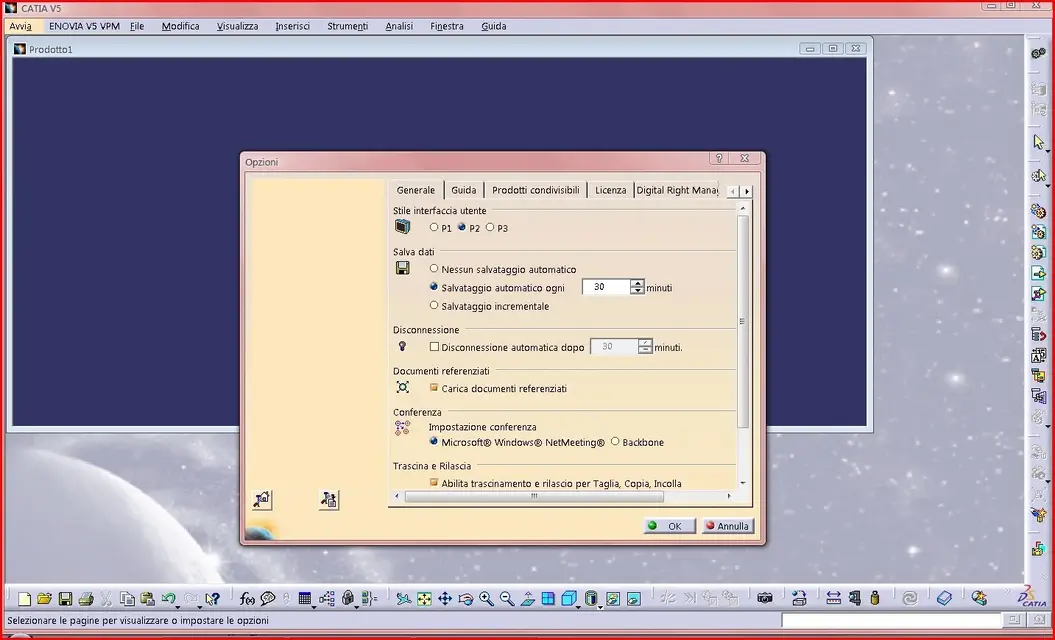
-foto2(home2.jpg), in tools>options missing something! ! !
apro environment editor, here are the two directories, created by default during installation, which I display:
-foto3(editor.jpg)
I have read in other discussions that you have to hand out with catsetting using environment editor.
If yes, explain to me in detail what to do?
If not... help me!!!:frown:
I trust your experience and goodness.
I wait for news
thank you all!! !
alec3d
I have not found solutions for this problem that is why I open a new discussion.
I installed catiav5r19 on windows view 32bit and here's what I see after the program starts:
-foto1(home1.jpg), blue screen and absence of the logical tree and axes.
-foto2(home2.jpg), in tools>options missing something! ! !
apro environment editor, here are the two directories, created by default during installation, which I display:
-foto3(editor.jpg)
I have read in other discussions that you have to hand out with catsetting using environment editor.
If yes, explain to me in detail what to do?
If not... help me!!!:frown:
I trust your experience and goodness.
I wait for news
thank you all!! !
alec3d