
• This forum is the machine-generated translation of www.cad3d.it/forum1 - the Italian design community. Several terms are not translated correctly.

ceiling board in rendering

  • Thread starter Thread starter gaelp
  • Start date Start date

gaelp

Guest
Bye to all,
I'll ask you a question, perhaps, banal, but I can't solve the probelma. .
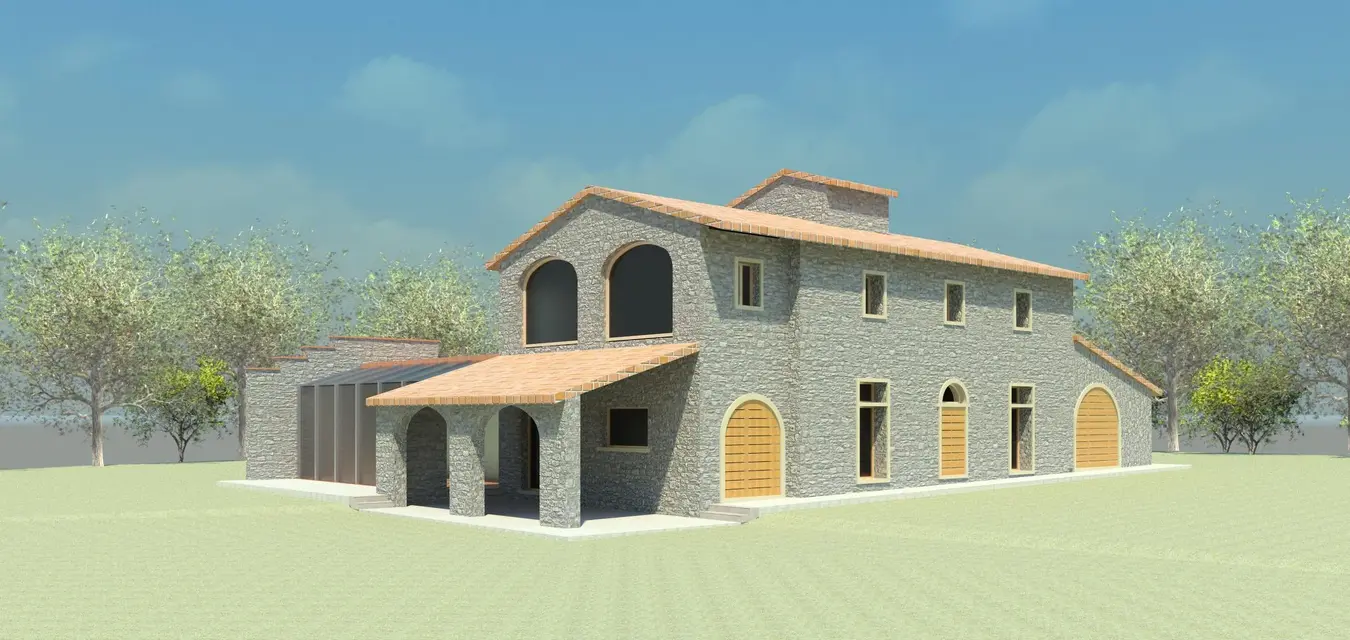
as you can see from the attached image, the texture of the cover that I would like to stay only above the roof, it also descends on the sides (bords) creating an unpleasant effect.
Can you tell me how to stop this? ? ? ?
Thank you.
 

Attachments

  • Vista 3D 2.webp
    Vista 3D 2.webp
    312 KB · Views: 70
Good morning gaelp
from the .jpg that places, it seems that you have created the roof from: component----local model-----tect-----extrusion solid, and then associated the material.
If you followed this procedure then there is nothing strange, because the solid created is a unique thing and therefore the material is mapped on all faces.

other posiibility: you have created the roof with the roof command from the perimeter and you have eliminated all the stratification, leaving only one element.
it is not good, put back the other layers, and to the element that mappi with the plugs, from a low thickness (about 2-5 cm).

Let us know

Hi.
f.
 
hello and thanks to the answer...I used the second solution, and the thickness of the plugs is 4cm, I tried to change thickness but nothing changes. the other layers, cament, insulating etc. there are, but as you see the coup retino goes over everything.
 
Bye to all,
I'll ask you a question, perhaps, banal, but I can't solve the probelma. .
as you can see from the attached image, the texture of the cover that I would like to stay only above the roof, it also descends on the sides (bords) creating an unpleasant effect.
Can you tell me how to stop this? ? ? ?
Thank you.
controls the 're rendering composition' of the last layer of material. You'll see that it's set up. replace with other, e.g. plaster.
Mar
 
in the image "view 3d 1" the first roof to sin is by perimeter and as you see from its config in the image "view 3d 3" is all of a material, the one in the center is by perimeter with the stratifications of default and that to mdestra is by extrusion with stratigraphy default "image "view 3d 4"
how do you end up doing it?
because the second and third layers make the white edge

put the picture of the roof config window as I did
so you understand how you do it
 

Attachments

  • Vista 3D 1.webp
    Vista 3D 1.webp
    19.1 KB · Views: 27
  • Vista 3D 4.webp
    Vista 3D 4.webp
    50.9 KB · Views: 23
  • Vista 3D 3.webp
    Vista 3D 3.webp
    47.9 KB · Views: 19

Forum statistics

Threads
44,997
Messages
339,767
Members
4
Latest member
ibt

Members online

No members online now.
ciao
Back
Top