
• This forum is the machine-generated translation of www.cad3d.it/forum1 - the Italian design community. Several terms are not translated correctly.

change "crash"

  • Thread starter Thread starter Ale34
  • Start date Start date

Ale34

Guest
hi guys, a question, after I reinstalled solid 2019, I lost this setting...that is:
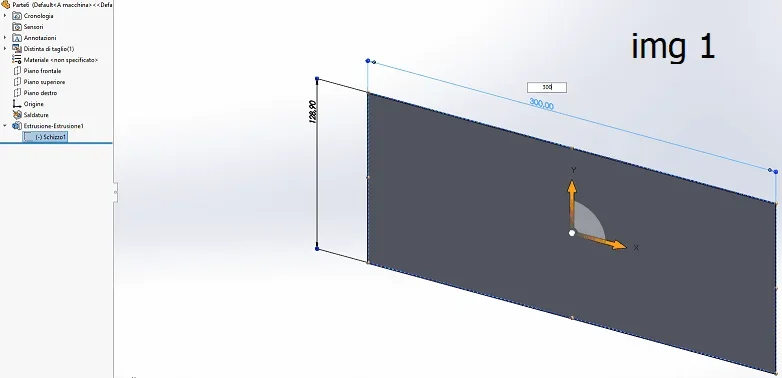
In the beginning, and it is as I would like to return, on the tasckpane tree, in one part, by clicking on the sketch of a function you see both the sketch and its quotas, to change the sketch you just double click on its sketch.
Now, in one part, by clicking on the sketch of a function you only see the sketch without its odds, to see the odds of this same sketch I have to do 2 clicks and to change it I have to do dx button "change".


where do I find this setting?

thanks 10000000
 
 
I had already read that post... but it's not my problem because I can always and still change it. . . .
 
It is not a question of being able to change it, but that by activating the instant you have the mode indicated by you.
Have you tried to activate/disable the instant?
 
an image to facilitate life?
I should make a video... Hihihihi!

However, this could be linked to another "anomaly".
on the taskpane of a part, I double-click on the sketch of a function, you see me sketch and quotas, I change the value of a quota, confirm, esco... but the part does not change until I "reconstruct" with the traffic light.
what didn't happen before because the model was updated instantly. .
boh.
 
However, this could be linked to another "anomaly".
on the taskpane of a part, I double-click on the sketch of a function, you see me sketch and quotas, I change the value of a quota, confirm, esco... but the part does not change until I "reconstruct" with the traffic light.
what didn't happen before because the model was updated instantly. .
boh.
is not called taskpane (which is the one on the right openable with f1), but feature manager.
the behavior you describe, the immediate update, is due to the instant 3d.
that aell's image 1 is the graphics with the instant 3d active, that of the image 2 with the instant 3d not active
 

Attachments

  • Immagine1.webp
    Immagine1.webp
    13.9 KB · Views: 16
  • Immagine2.webp
    Immagine2.webp
    11 KB · Views: 16
Sorry to forgive the error of the feature manager... .

instant 3d... that's exactly what messed me up...

You have to excuse me... I only put my hands on instant 2d for that I didn't understand the problem.. .

however solved! thanks 100000000000000
 

Forum statistics

Threads
44,997
Messages
339,767
Members
4
Latest member
ibt

Members online

No members online now.
Back
Top