• This forum is the machine-generated translation of www.cad3d.it/forum1 - the Italian design community. Several terms are not translated correctly.

change origin derived parts

  • Thread starter Thread starter Adahm
  • Start date Start date

Adahm

Guest
Bye to all,

Can someone tell me if and how it is possible to change the origin of a derived part?
to make an example:
in the file "model1.ipt" there is a geometry derived from the file "a.ipt"
I want to change the derived part "a.ipt" with "b.ipt" without having to derive it again.

in the attached image, you can see blue circled the possibility of being able to change the origin of a connected excel file.
While I don't know how to change the origin of a derivative part.

Obviously the connected parts that I intend to replace, are compatible, that is they have the same "objects" with different sizes.

Thank you.
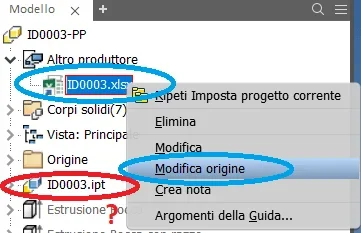
Immagine.webp
 
"works under certain conditions." read this:this has been discussed several times in the past. the main reason why this workflow is not yet supported is about how the associativity is established. derive assembly or derive part relies on the unique source document id to map objects. if you change the source to a file with a different document id, the derive feature and all downstream features will simply fail to compute. inventor documents only share the same doc id when they are saved by save copy as or save as. if you start a file new, the doc id will be different.
 
"works under certain conditions." read this:this has been discussed several times in the past. the main reason why this workflow is not yet supported is about how the associativity is established. derive assembly or derive part relies on the unique source document id to map objects. if you change the source to a file with a different document id, the derive feature and all downstream features will simply fail to compute. inventor documents only share the same doc id when they are saved by save copy as or save as. if you start a file new, the doc id will be different.
thanks for the cast16 answer.
Obviously I need to change the origin of the derived part, taking into account that the parts were generated by the same file and that therefore are compatible.
 
here opens a world that I don't know in inventor yet.
Could you give me a few tips to introduce me to the ilogic topic?

Until now I have used a somewhat loot system, which consists in renameing the folder that contains the derived file, so that inventor gives me the chance to use the "resolve file" command.
but he's snout.
Besides now inventor has become smart and finds me the folders even if they are renamed (which has a smart inventor?), so I have to rename the files, but it is a real break and little fluid.

from a few days he also became very slow when I do these things, as if he wanted to find the files that I dare to hide.

we are competing for those who are smarter.

help me please!! !
 
here opens a world that I don't know in inventor yet.
Could you give me a few tips to introduce me to the topic ilogic?/quote]


It is a world that must have time and study it. I never found enough. I arrange to copy and paste from the web. The beauty of inventor is that it seems to be very widespread and you can find for every problem someone who tried before.. .
in your case just do:
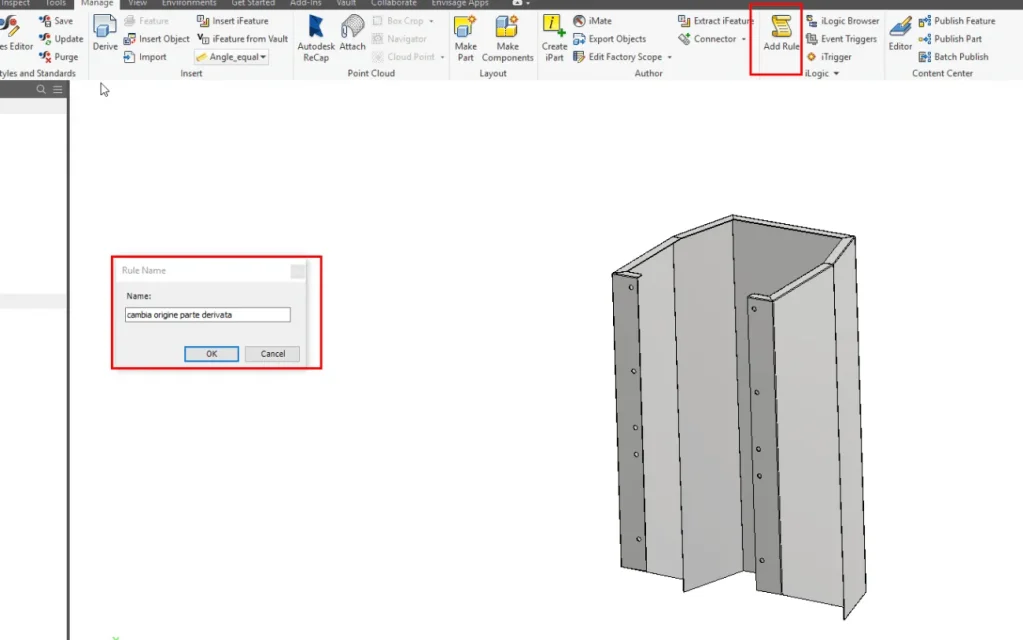
1.manage-ilogic-add rule2019-05-24 12_40_42-Window.webp2. name rule as you like
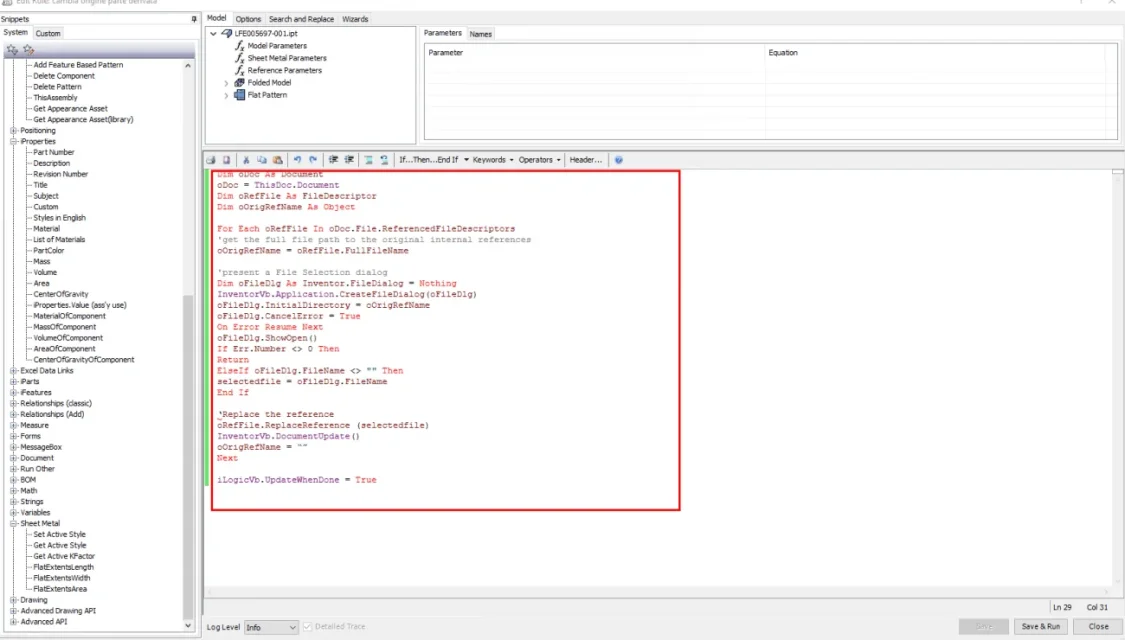
3. Paste the link text above2019-05-24 12_41_59-Window.webp4. Save
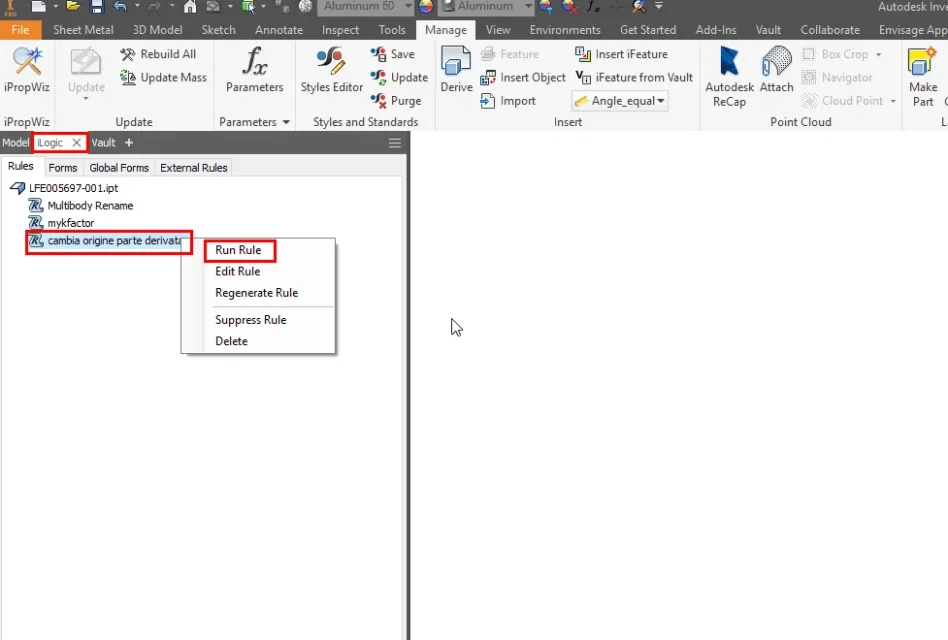
5. alas su illogical rule e fai run2019-05-24 12_43_31-Window.webpif the part is derived asks you the new source
 
Thanks endless cast16, it works!
but as appetite comes by eating, now I ask you something more.
in my model I have more derived parts and this code asks me to select them all.
If I wanted to replace only one, is it possible?
 
I'll ask the people who posted it in the English forum.
in time if someone else knows how to change it. . .
 
I'll ask the people who posted it in the English forum.
in time if someone else knows how to change it. . .
Thank you!
just to give you a match, yesterday I tried with a file inside which were derived several parts from other files.
the code asks the new reference file so many times as the derived parts are, I gave them all (because it would be convenient to replace only the modified part), but it seems not to work.
I do not exclude that there is some inconsistency between the various parts, but it is difficult to isolate the problem.

It also works very well to replace the reference model for table harvests, running it from .idw file and indicating the new model.
 
Try the code below. I tested it two minutes ago. Looks like it works.
Code:
public sub main()
    
dim il_no as string = "0004dp"
dim il_name as string = "replace derived part refeence"
dim il_fullname as string = il_no & ": " & il_name

dim opendoc as document
opendoc = thisdoc.document
'messagebox.show("opendoc: " & opendoc.fullfilename, il_fullname)

if opendoc.documenttype <> kpartdocumentobject then
    messagebox.show("this rule is for a part docuent only!", "file type mismatch!", messageboxbuttons.ok, messageboxicon.exclamation)
    exit sub
end if

dim oreffile as filedescriptor
dim oname_derivedfile as object     
dim offn_derivedparts_array as new arraylist
dim olfn_derivedparts_array as new arraylist
dim ocancel as string = "cancel"

for each oreffile in opendoc.file.referencedfiledescriptors
oname_derivedfile = oreffile.fullfilename
offn_derivedparts_array.add(oname_derivedfile)

if offn_derivedparts_array.count = 0 then
messagebox.show("no derived part(s) found: exit sub!", il_fullname)
exit sub
end if   

oposition_lfn_oreffile = instrrev(oname_derivedfile, "\", - 1)
olfn_oreffile = right(oname_derivedfile, len(oname_derivedfile) - oposition_lfn_oreffile)
olfn_derivedparts_array.add(olfn_oreffile)
next

'olfn: local file name
olfn_selected_derivedpart = inputlistbox("prompt", olfn_derivedparts_array, olfn_derivedparts_array(0), title := il_fullname, listname := "list of reference docs")
oindex = olfn_derivedparts_array.indexof(olfn_selected_derivedpart)

oreferencedoc_of_selected_derivedpart = offn_derivedparts_array(oindex)
oreplace_dp(oreferencedoc_of_selected_derivedpart)

ilogicvb.updatewhendone = true

end sub


sub oreplace_dp(byval oreferencedoc_of_selected_derivedpart as string)
dim odoc as document
odoc = thisdoc.document
dim oreffile as filedescriptor
dim oorigrefname as object     
for each oreffile in odoc.file.referencedfiledescriptors
'get the full file path to the original internal references
oorigrefname = oreffile.fullfilename
    if oreffile.fullfilename = oreferencedoc_of_selected_derivedpart then
    'if oreffile = oreferencedoc_of_selected_derivedpart then
        'present a file selection dialog
        dim ofiledlg as inventor.filedialog = nothing
        inventorvb.application.createfiledialog(ofiledlg)
        ofiledlg.initialdirectory = oorigrefname
        ofiledlg.cancelerror = true
        on error resume next
        ofiledlg.showopen()
        if err.number <> 0 then
        return
        elseif ofiledlg.filename <> "" then
        selectedfile = ofiledlg.filename
        end if
    '    messagebox.show("oreffile: " & oreffile.fullfilename _
    '    & vblf & "selectedfile " & selectedfile, il_fullname)

        'replace the reference
        oreffile.replacereference(selectedfile)
    end if
next
inventorvb.documentupdate()
'oorigrefname = “”
ilogicvb.updatewhendone = true

end sub
 
Try the code below. I tested it two minutes ago. Looks like it works.
It works perfectly!
This code does not work to change the starting 3d model of a table set, but I can use the first one you gave me.
thank you cast16, I am very helpful this suggestion!
 
the last code was posted by another person in a different post (he also said he had a pasted copy from the internet).
you could try to find the differences between the lines and try to build your code that combines the 2 functions. would be the best way to understand ilogic.
 
If I can understand and make the place work.
another question, do I have to force this code to incorporate it into each file or can you make it public so that all files can see it?
 
to do that you have to insert it and save it in templates.
I don't know how to automatically copy it to old files.qui There's a code called megajerk's ilogic code injector but I didn't test it.
 

Forum statistics

Threads
44,997
Messages
339,767
Members
4
Latest member
ibt

Members online

No members online now.
Back
Top