
• This forum is the machine-generated translation of www.cad3d.it/forum1 - the Italian design community. Several terms are not translated correctly.

change origin in imported step files

  • Thread starter Thread starter pierluigip
  • Start date Start date

pierluigip

Guest
Good morning to all

use the circuitworks program for importing cae files in idf format

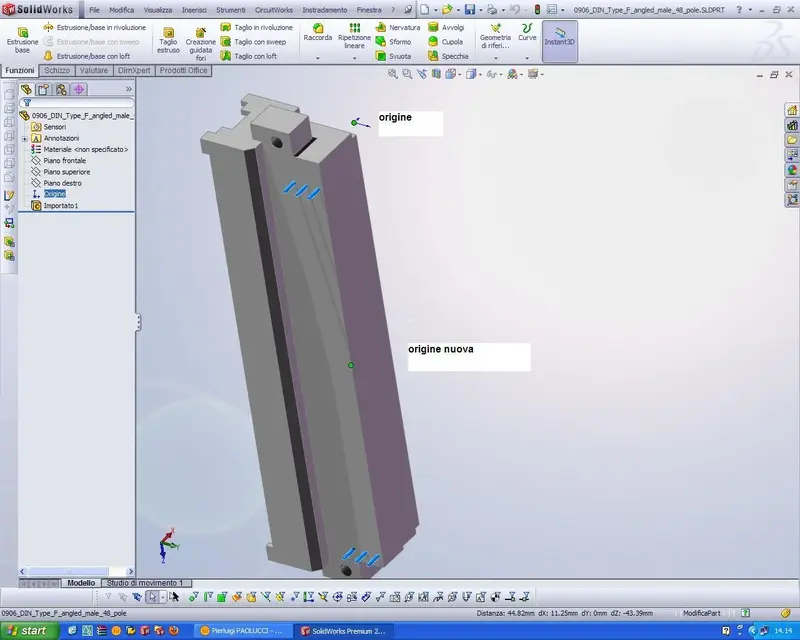
I need to change the origin of a part in a specific point (indicated as a new origin in the enclosed jpeg )
-I imported it from a step of the commercial library of harting connectors
How do I edit it (but only to change origin ) ??

I also attach the part (use solidworks 2009 sp4.1 )


thanks to all
Good job
 

Attachments

Good morning to all

use the circuitworks program for importing cae files in idf format

I need to change the origin of a part in a specific point (indicated as a new origin in the enclosed jpeg )
-I imported it from a step of the commercial library of harting connectors
How do I edit it (but only to change origin ) ??

I also attach the part (use solidworks 2009 sp4.1 )


thanks to all
Good job
I do this:

-Save the imported part as a native file.
- I put it in a blank set
- the posiziono as needed
-Save the ashem as step or parasolid
-re amounts the file into a part template

Maybe there are faster methods.
 
do not just use the move/copy function under the insert>functions>spost/copy menu?
I create a 3d sketch with inside a point placed in the new origin and then use the function to move the old origin to the new point
 
do not just use the move/copy function under the insert>functions>spost/copy menu?
I create a 3d sketch with inside a point placed in the new origin and then use the function to move the old origin to the new point
this is the + fast mode, I add that you can use the 3 floors on the origin to couple the body.
 

Forum statistics

Threads
44,997
Messages
339,767
Members
4
Latest member
ibt

Members online

No members online now.
Back
Top