• This forum is the machine-generated translation of www.cad3d.it/forum1 - the Italian design community. Several terms are not translated correctly.

change pattern geometry

  • Thread starter Thread starter Stemox
  • Start date Start date

Stemox

Guest
Hi.
I use it little and do not remember if it is possible or not.
I would like to change the radius of one of the pockets made on the outside of the disk so as to affect the change on all the others. pockets were made with a pattern, is there a way or should I change them all individually? I tried, but I can't find the command.

Thank you.
pattern.webp
 
I do not now have the software under hand but if I do not remember bad the correct procedure should be:

- in the tree structure of the part click on the + of the pattern to "explode it"
- right click on the pocket you "modified" and choose edit
- in the drop-down menu select redefine and then flag on edit propagation or something like that
 
So, I tried now, and it's like this:

1) change the parent group with your "face mail" operations, "distancy", "modification ray" etc. etc.
2) the cad will tell you: "no valid group"
3) open the command "change group" and touch the invalidated group, choosing the option "redefined" + "proga a pattern"
4) give green tick

at this point all other instances of the pattern should change as the newly redefined master.
[youtube]cuhwhn8onhy[/youtube]
 
Last edited:
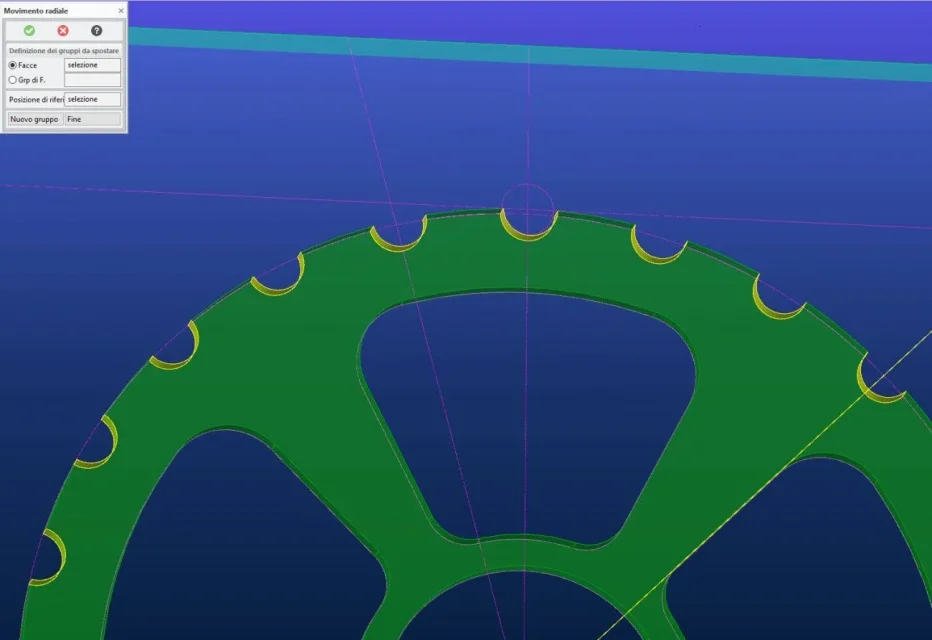
return to guest object to carry out a radial shift of peripheral recesses, I am trying the radial movement but the shift takes place along a proposed or chosen axis, and is what I look for.
I would like to move radially not with offset ...you know how to tell me how to do it? I don't understand how.
 

Attachments

  • Cattura.webp
    Cattura.webp
    50.6 KB · Views: 7
  • Cattura1.webp
    Cattura1.webp
    58 KB · Views: 7

Forum statistics

Threads
44,997
Messages
339,767
Members
4
Latest member
ibt

Members online

No members online now.
Back
Top