valeriob
Guest
Good morning, everyone.
I would like to know if in sw2009 it is possible to create a dynamic change of the belt in relation to the pulleys (not dragging).
I'll explain better: do you know hay bales in summer in the fields? are created by a machine that rotates the hay conveyed inside a room where there are more pulleys and only one belt that, being of non-variable length, "deforms" its pozision and that of the pulleys assuming the shape of the ball itself.
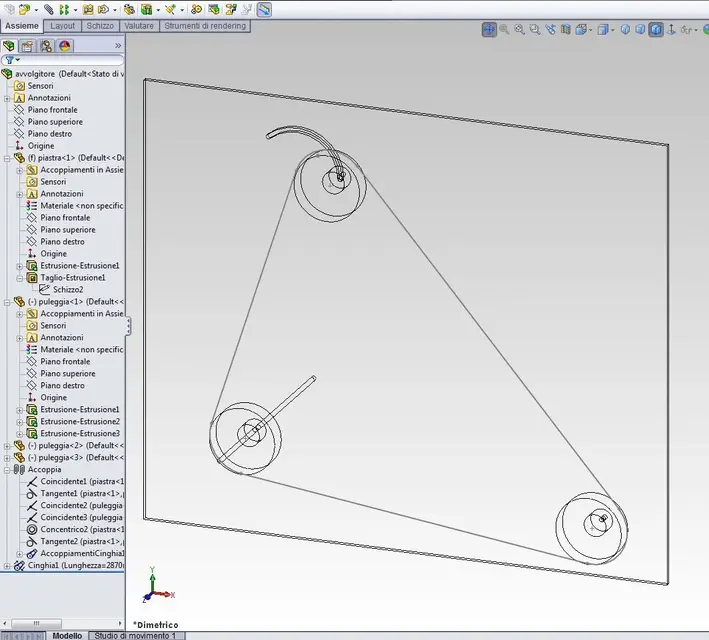
I created, to try, 4 pulleys (solid in atoms) and a belt that connects them to them but when I move a pulley, the belt does not update dynamically but I have to update it with the update button.
Perhaps it is not possible, I am wrong something, it is better to try with the blocks, or is it not feasible?
I don't have the chance to post images but if I hadn't explained and someone wanted to bang a little on youtube there are Vietnamese of these machines.
if you can then advise me how to do please attach or photo or file.
thanks for the space. :smile:
I would like to know if in sw2009 it is possible to create a dynamic change of the belt in relation to the pulleys (not dragging).
I'll explain better: do you know hay bales in summer in the fields? are created by a machine that rotates the hay conveyed inside a room where there are more pulleys and only one belt that, being of non-variable length, "deforms" its pozision and that of the pulleys assuming the shape of the ball itself.
I created, to try, 4 pulleys (solid in atoms) and a belt that connects them to them but when I move a pulley, the belt does not update dynamically but I have to update it with the update button.
Perhaps it is not possible, I am wrong something, it is better to try with the blocks, or is it not feasible?
I don't have the chance to post images but if I hadn't explained and someone wanted to bang a little on youtube there are Vietnamese of these machines.
if you can then advise me how to do please attach or photo or file.
thanks for the space. :smile:
Last edited by a moderator: