• This forum is the machine-generated translation of www.cad3d.it/forum1 - the Italian design community. Several terms are not translated correctly.

clasp frame-tetto

  • Thread starter Thread starter mario.argese
  • Start date Start date

mario.argese

Guest
hi to everyone, I've been following your forum for a while and found several times, with the search command, solutions to my problems.
This time however it was more difficult.
My problem about drawing a kind of roof.
normally revit draws the roof with a "unarmed frame", while the more you want me ask to perform the cover in a certain way (armed frame, perpendicular frame to wall, etc.).
I may not have explained well, so I attach you a sketch of what I would like to be able to draw.
(the cover I would like to draw is the framed cover of red, while the one framed in blue is the one that automatically draws me revit)

Thank you in advance and I hope you can help me.
Hello, everyone!
 

Attachments

if not mistaken, the new updates allow to add to the profile "the triangle" that is missing.
However, once the "normal" roof is drawn, add a solid mediate an extrusion on the path, where the path (selected) is the perimeter of the roof, to quaesto, from a section/prospect view, add a profile equal to the "triangle/poligon " that is missing to close the gronda/cornicione.
to this profile will also assign a "material" parameter for the assignment of the material
 
which update should I download to perform a roof as I indicated above?
What you mentioned would be a good method, but it seems more a loophole (if you can call it this way) :smile:
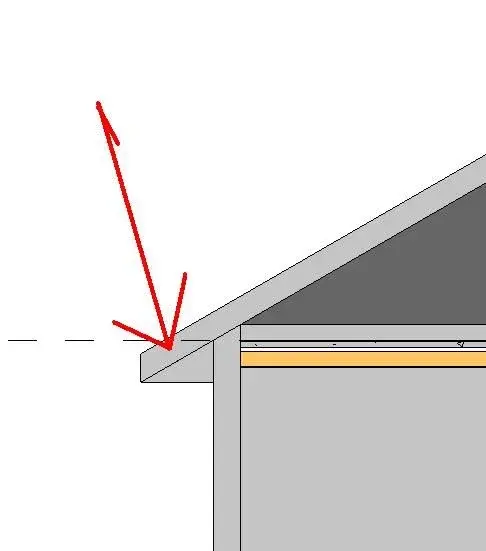
also because I would have a doubt: If I run the roof with the modeling you said, when I do a section, you see a line between the shaped triangle and the base roof.
I don't know if I made the idea.
 
see updates indicated by roberto (frcprojects)
is not a loophole, but a simple solution, otherwise you can always build a specific parametric family

the line, in the specific view, is hidden by applying the "invisible" mode from: annota>modification line setting> invisible line setting and clikka on line to hide
 
I've been trying right away as you said, and I have to say that the result is satisfying, only there's a problem.
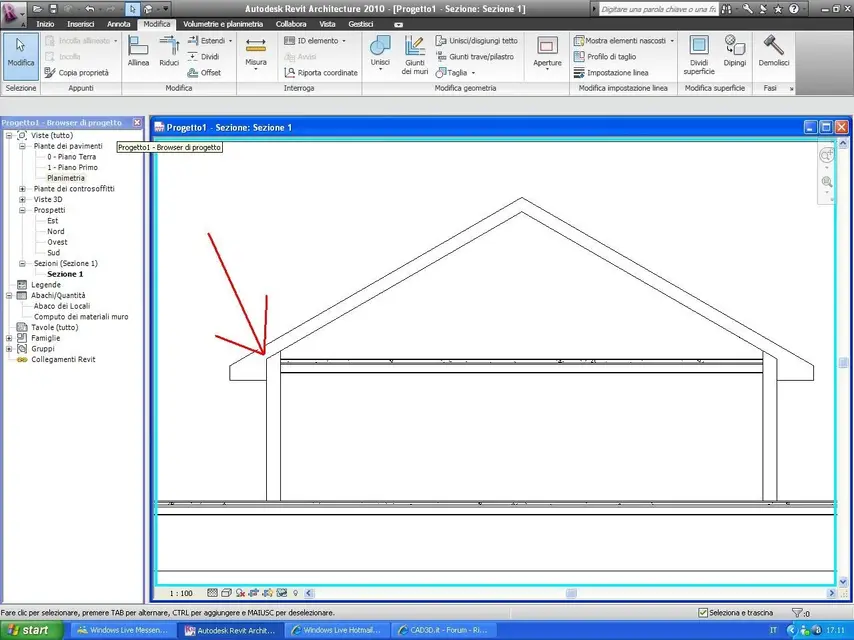
I can't hide the line shown in the picture.
I use the revit version 2010.
I can't find the following command: (annota>modification line setting > invisible lines and clikka on line to hide )
 

Attachments

  • riga da eliminare.webp
    riga da eliminare.webp
    7.8 KB · Views: 10
I tried but the final result is not the desired one unfortunately.
Have you drawn this kind of revit?
 
I tried but the final result is not the desired one unfortunately.
...
if the roof is composed of several bonfires, it is necessary to draw the cornice for each single layer/falda extract
if the solid " cornice " has been designed using the family of roofs, the various parts (cornicione/tetto/muro) join with the command "modification>unisci (the lines of conjunction between the various elements disappear
 
Would you be able to post a photo of a section or a detail you designed? (always if it is not a problem of course)
I could use a lot to get an idea of how it could come.
 
Okay.
the result is identical to how I drew it, only that I had inserted a loft between the top floor and cover.
Now I'll show you my drawing.
I am only a student who has a great desire to learn this useful program. :smile:

my intention would also be able to hide these two stretches of line between wall and floor (as if loft and wall were of the same thing we say)
 

Attachments

  • vis.webp
    vis.webp
    87.1 KB · Views: 19
is also present in mine
command: change >modification geometry > unit geometry and select the two elements (right and wall)
you can also apply to floor and wall
 
Nothing, I've tried several times, but it doesn't kill me those two pieces.
Am I wrong?
 
for the lateral union must be carried out between wall and cornice, as long as the cornice is a "tetti" family, the one above between wall and roof.
possibly you can try to dissociate the elements, and then resume to perform the union

p.s. in the forum we all give us "you"
 
perfect.
now it all works
You were very helpful.
Thank you very much. .
:finger::biggrin
 

Forum statistics

Threads
44,997
Messages
339,767
Members
4
Latest member
ibt

Members online

No members online now.
Back
Top