• This forum is the machine-generated translation of www.cad3d.it/forum1 - the Italian design community. Several terms are not translated correctly.

classic inventor interface 2018

  • Thread starter Thread starter rdilecce80
  • Start date Start date

rdilecce80

Guest
hi guys, I have a problem with inventor 2018. accustomed to autocad that has all the icons in the interface, inventor has grouped them and this causes a remarkable loss of time.
Is there a way to place them all without having to search them every time?
I read that from inventor 2012 it is no longer possible to select the classic interface but I saw video tutorials of inventor 2015+ with all icons to video.
thanks for any answers.
 
Hi, that I know is not possible.
with autocad maybe it is possible, with inventor I don't think so.
but because you don't get used to new icons since it will be the future and the old ones will be eliminated if they haven't already.
a bit like word when they put the new graphic interface, it is not that you could go back to the old interface. Did you get used to it or did you?
 
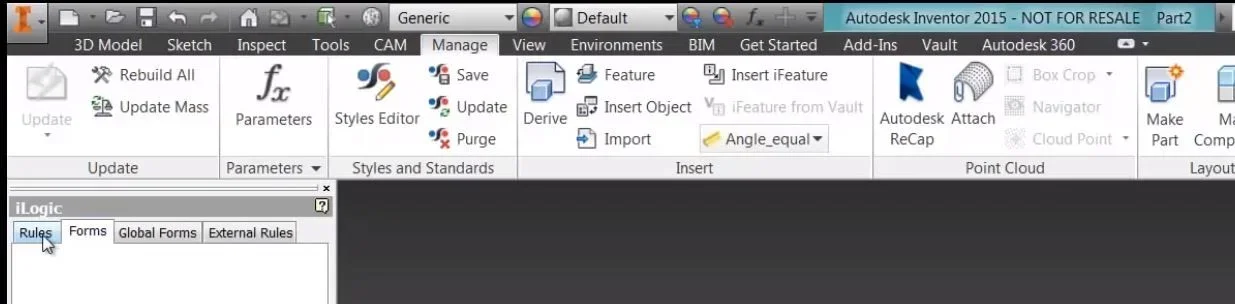
Yeah, maybe you're right, but I see versions of inventor with two different interfaces... a collection in groups and an "exploded".

I would like to "exploded" like in the photo
 

Attachments

  • Cattura.webp
    Cattura.webp
    35.8 KB · Views: 18
That explosion is the classic inventor. as rightly said catafract that icon allows the passage between the different interfaces.
or it may be that the monitor is not wide and then automatically tightens the icons.
Can't you post your current interface?
 

Forum statistics

Threads
44,997
Messages
339,767
Members
4
Latest member
ibt

Members online

No members online now.
Back
Top