• This forum is the machine-generated translation of www.cad3d.it/forum1 - the Italian design community. Several terms are not translated correctly.

closed end

  • Thread starter Thread starter Esselle
  • Start date Start date

Esselle

Guest
Good morning, I created this simple easel and used, for the first time, the end function closed.
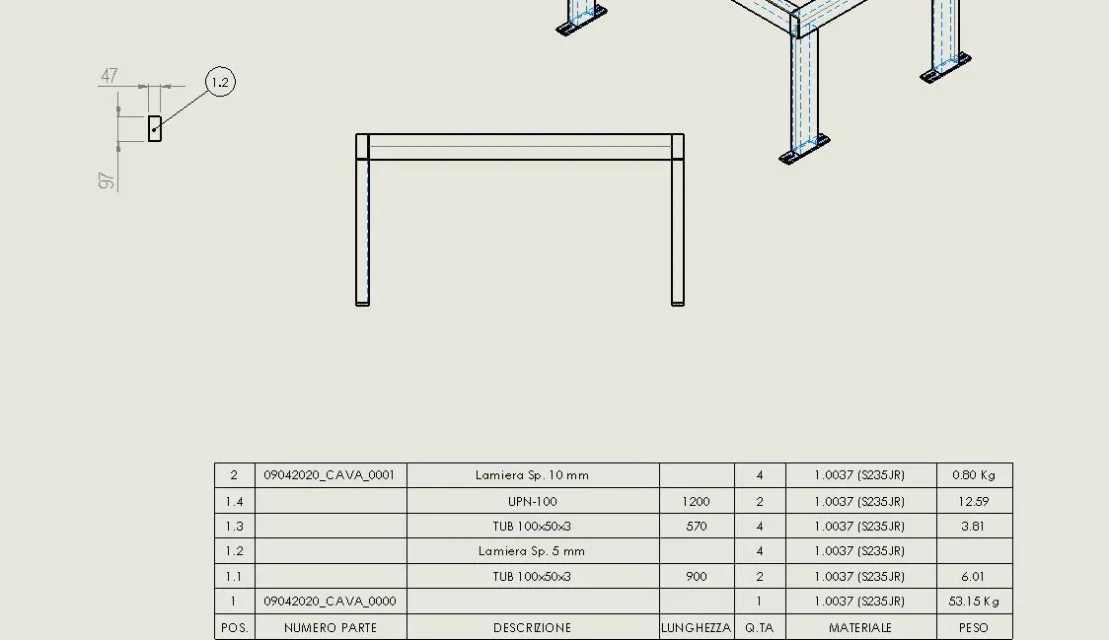
In the table, however, I would like to indicate in the table the details of the piece that it does from the end (in the specific one: sheet sp. 5 mm, the size I do not put in the sheets) and not only in the same table I would like to include a view of the piece in order to make it laser cut. Is this possible? the closed end function is very comfortable!

I attach files.
 

Attachments

in the table but I would like to indicate in the table the details of the piece that makes from the ends
the line is already present and is 1.2. you have to fill out the properties of the cut
e non solo, in the same table I would like to include a view of the piece to make it laser cut
insert the part model and select the body to represent
 
the line is already present and is 1.2. you have to fill out the properties of the cut

insert the part model and select the body to represent
for the first thing I have to fill in?

here?
Cavalletto.webpor in the table table table table?


for the second thing in the vex I did not understand how I can do. I put in the table the side file, but I do not understand where to act to select the body to represent.
 
the distinct do not fill in the drawing, otherwise it is worth using an empty table.
Right-click on item list 4 and enter the column-related item.
for the second thing in the vex I did not understand how I can do. I put in the table the side file, but I do not understand where to act to select the body to represent.
when you insert the part into the property manager you find the item select body. is a procedure already explained in the forum https://www.cad3d.it/forum1/threads/tavola-saldato-e-normalini-su-stesso-file.56187/
 
the distinct do not fill in the drawing, otherwise it is worth using an empty table.
Right-click on item list 4 and enter the column-related item.

when you insert the part into the property manager you find the item select body. is a procedure already explained in the forum https://www.cad3d.it/forum1/threads/tavola-saldato-e-normalini-su-stesso-file.56187/
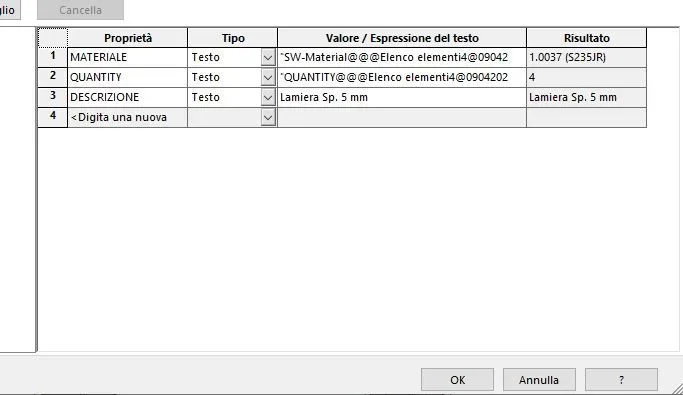
I created the property I need and it worked. here:Proprietà.webpfor the table, I would say that it is the case that I change the glasses because it was so obvious. . .
Tavola.webpat this point every time I create a closed end I have to go to create and fill that property or is there a way it comes automatically? because I didn't, but I have to add the mass.
 
the closed ends, strangely, do not carry behind the description.
then the possibilities are 2:
-Insert them by hand
-create the selection pane.

First of all, however, it is good to make sure that any element that is not a structural element has to its creation present the list of properties that is what you see in the first image of the post #5; to do this you must start from a template already prepared to make multibody elements with separate cut.
as seen in the image of the post #3 immediately after the origin there is the welding symbol (if it is not present go on menu functions>saving and select welding); clicking on it with the right button and selecting properties appears the list of properties that will be empty. inserting voices Description that affect all the bodies that will be created will inherit these properties as any default of the function type.
these fields will be empty and will have to be manually compiled for each individual instance folder.

attention that the welding profiles generally contain the properties of the cut differential then when filling out the descriptions in the template you have to have the consistency that correspond to those present in the weld profiles so that the cutting distints are compiled evenly.

selection pane method:
the Selection pane automatically creates within the cut-off folder entries:
description (customable in Document options)
sw width
sw length (it is the maximum size)
sw thickness (it is always the minimum size)
vsw volume
this method most be very practical if you stick to standard descriptions that however can be changed locally to need.
be careful that I do not know if it is possible to manage property names so if it is possible to sync them with those of welding profiles
 
the closed ends, strangely, do not carry behind the description.
then the possibilities are 2:
-Insert them by hand
-create the selection pane.

First of all, however, it is good to make sure that any element that is not a structural element has to its creation present the list of properties that is what you see in the first image of the post #5; to do this you must start from a template already prepared to make multibody elements with separate cut.
as seen in the image of the post #3 immediately after the origin there is the welding symbol (if it is not present go on menu functions>saving and select welding); clicking on it with the right button and selecting properties appears the list of properties that will be empty. inserting voices Description that affect all the bodies that will be created will inherit these properties as any default of the function type.
these fields will be empty and will have to be manually compiled for each individual instance folder.

attention that the welding profiles generally contain the properties of the cut differential then when filling out the descriptions in the template you have to have the consistency that correspond to those present in the weld profiles so that the cutting distints are compiled evenly.

selection pane method:
the Selection pane automatically creates within the cut-off folder entries:
description (customable in Document options)
sw width
sw length (it is the maximum size)
sw thickness (it is always the minimum size)
vsw volume
this method most be very practical if you stick to standard descriptions that however can be changed locally to need.
be careful that I do not know if it is possible to manage property names so if it is possible to sync them with those of welding profiles
thanks to the explanation.

I will try to apply the first system, since I start from my templates with a lot of info that automatically updates me. everything is constantly changing. . .
 

Forum statistics

Threads
44,997
Messages
339,767
Members
4
Latest member
ibt

Members online

No members online now.
Back
Top