
You are using an out of date browser. It may not display this or other websites correctly.
You should upgrade or use an alternative browser.
You should upgrade or use an alternative browser.
Cla
Guest
I arranged to make the version pass... thank you x the help! I didn't want to do geometry corrections, maybe x that didn't go
gianni55
Guest
Hello, cla,
In reality I think that some corrections you should consider it anyway and I do not refer to the smoothing that actually eliminates only the vertices created by the formula of the step.
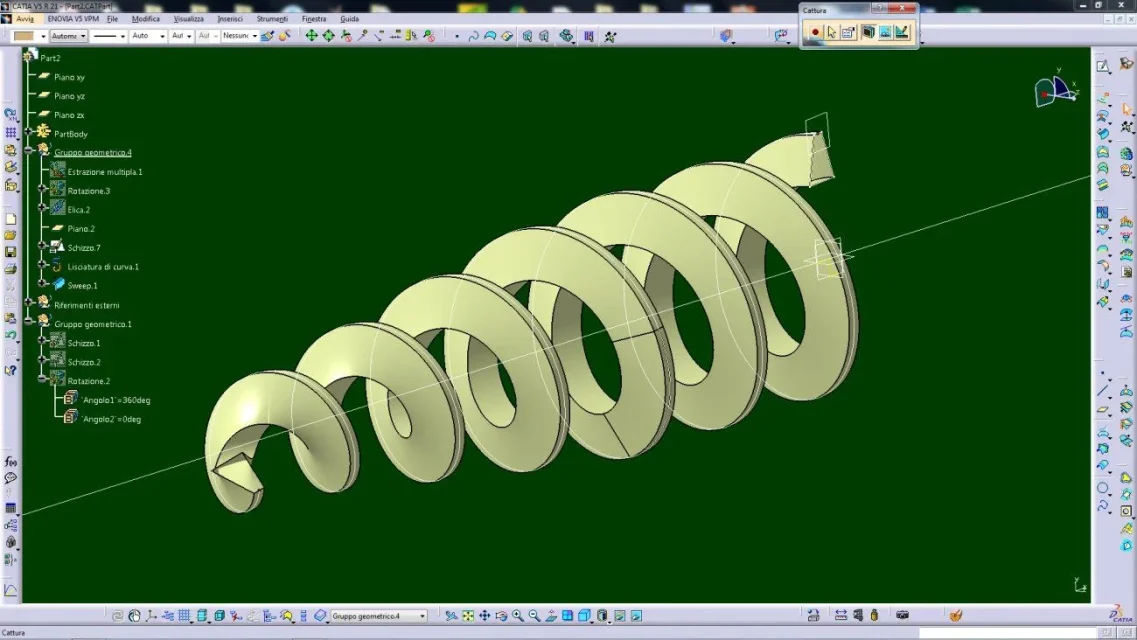
I see if I can explain: the trapezoidal profile flowing on the propeller, works until it is on the cylindrical parts, but when it meets the conical part performs an adaptation that moves away from the external profile (rotation 3) and also the thickness is not at all constant but varied and bad... also changing the connection strategy (automatic, standard or similar to the guide), the result does not meet.
at this point you can set the "reference surface" sweep and select the rotation surface 3, the section also adapts to the conical part, but in the passage zones it still moves away from the profile. Now it's about understanding how much light you leave between the cochlea and the work wall.
otherwise to go closer perhaps you should create parallel lines to the propeller projected on the rotation profile, shred it and then with two sweeps get the angle of 15 (or what it serves).
In short, careful that the sweep does not make miracles in the passage areas.
Hi.
In reality I think that some corrections you should consider it anyway and I do not refer to the smoothing that actually eliminates only the vertices created by the formula of the step.
I see if I can explain: the trapezoidal profile flowing on the propeller, works until it is on the cylindrical parts, but when it meets the conical part performs an adaptation that moves away from the external profile (rotation 3) and also the thickness is not at all constant but varied and bad... also changing the connection strategy (automatic, standard or similar to the guide), the result does not meet.
at this point you can set the "reference surface" sweep and select the rotation surface 3, the section also adapts to the conical part, but in the passage zones it still moves away from the profile. Now it's about understanding how much light you leave between the cochlea and the work wall.
otherwise to go closer perhaps you should create parallel lines to the propeller projected on the rotation profile, shred it and then with two sweeps get the angle of 15 (or what it serves).
In short, careful that the sweep does not make miracles in the passage areas.
Hi.
Cla
Guest
in addition to the trapezoidal profile (of the file I uploaded) I also tried with a line (orthogonal to the axis or inclined) and also received errors, in any case I will try with the r28Hello, cla,
In reality I think that some corrections you should consider it anyway and I do not refer to the smoothing that actually eliminates only the vertices created by the formula of the step.
I see if I can explain: the trapezoidal profile flowing on the propeller, works until it is on the cylindrical parts, but when it meets the conical part performs an adaptation that moves away from the external profile (rotation 3) and also the thickness is not at all constant but varied and bad... also changing the connection strategy (automatic, standard or similar to the guide), the result does not meet.
at this point you can set the "reference surface" sweep and select the rotation surface 3, the section also adapts to the conical part, but in the passage zones it still moves away from the profile. Now it's about understanding how much light you leave between the cochlea and the work wall.
otherwise to go closer perhaps you should create parallel lines to the propeller projected on the rotation profile, shred it and then with two sweeps get the angle of 15 (or what it serves).
In short, careful that the sweep does not make miracles in the passage areas.
Hi.