
• This forum is the machine-generated translation of www.cad3d.it/forum1 - the Italian design community. Several terms are not translated correctly.

colonic house - 3ds max and crown renderer

  • Thread starter Thread starter Tristus
  • Start date Start date
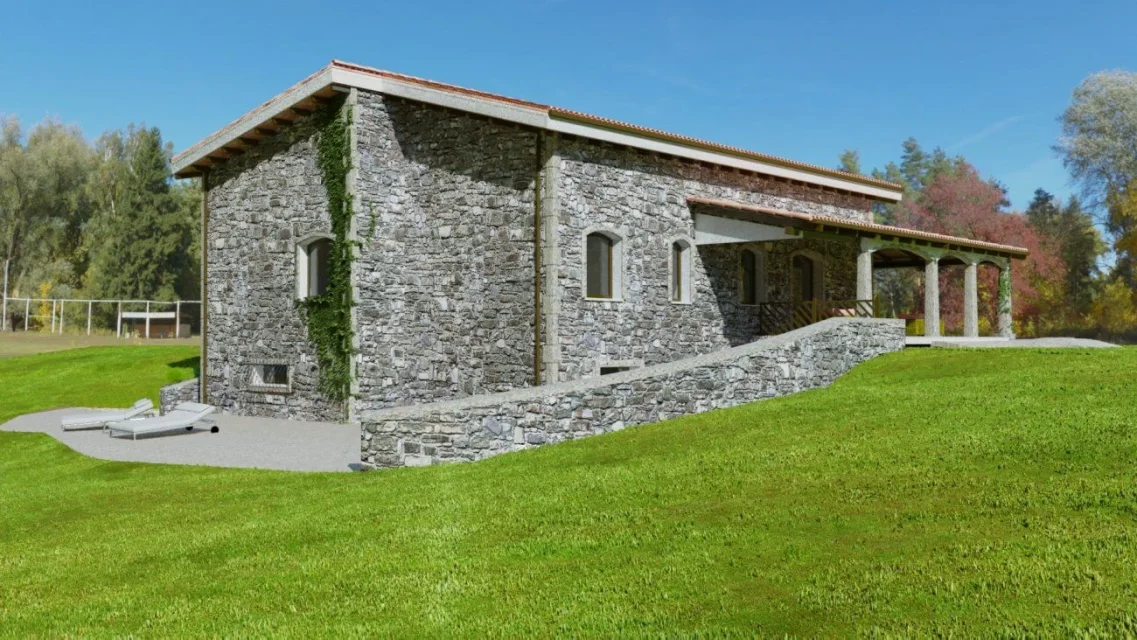
Perhaps this hdri is better than the first. At least there is the sun, which illuminates very well. in practice the scene is illuminated only by the dawn. I'd say that as a base of departure it can be fine. now it touches the lawn and some accommodation around the house. Let's see what we can do.
not having a power monster like computer I entrust myself to the good old 3ds max and to its video memory that still allows me to rotate the views quite smoothly despite the lost file about 200 mb. I'll have to clean it up a little bit. the only drawback to having a hdri which is also primary source of lighting is that if you want to change the position of the sun I am forced to rotate the hdri resulting in change of the background image.
What do you think? better this background or the other of previous renderings?

p.
I'm going to apply a little depth of field to the 1-inch scene. Those trees in the background are sharp patches. They steal too much. They're a little numb, but...
 

Attachments
  • nuovo hdri camera3.webp
    nuovo hdri camera3.webp
    252.3 KB · Views: 16
  • nuovo hdri camera2.webp
    nuovo hdri camera2.webp
    274.6 KB · Views: 18
  • nuovo hdri camera1.webp
    nuovo hdri camera1.webp
    291.1 KB · Views: 18
Last edited:
Just some evidence.
the interior must be furnished.
 

Attachments

  • camera5bis.webp
    camera5bis.webp
    198.8 KB · Views: 14
  • camera5ter.webp
    camera5ter.webp
    227.9 KB · Views: 16
  • interno.webp
    interno.webp
    56.6 KB · Views: 20
I'd like to set up the ground by adding other things, but it's starting to be challenging to turn the views. My pc is not a monster of power. Until now, I can handle the design, if I keep moving my mouse. with the latest additions the file reached the 360 mb.
I went back to the old hrdi.
The second one's nice, but in my opinion, "gather" too. and unless there is the need to put in the background an image taken on the place where the building will have to rise, you can place an equally significant and more discreet hdri.
 

Attachments

  • camera2BIS.webp
    camera2BIS.webp
    314 KB · Views: 24
hi what graphics card you use, I'm new to the field you would have to give me one within 300 euros?
I also have a pc with video card similar i3-3217u to 1.8 ghz and nvidia gt 720m 2gb but it is not that it is just fast and at the times that were paid it on offer around 500€. try to raise the purchase number because with 300€ a fast i7 not with a decent card hardly find it.
 
it is necessary at least one i7 with a minimum of 16 giga of memory (minimum 16) to work with rendering with a little looseness. because when you start something... At first everything goes well, but at the moment you want to add details it happens that a pc "under tone" begins to protest.
for the record I have an i7 of the acer (an acer aspire m3985 with processor i7 3770) ... very dated by now, with 8gb of memory (that never enough, if you decide to buy a pc for rendering opt for at least (at least) 16 gb at least.
always for the record the file in question has reached and exceeded the 450 mb and I can barely manage the views. I had to delete all the tiles and apply the displacement always for the same. However, if on the one hand it allows me to speed up the video management of the views, on the other it does not solve the problem of rendering times (which, however, for the outside are usually contained and hardly exceed 1 hour).
I certainly exaggerated also with the edera and the high foliage. with a new generation pc I would have had no problem.

However you can also do discreet things without having a monster of power. What matters is to simplify as much as possible the surfaces (some year ago you worked mainly in low poly, today with increasingly powerful pcs you forget to simplify the geometries with the result that when you go to add stuff and stuff, and still stuff to your design, even your "stro" of power begins to aspire). materials are also important. when possible better use materials not too elaborate.
 
This is the last rendering. I applied the displacement for the tiles, but it doesn't seem like a great result. But I found some better tiles, let's see.
I can't find anything lighter for the lawn.
 

Attachments

  • camera1ultimobis.webp
    camera1ultimobis.webp
    298.9 KB · Views: 24
it is necessary at least one i7 with a minimum of 16 giga of memory (minimum 16) to work with rendering with a little looseness. because when you start something... At first everything goes well, but at the moment you want to add details it happens that a pc "under tone" begins to protest.
for the record I have an i7 of the acer (an acer aspire m3985 with processor i7 3770) ... very dated by now, with 8gb of memory (that never enough, if you decide to buy a pc for rendering opt for at least (at least) 16 gb at least.
always for the record the file in question has reached and exceeded the 450 mb and I can barely manage the views. I had to delete all the tiles and apply the displacement always for the same. However, if on the one hand it allows me to speed up the video management of the views, on the other it does not solve the problem of rendering times (which, however, for the outside are usually contained and hardly exceed 1 hour).
I certainly exaggerated also with the edera and the high foliage. with a new generation pc I would have had no problem.

However you can also do discreet things without having a monster of power. What matters is to simplify as much as possible the surfaces (some year ago you worked mainly in low poly, today with increasingly powerful pcs you forget to simplify the geometries with the result that when you go to add stuff and stuff, and still stuff to your design, even your "stro" of power begins to aspire). materials are also important. when possible better use materials not too elaborate.
I7 3770 is a Mr. Procio who if coupled with a
it is necessary at least one i7 with a minimum of 16 giga of memory (minimum 16) to work with rendering with a little looseness. because when you start something... At first everything goes well, but at the moment you want to add details it happens that a pc "under tone" begins to protest.
for the record I have an i7 of the acer (an acer aspire m3985 with processor i7 3770) ... very dated by now, with 8gb of memory (that never enough, if you decide to buy a pc for rendering opt for at least (at least) 16 gb at least.
always for the record the file in question has reached and exceeded the 450 mb and I can barely manage the views. I had to delete all the tiles and apply the displacement always for the same. However, if on the one hand it allows me to speed up the video management of the views, on the other it does not solve the problem of rendering times (which, however, for the outside are usually contained and hardly exceed 1 hour).
I certainly exaggerated also with the edera and the high foliage. with a new generation pc I would have had no problem.

However you can also do discreet things without having a monster of power. What matters is to simplify as much as possible the surfaces (some year ago you worked mainly in low poly, today with increasingly powerful pcs you forget to simplify the geometries with the result that when you go to add stuff and stuff, and still stuff to your design, even your "stro" of power begins to aspire). materials are also important. when possible better use materials not too elaborate.
the i7 3770 is a Mr. Procio with 3,9ghz peak that if coupled with a better card of the gt 620 can still give good satisfaction in various fields. :-)
 
I7 3770 is a Mr. Procio who if coupled with a
the i7 3770 is a Mr. Procio with 3,9ghz peak that if coupled with a better card of the gt 620 can still give good satisfaction in various fields. :
when I bought it wasn't bad. But if he's got to do it today, if I don't have to do heavy things. the last processors of the intel are abyss to comparison. But it's okay anyway. I believe that a good video card accounts especially for managing screen views, when the application is built to exploit gpu. probably new programs, especially those for mechanical design, are structured to exploit the video card. otherwise if the program does not support it is like not having it. in the architectural field, for example, both vray and crown maker, exploit the traditional processor. vray from a few years has made sure that you can choose to make the video card intervene instead of the cpu.

However, for what is my experience, the active rendering of crown, which exploits the normal cpu, is quite pimping in the answer. also the active shade of vray responds quite well, despite applying many compromises. I used it for this last job without any problem, on a file that exceeded the 450 mb. I noticed that the active rendering in question does not give the best of itself only when there are relatively extensive surfaces interested in displacement, for example the displacement of tiles. There are small distortions that with normal rendering do not occur. It is probably a matter of sects so that an easy compromise can be reached. For the rest the ar is sufficiently snappy and responds to every change, so in my humble opinion, at least in this field, the video card no longer counts so much. for other programs I don't know. In those cases the video card can be decisive.
 
some update.
I'm trying to reach my PC's limit. I'm afraid I can't go any further with my dated computer.
I applied the displacement map to the walls in order to create shadings that give greater emphasis to the stone playing a little with the light source.

management of video views remains still acceptable (with some patience).
trouble comes at the time of rendering, and at this point the memory used reaches 75 /80 percent. However rendering time is less than hour. remains a bit of noise, benign, otherwise the times would be extended. But with a good denoiser you can get around the problem.
 

Attachments

  • camera2TER.webp
    camera2TER.webp
    319.5 KB · Views: 18
some update.
I'm trying to reach my PC's limit. I'm afraid I can't go any further with my dated computer.
I applied the displacement map to the walls in order to create shadings that give greater emphasis to the stone playing a little with the light source.

management of video views remains still acceptable (with some patience).
trouble comes at the time of rendering, and at this point the memory used reaches 75 /80 percent. However rendering time is less than hour. remains a bit of noise, benign, otherwise the times would be extended. But with a good denoiser you can get around the problem.
ram should be expandable up to 32gb and as I mentioned before if your software can exploit gpu would not be bad (if I'm not mistaken vray exploits gpu) https://www.treddi.com/forum/topic/119474-vray-e-utilizzo-gpu/I found this discussion if it could help you. If you don't want to ruin your finances you could try to see some nice gpus used with a good dose of ram video.
My advice is just a handy advice since I am not an expert in rendering software and related.
 
ram should be expandable up to 32gb and as I mentioned before if your software can exploit gpu would not be bad (if I'm not mistaken vray exploits gpu)
Ram is never enough. I'm talking about the one installed on the motherboard. I should see if my motherboard allows expansion. But I don't think so, maybe up to 16, I don't remember well.

The video card speech is wider. There are rendering engines like lumion, for example, that make you a rendering in seconds. and interactively, like the active shade of vray or like the interactive rendering of crown. at this point the video card is definitely important.
I believe that lumion is a biased engine (i.e. it applies several compromises) a little like vray. so having a good card that is responsible for the calculation by stunning results when you see that you turn the view and in the pane, after a few seconds, you see the ready and packed rendering.

While for the most traditional renderings, those that make cpu work, and especially the unbiased rendering engines (with few compromises) the need for a top video card feels less. You know from the beginning that the rendering will have to last a certain tot of time... and leave it in "cooking" (as they say in jargon) without problems. probably the card helps a lot in managing video views. clearly how much we talk about pc everything that is powerful goes better. but for the most traditional rendering, the one where you send and the cpu you charge the calculations, the need for a good video scede makes you feel less.
 
I corrected the displacement of the stone wall. the previous one did not have the right direction. I also emphasized it a bit in detail. as a utility I used the crazy bump. a nice program that creates both displacement and normal, ambient occlusion etc from the photo of the spread. I then corrected some things in the stairway.
 

Attachments

  • camera2quater.webp
    camera2quater.webp
    311.5 KB · Views: 10
If you don't want to ruin your finances you could try to see some nice gpus used with a good dose of ram video.
some insight into the video card.
when do you really need a good video card? when for example you want to shoot a beautiful realistic video game. enter on board the virtual car and mind run see the reflections and refractions of the environment flow on the bright body shop, also that of the other cars. or the realistic panorama that flows, with all the vegetation that moves depending on the speed and path. together with asphalt and other objects. You'll have to see all these in real time. These are impressive calculations that you can't compute to the single cpu, which would also call the virtual memory on disk... and the result would be a slaughter.
at this point a good video card is required. She'll be the one who'll get into most of the work, and you'll see everything realistic and real-time.

When I bought my old sapphire ati radeon 9600 xt edition (256mb ddr memory) I made it to enjoy the virtual sea of virtual skipper. before I mounted it on the pc I was still online even if I saw the marine surface as a simple blue mesh. with the wings I saw the transparency of the sea, the reflections of the lights on the sea surface when it was racing the night. the foam left by the hull etc. all very realistic. was the card that charged to calculate.

in the architectural field... Is it really so important to have a rendering in seconds? Is there really this need?
but above all... at what price in terms of rendering quality, in case you choose to use engines like lumion or octane?

that's why engineers and architects still use the most traditional rendering, and as favorite programs have on top of their vray list and crown maker. because having a rendering in seconds is not so fundamental in the architectural field.
 
off topic
About virtual skipper, some memory of when we ran online. a video from me mounted a few years ago. per minute 3:50 you see the class j that I built with 3ds because the nadeo allowed you to enter in the simulator a self-built hull and make it move on the water. ibq was my virtual skipper nik name.
the marine surface was really realistic when choosing to race on tropical path, in which you even saw the caustics on the sandy bottom.
I had mounted the radeon allies I mentioned earlier.
 
There is a huge number of programs that help you view 3d objects, but I care to know if there are programs that help you interact with objects so you can make the right choice? It would be very useful, actually... I'm looking for a security system right now and I think I take something from the ajax brand, but on the basis of many comments I begin to doubt this brand, so it wouldn't be bad if it were so. I see you're discussing computers here and I'm wondering who in 2021 uses 'i7 3770? the time has come to update the pc, buy the tenth generation of i5, productivity will increase a lot and operational programs will work more effectively. By the way, the eleventh generation of these processors was presented a short time ago. If there is not much money then look at the ryzen line, they have processors with decent productivity and for little money, but the productivity of cores from intel is definitely better, among multi-cores, of course, amd is very convenient now.
 
There is a huge number of programs that help you view 3d objects, but I care to know if there are programs that help you interact with objects so you can make the right choice? It would be very useful, actually... I'm looking for a security system right now and I think I take something from the ajax brand, but on the basis of many comments I begin to doubt this brand, so it wouldn't be bad if it were so. I see you're discussing computers here and I'm wondering who in 2021 uses 'i7 3770? the time has come to update the pc, buy the tenth generation of i5, productivity will increase a lot and operational programs will work more effectively. By the way, the eleventh generation of these processors was presented a short time ago. If there is not much money then look at the ryzen line, they have processors with decent productivity and for little money, but the productivity of cores from intel is definitely better, among multi-cores, of course, amd is very convenient now.
good morning gelalim, I answer you about the hardware part as the software part is out of my field of work. I would like to point out that the only processor is not indicative of the actual performance of a workstation but it should be framed all the configuration cpu, video card, ram, ssd and hd, motherboard and its possibility of upgrade.
the i7 3770 is a good quad cpu with peak speed of 3,9ghz supports up to 32gb of ram and I think with a newer cpu at equal frequency and core you will hardly see tangible improvements.
What configuration do you have in detail? the software you use what requirements it requires? I didn't realize what software you use?
 

Forum statistics

Threads
44,997
Messages
339,767
Members
4
Latest member
ibt

Members online

No members online now.
Back
Top