
• This forum is the machine-generated translation of www.cad3d.it/forum1 - the Italian design community. Several terms are not translated correctly.

colore linee sketcher

  • Thread starter Thread starter giuseppe.f
  • Start date Start date

giuseppe.f

Guest
Hello, everyone, I have a problem with the sketcher.
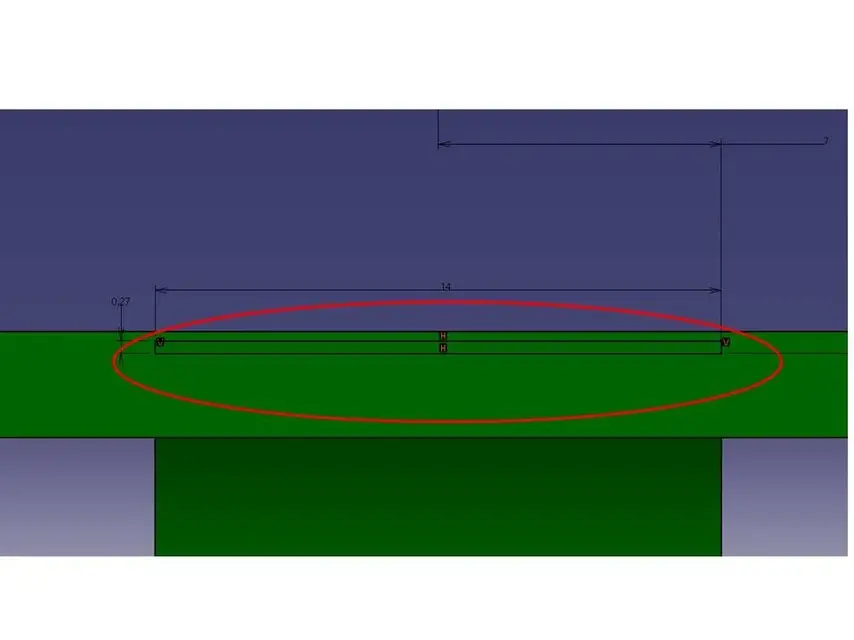
Sometimes it happens that the sketch lines are black, instead of the classic white color.
I'm also in the same part. some sketches are white, others are black.
the thing is very annoying because, in addition to making it difficult to distinguish lines on dark colors (with which I work usually), the color of the sketch does not change even when the sketch is is isovincolato (green) or supervincolato (viola).
I'll get a picture. The sketch is the rectangle 14*0.27.
thanks to anyone who wants to help me.
Giuseppe
 

Attachments
  • 2pplg9d.webp
    2pplg9d.webp
    8.2 KB · Views: 9
Last edited by a moderator:
select the sketch, dx key, and on set graphic property
the desired color for lines,points etc etc.
to the
 
Unfortunately it doesn't work. the selected color is already white, but the sketcher lines are black.:mad:
 
Unfortunately it doesn't work. the selected color is already white, but the sketcher lines are black.:mad:
I'd like to see that you're working in product environment, coloring depends on the fact that you've assigned a color to a part at the level of together.

If you want to color the parts it is preferable to assign the color to partbody level, that is within the part itself.

Hi.
 
I'd like to see that you're working in product environment, coloring depends on the fact that you've assigned a color to a part at the level of together.

If you want to color the parts it is preferable to assign the color to partbody level, that is within the part itself.

Hi.
but where did you see that he is working in the environment product:biggrin::biggrin::biggrin:? ? ?
You're a real monster with the use of catia...
This problem had happened to me some time ago but having failed to solve it I had given up. ....

But a question arises... when you are in the sketch you must not be necessarily in the environment part and therefore not environment product???? What do I miss? ? ?
 
Yes, but I believe that ferrity meant that the choice of color should be made at partbody level and not catpart. in practice, if you want to change the color of a part, this color should be set in the properties of the body and not in those of the part. At least I did. :smile:
 
But then... you wanted to change the color of the lines once out of the sketch?? ?
Do I understand?
Because what happened to me was that after creating a sketch (with white lines) I patted a little bit and when I came back into the sketch environment to change the lines had become black and I couldn't change the color
 
No, no, I did exactly what happened to you. The sketch is white, then after getting out and then back into the sketcher, the sketch becomes black. but now I solved simply by setting the color to body level and not to part level. in this way the sketch becomes again of the desired color.
 

Forum statistics

Threads
44,997
Messages
339,767
Members
4
Latest member
ibt

Members online

No members online now.
Back
Top