
• This forum is the machine-generated translation of www.cad3d.it/forum1 - the Italian design community. Several terms are not translated correctly.

columm replacement in separate materials (bom)

  • Thread starter Thread starter Matteo Cappelli dis.CAD
  • Start date Start date

Matteo Cappelli dis.CAD

Guest
Hi.
Is it possible through ilogic to situate one column with another within the set already inserted on table 2d?

Thank you!_foto__268.webp
 
first of all thanks
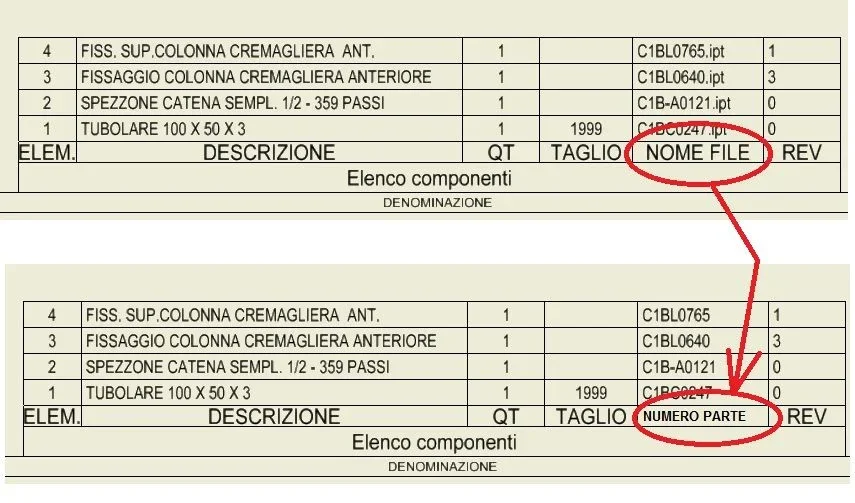
I tried but, does not do what I need, the command renames the column title, instead I would need to replace the column field, specifically, instead of displaying the "filename", I would like to see the "number part", in this way, would no longer appear the file extensions in the boxes of the various rows of the bom
 
instead of changing the table I think it is better to create a new global style and set that on the table. However in ilogic I do not find the commands to do so. . .
 
Thank you.
I was afraid.... I am currently performing the replacement "upgrading " manually through the new table style. I searched in the forum "customization inventor" and actually it seems that there is no way to create automatism.
I was hoping for some "miracle" from the mythical cad 3d

Hi.
 
Something like that in vba...
Code:
public sub changepartlist()
    dim oapp as inventor.application
    set oapp = thisapplication
    
    dim odrw as drawingdocument
    set odrw = oapp.activedocument
    
    
    dim opartslist as partslist
    set opartslist = odrw.activesheet.partslists.item(1)
    
    dim newstyle as partsliststyle
    for each newstyle in odrw.stylesmanager.partsliststyles
        debug.print newstyle.name
        if newstyle.name = "il mio nuovo stile" then exit for
    next
        
    opartslist.style = newstyle
end sub
 

Forum statistics

Threads
44,997
Messages
339,767
Members
4
Latest member
ibt

Members online

No members online now.
Back
Top