
• This forum is the machine-generated translation of www.cad3d.it/forum1 - the Italian design community. Several terms are not translated correctly.

command to open specific folders

  • Thread starter Thread starter genbel
  • Start date Start date

genbel

Guest
Good morning.
It's been a few days since I tried to search the web for a command that allows me to open an explorer to see a folder with all types of files contained.
reason the request: I believe that a little everyone in our web searches happens to us to download something that maybe a next tomorrow with can come back useful and so also the reference web page;
co this system I made a folder containing several lisp cataloged with an acceptable order of vision.
I could see that folder from the upload to see the content lisp
but so it would be difficult to see and/or open any reference html file or txt file of explanatory of the lisp and returns quite annoying in terms of time open the explorer of win etc etc etc etc.

it might be useful to hold a command in autocad that would allow me to open an external folder, but I did not find suitable references on the web and I think the topic has not yet been treated in the forum
Can someone please give me some indication?
 
(command "shell" "d:\\maps\\acqua.jpg")
opens the water.jpg file with the default program

bye
 
thanks rporr
abuse your courtesy:
I write this as it is in the command line
but how do I put it in a menu in the iupers window?
 
in breve:
Code:
(startapp "explorer" (strcat "/n," (getvar "dwgprefix"));; opens explore resources in the drawing folder
(startapp "explorer" (strcat "/n," "c:\\\fold your custom files"));;; opens explore resources in the folder of your custom files
 
kindly help
building a command in the customization of which (iupers to tell us) I typed the macro as reported by "confutatis", but strangely the macro stops and in the command line appears " c:"
so I transcribed the same row of the macro in the command line to verify it, and in this case everything works regularly opening me the explorer in the folder I request
I don't know how to solve this case or what error I make
in the macro I regularly reported -- ^c^c(startapp "explorer" (strcat "/n," "c:\\\\fold your custom files"))
someone can kindly give me an indication
 
define a command where there is the macro, so:
Code:
(defun c:explo ()
(startapp "explorer" (strcat "/n," "c:\\\fold your custom files"));;; opens explore resources in the folder of your custom files
)
at this point, associate the button with the newly created explo command, instead of the whole string. this writing has a dual advantage, you can launch the explo command either with the button that typing it to the keyboard.

nb: the explo command name was just an example, of course you can change it
 
or
(startapp "explorer" (strcat "/n," "d:/google drive/signs"))
replace \\\ bars with /

bye
 
Thank you
Your indication was fruitful
I was going crazy because it didn't work.
but, then, what is the correct version of writing the path in the macro?
 
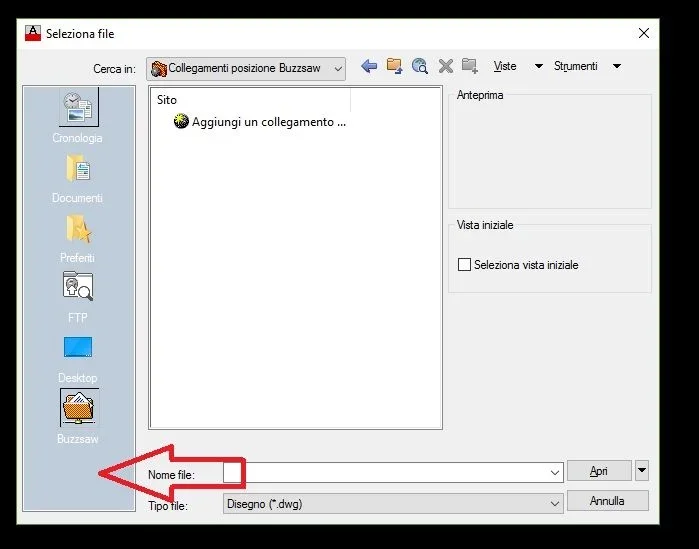
you can also add the folder in the window that opens at the launch of the command Open the door Immagine.webp
 
Thank you
Your indication was fruitful
I was going crazy because it didn't work.
but, then, what is the correct version of writing the path in the macro?
Confutatis said:
There is no correct version or not, both are fine.
what confutatis says is true, write \\ or / has the same meaning in lisp, except for the macros added through the editing of the .cuix menu, where the use of \\ is not allowed.
then, following the example of confutatis, creating a lisp with the command:
(defun c:explo ()
(startapp "explorer" (strcat "/n," "c:\\\fold your custom files"));;; opens explore resources in the folder of your custom files
)and add it to menu customization, macro: ^c^cexplo instead of ^c^c(startapp "explorer" (strcat "/n," "c:\\\fold your custom files"))
You'd get the same result.
bye
 
post of unexceptionable rpor66, I confess that I had escaped the fact of the symbol "/" in the editing of the macro in the menu .cuix. I'm used to never write whole macros in the menu, but only the command name, which, as I said before, works in both ways (keyboard and button).
 

Forum statistics

Threads
44,997
Messages
339,767
Members
4
Latest member
ibt

Members online

No members online now.
Back
Top