
• This forum is the machine-generated translation of www.cad3d.it/forum1 - the Italian design community. Several terms are not translated correctly.

complex iges objects

  • Thread starter Thread starter tomasimattia
  • Start date Start date
you well consider that it is as a unit measuring 10 modules, I can get up to 64 modules then 640 on two extruded bifacial profiles.... total 640x4 = 2560 modules. solidworks doesn't bother me, snaps a bit but keeps banging, considering that it also has all the other components
first suggestion, based on the images you posted.

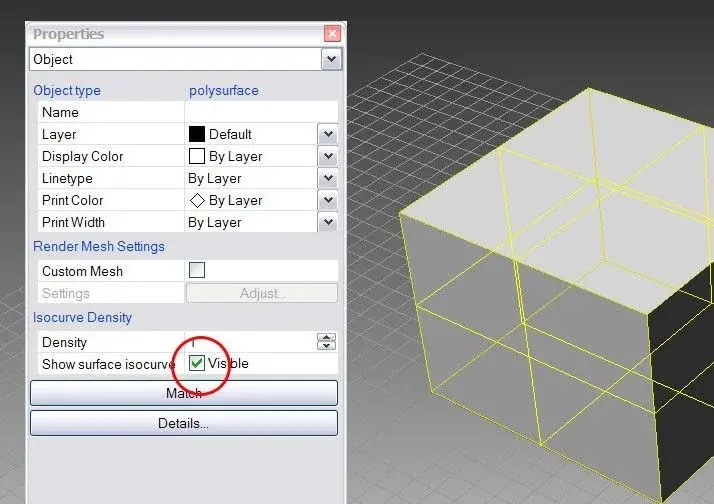
in the second image there are the properties of the object, from which it is shown that you managed to combine the surfaces in a single closed polysurface (a solid therefore).

select the object ... press f3, to view the properties, and remove the check mark under the heading "isocurve monster". This will make the object much lighter.
see image attached
 

Attachments

  • suggerimento_1.webp
    suggerimento_1.webp
    45.6 KB · Views: 10
I took off the curves right after that! in fact improves definitely, the surfaces were joined in a solid and I improved. I add some words, solidworks is a great program and very complete, but it is for those who design. the render module is decent but they are still working on it. solidworks objects are heavier because they are solid in the pure state not a set of faces but is developed on nvidia platform (they make special collaborations). sincerely I prefer to spend 1500 euros for a 4800 fx framework that move me on such an advanced program of cad...
 
I took off the curves right after that! in fact improves definitely, the surfaces were joined in a solid and I improved. I add some words, solidworks is a great program and very complete, but it is for those who design. the render module is decent but they are still working on it. solidworks objects are heavier because they are solid in the pure state not a set of faces but is developed on nvidia platform (they make special collaborations). sincerely I prefer to spend 1500 euros for a 4800 fx framework that move me on such an advanced program of cad...
Based on the image you posted, I reconstructed the geometry of the piece.
It was a polysurface of 4184 single surfaces, unlike your piece that only has 2922...and also on my 2.2 ghz laptop with a picture board nvs 320m 512 mb (not the most so) I roar the object as a wind flag.

I think you have an opengl problem.

1) verify that opengl is activated (see image attached)
2) if they are activated.. .update video drivers

Let me know...
 

Attachments

  • suggerimento_3.webp
    suggerimento_3.webp
    32.8 KB · Views: 21
  • suggerimento_2.webp
    suggerimento_2.webp
    46.4 KB · Views: 16
I have the same settings! is it that with windows 7 there is a problem? I also have the latest drivers installed... .
 
rhino with win7 works from service release 6 onwards. and it works very well. opengl also work or do not work at the operating system level and certainly not "single software".

download the latest available drivers of the sk video, and reinstall them, to be 100% sure that everything goes as you should.

Moreover, rhino will certainly have its limits but as to mere display it has nothing to envy to the other sw.

Have you tried _fitsrf?
 
I often move large files from solidworks to rhino and I must say that sw is extremely powerful to manage the display of rhino.
Many times of the models that in sw manage easily, you can and not rotate in rhino.

in any case beyond you have advice I had already given you in my previous post, and then they were repeated, to remove the display of the isocurve and to correctly set the open gl settings, you can lower the mesh level to render for some components.
If you select a polysurface you can selectively set its mesh to render and thus represent more coarse objects that you feel less important to display.
in this way speed up the screen movements.
Of course, if you have only one very complex polysurface you cannot apply this system
Hi.
wave
 
I did the rehearsal, but I have to leave rhino for more advanced programs. rhino is good for individual objects, but together with complex objects fatigue! In fact, my problem is not the number of components but the complication of individual objects! Thank you very much to all, I don't want you to waste time yet. . .
 

Forum statistics

Threads
44,997
Messages
339,767
Members
4
Latest member
ibt

Members online

No members online now.
Back
Top