
• This forum is the machine-generated translation of www.cad3d.it/forum1 - the Italian design community. Several terms are not translated correctly.

concentric hole to another with the same inclination

  • Thread starter Thread starter fabietto75
  • Start date Start date

fabietto75

Guest
Good evening to all,
This year they decided to install inventor, and now I am with this problem:
how do I make a hole that is concentric to another hole already existing with the same inclination but on another particular. ...
I would like the hole n°1 to be concentric n°2
thanks to all in advance... .
allego photosFORO NON CONCENTRICO.webp
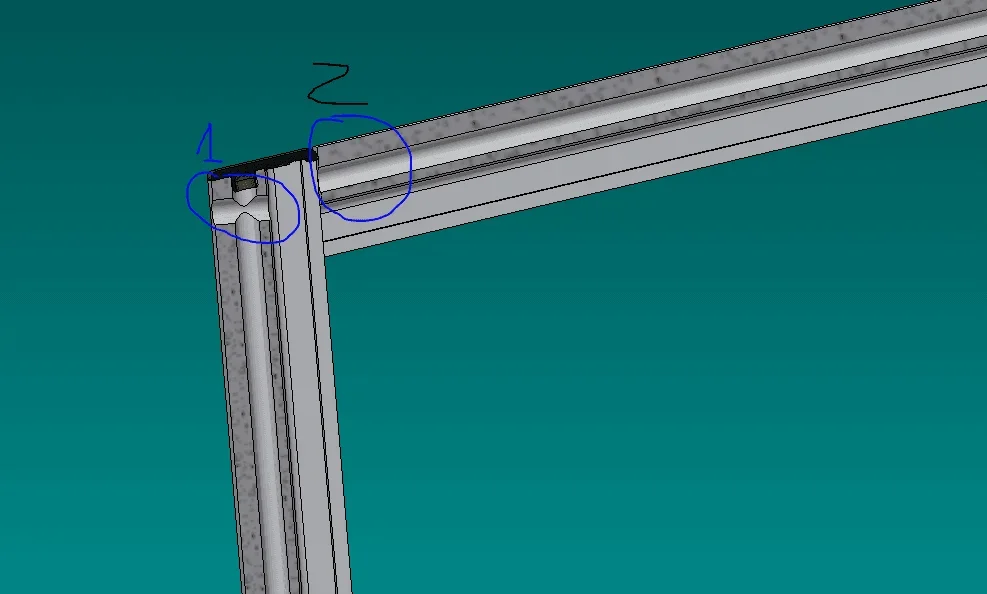
 
starting from the set where both parts are present, enter the design of part 1. open a sketch by selecting on part 2 the same plan used for the sketch of the reference hole. on this sketch project the center of hole 1. close the sketch and use it to make the coaxial hole to the reference one.
 
By doing so, the hole becomes adaptive, one of the most dangerous things I have inventor.
if you do what exxon says, but when you project the reference hole press the " maiusc" button, avoid adactivity.
adactivity binds one particular to another, so if in a year the parent, the child, used in several projects and in different contexts, changes his characteristics.
so you find yourself with the holes moved without knowing why.
 
By doing so, the hole becomes adaptive, one of the most dangerous things I have inventor.
if you do what exxon says, but when you project the reference hole press the " maiusc" button, avoid adactivity.
adactivity binds one particular to another, so if in a year the parent, the child, used in several projects and in different contexts, changes his characteristics.
so you find yourself with the holes moved without knowing why.
I didn't know that shift. Thank you!
 
starting from the set where both parts are present, enter the design of part 1. open a sketch by selecting on part 2 the same plan used for the sketch of the reference hole. on this sketch project the center of hole 1. close the sketch and use it to make the coaxial hole to the reference one.
Thank you.
 
starting from the set where both parts are present, enter the design of part 1. open a sketch by selecting on part 2 the same plan used for the sketch of the reference hole. on this sketch project the center of hole 1. close the sketch and use it to make the coaxial hole to the reference one.
Grazie!
 
the particular developed within a project should never be used in different projects or in contexts other than development.

If you have this need, the particular must be transformed into a library object, whose eventual modification is prevented by the interior of the project that uses it.
 
If you work for more customers you have to do some deadly jumps and you don't have much time to settle for good.
 
I'll be goat, but I haven't... I've always had the wrong inclination... Please bring a little patience. .
 
You see you take the wrong reference plan.
What are they, two extruded who mate at about 100 °?
 
all the patience you want, but without information you can not help. . .

If the starting plan is the same for the two holes, their axes must necessarily be parallel.

How is the first of the holes made? Is it an extrusion, a revolution or a real hole?
 
I'll be goat, but I haven't... I've always had the wrong inclination... Please bring a little patience. .
in the English forum the first thing they ask you is to attach the file. after someone attach the file with the solution or a video.
 

Forum statistics

Threads
44,997
Messages
339,767
Members
4
Latest member
ibt

Members online

No members online now.
Back
Top