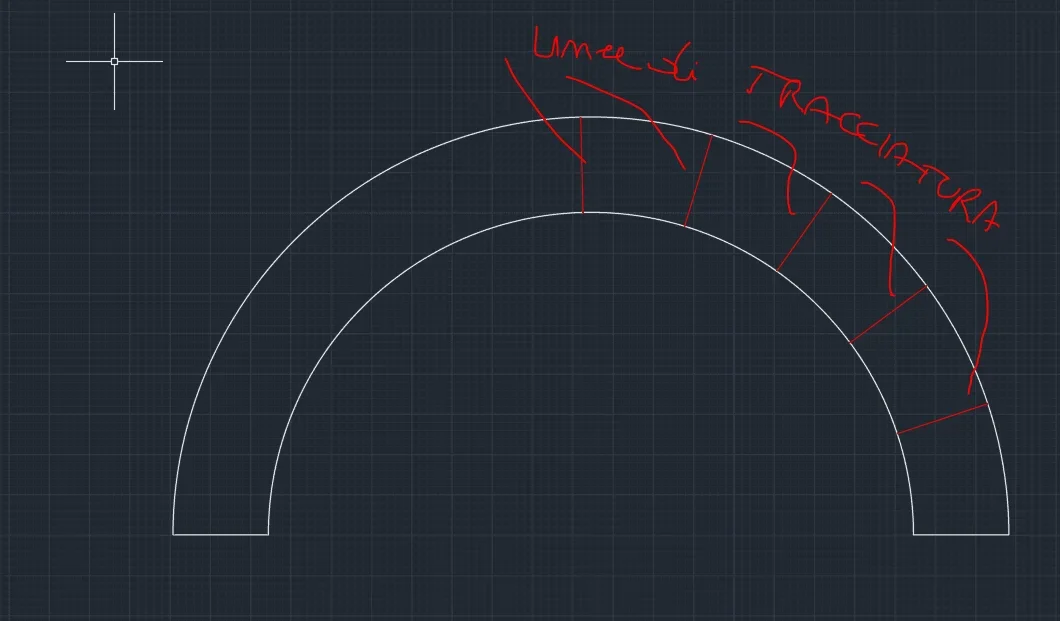
hi, create the cone by means of 2 sketches on two floors (even not parallel), the sketch should be opened (even 0.1mm) then create sheet with loft, choose bent manufacturing method and from there you can set the number of stools, or the angle of each fold. so in flattening to dxf tracks the fold lines. Good dayGuys. ..no one has ever had need to have trace lines on laser cutting dxfs
hi, I also get it in dizzying as well as bending, and with this method I draw with the laser the lines you indicated in your first post. I don't understand your question.Thank you valter, but that method there is no good...because I get the cone for displacement... mine must be lines of traction....with inventor I can get....so surely also with solid you can
it can't work because the sketch would be bound to the calandrate and not to flattening. if instead you have verified it post the file that we learn something newI saw the function shaft in the first post. to make the calandrate cone I would make a loft with two open profiles, and the openings on the two profiles must be corresponding.
on the outer surface of the cone you make your traces as if they were normal and bound sketches.
extend the sheet, in the table setting, but activate the display of the sketches.
I didn't check. I use this procedure for flat folds and, in fact, on curved surfaces it is not possible, at least directly and without resorting to artificial.it can't work because the sketch would be bound to the calandrate and not to flattening. if instead you have verified it post the file that we learn something new
he is capito.the result must be that on the flat model I have to have some sketch fins that though are drawn on the model
cutting pass?? What do you mean by complete removal??? . I didn't understand your message
but here who are you asking to correct you?? to whom is the disappointment to me?? ?the problem basically, correct me if I say a cagata, there is in the fact that in the flattening the sheet must have constant thickness on the warp areas so it is not possible to make markings, understood both as sketch and as thin cuts not passing, on the calandrato; markings that can be done on the flat surfaces of the classic plates.
a little orthodox method therefore is to draw the sketch of the area to mark and make an engraving (wind function) with complete removal of the material.
to no one in particular. Since this is a hypothetical explanation made for deduction, I put my hands forward and emphasize the fact that I could say a stupidity so, in case someone has a more solid explanation well come to correct me. paraphrasing such if I am mistaken you willbut here who are you asking to correct you? ?
I shall sayto whom is the disappointment to me?? ?