
• This forum is the machine-generated translation of www.cad3d.it/forum1 - the Italian design community. Several terms are not translated correctly.

config.pro set a "variable" for a possible route?

  • Thread starter Thread starter noonexl
  • Start date Start date

noonexl

Guest
Hello everyone,
I'm handing over to the config.pro.
after 12 years and so many versions is a cherry not indifferent.

to better manage the pointing of the directories where the various configuration files are contained I would like to set a sort of "variable" for the path directioncotry to shorten at the beginning of the config.
Let me explain to you

the value
system_colors_file at the moment is so
system_colors_file c:\proewf5\conf\appearance.dmt

I wish it would become something like:
dirconf= c:\proewf5\conf
system_colors_file %dirconf%\appearance.dmt

the thing would simplify the reconfiguration of directories according to the machine on which I install them etc...

thanks in advance
Noone
 
Hello everyone,
I'm handing over to the config.pro.
after 12 years and so many versions is a cherry not indifferent.

to better manage the pointing of the directories where the various configuration files are contained I would like to set a sort of "variable" for the path directioncotry to shorten at the beginning of the config.
Let me explain to you

the value
system_colors_file at the moment is so
system_colors_file c:\proewf5\conf\appearance.dmt

I wish it would become something like:
dirconf= c:\proewf5\conf
system_colors_file %dirconf%\appearance.dmt

the thing would simplify the reconfiguration of directories according to the machine on which I install them etc...

thanks in advance
Noone
instead of % just use the $ and the game is done.:cool:
greetings
 
Unfortunately it does not work
I explained:

dirstandard= c:\pippo

I recalled:
template_solidpart $dirstandard\start_files\template_.prt

don't find me the directory
the same goes for the others.. .

If I put all the dir it seems to go
es:
dirtrail= c:\temp
plot_file_dir $dirtrail

but if I have to compose the dir it goes wrong.. .
:
 
but did you set the environment variable in windows?
in your case:
variable name: dirstandard
value: path for example: c:\admin_creo\dirstandard

greetings
 
therefore the problem is precisely this,
I don't want to set variables in win environment

I would like to set the variables from the config so that wherever I carry the config passes the variables at the start of proes without putting hand to the pc.

the solution proposed above partially works
in fact putting in the config:
dirtrail= c:\temp

and calling
plot_file_dir $dirtrail
works perfectly
the problem is if I "compose" the directory.
in that case only accepts the first part without reading the following values
es:
template_solidpart $dirstandard\start_files\template_.prt
does not read the part "\start_files\template_.prt"

Thanks again for the help! !
:
 
Sorry I got it wrong.
then I recommend editing the file proe.bat.
set dirstandard=c:\admin_creo\dirstandard
 
I don't understand.
Sometimes it seems to work and sometimes it doesn't...
Indicatively it seems the right way
....continuous in the tests!
 
therefore
if I set the variable to start config putting
dirstandard=c:\pippo
does not work reading the variable
mdl_tree_cfg_file $dirstandard\conf\tree_.cfg

but it works
template_designasm $dirstandard\start_files\template_.asm

...
But why do these things happen only to me?
o
 
no but in the config.pro you don't have to put any variables, you have to put it in the .bat file as I wrote, in the .bat file you can also set the trail and other things, in the config.pro you then only have to recall that variable with the $.
I always did. :smile:
 
Sorry I was out for work. . .

I'm really screwed up. . .
I didn't realize you were talking about proe.ba o_o

Thank you very much
 
Bye to all,
I apologize if I answer this question, but in I create parametric 3.0 m060 I do not find proe.bat.
which file took its place where you can insert the first quoted row:
set dirstandard=c:\admin_creo\dirstandard
Besides, you can place that file in the boot folder so that to switch from one pc to another just copy the boot folder and do nothing else?
 
search for the parametric.bat file.

I don't understand the second question, can you explain yourself better?
 
ok, prefect, parametric.bat is located in the folder ..\ptc\creo 3.0\m060\parametric\bin\bin\

As for the second question, perhaps it was set on a concept error, I try to explain: when I wrote the question I thought that the proe.bat (parametric.bat) was automatically launched during the crack start, that I currently launch using the link to the file "parametric.exe"; So I was wondering how to tell creo where to look for it during startup in case you moved it from the original folder. But all this I think is wrong.
If I have understood correctly, to exploit the parameterc.bat you have to throw creo through this bat precisely, and no longer with the link to the parametric.exe (since the parametric.bat calls himself the parametric.exe), correct?

if it is correct, I would ask if you could tell me how to set the parameterc.bat, which is now like this:

@echo off
"c:\program files\ptc\creo 3.0\m060\parametric\bin\parametric.exe" "c:\program files\ptcreo 3.0\m060\parametric\bin\parametric.psf" %*

if however launch I create from the parameterc.bat so set, I create not point to the working directory of departure that I would like (because the path of the working directory of departure I set it to the voice "start in" in the properties of the connection to the "parametric.exe"), then I would need to insert in the parametric.bat the information that you indicate to the program to which working directory point to start.
 
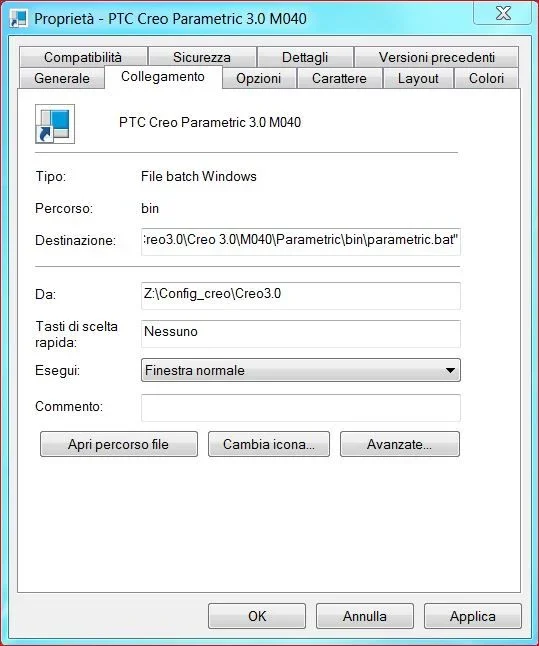
exact you have to launch it from the bat, on the link icon you can specify whether to launch it from the eexe or from the bat, and the boot directory, which in my case is the one where there are configuration files, since we have pdmlink and do not work on a local working directory.Creo.webp
 
All right, clear!

last thing: is it possible to close the dos window after launch? I tried to enter the command "exit", "exit \b" "exit 0" at the end but it does not close anyway
 
Perfect, it works!
I add a small note for any profane like me: the string should be added before
"c:\program files\ptc\creo 3.0\m060\parametric\bin\parametric.exe" "c:\program files\ptcreo 3.0\m060\parametric\bin\parametric.psf" %*
 
Perfect, it works!
I add a small note for any profane like me: the string should be added before
"c:\program files\ptc\creo 3.0\m060\parametric\bin\parametric.exe" "c:\program files\ptcreo 3.0\m060\parametric\bin\parametric.psf" %*
You're right, I forgot to write it in the previous post.
 

Forum statistics

Threads
44,997
Messages
339,767
Members
4
Latest member
ibt

Members online

No members online now.
Back
Top