
• This forum is the machine-generated translation of www.cad3d.it/forum1 - the Italian design community. Several terms are not translated correctly.

configuration code

  • Thread starter Thread starter genesis1975
  • Start date Start date

genesis1975

Guest
Good morning.
I wanted to talk to you about a question about a simple configuration;
I have a rivet that is present in the assemblies with so many lengths and I have made a configuration. . Now I should rename the various rivet measurements with the corresponding code, but I think the file name of the rivet with the various configurations is always the same, I can't put a file name for each configuration and this creates a hitch...you know how you do it?
 
if later I want to change the length measurement in a configuration, do I also update in the various sets and only in the rivets corresponding to that configuration?
 
and as file name after what you put? [/QUOTE
]whatever you want.
a screw, for example, you will call it screws tcei uni 4762
a dado dado esa uni 5588
the rivet rivetto uni 9200
 
if you change a configuration all files in that configuration will be changed
 
But now I have to replace the rivets in a set in which I made the pack and go and that therefore they lost the references, but setting for example the rivet along 51, does not replace me only those from 51 but all....even if it is specified in the configuration item "find corresponding to the name"
 
then I go to the rivet file, I click twice and select the configuration e.g. length 51 then save and exit. I go to the assembly and I make dx key in a rivet with configuration 51, replace component, browse and find the file I set on 51, in the tab there is configuration corresponding to the name then green tick and see me replaced all rivets
 
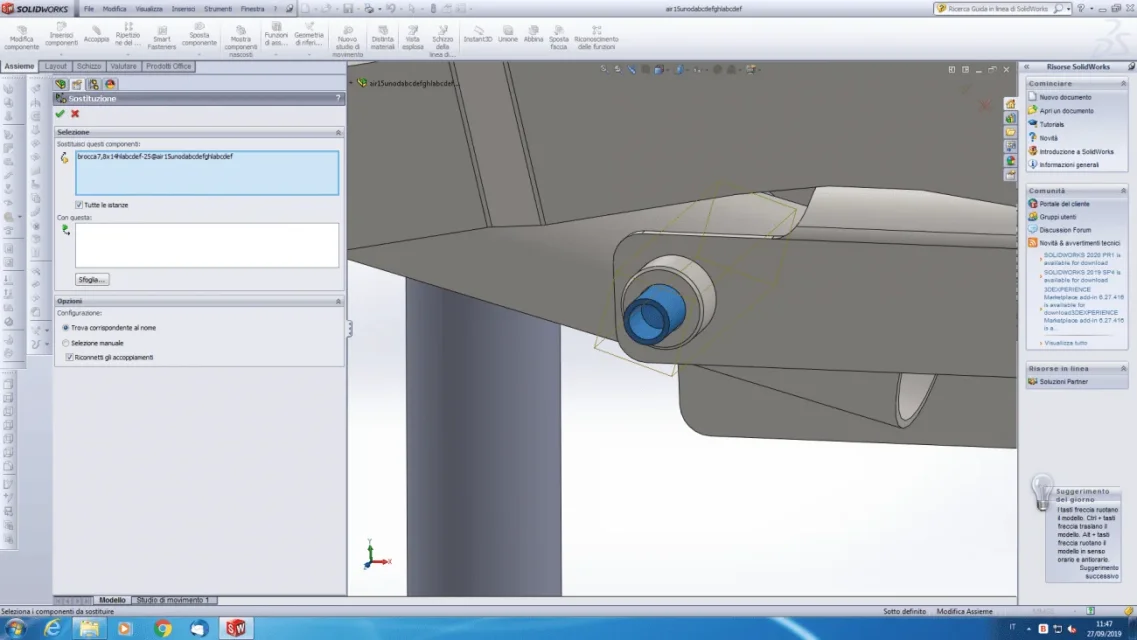
put an image of the component replacement card because I have no option regarding the configuration
 
because you set changes all instances. If you select only the rivets that interest you and remove all the tick to change all the istane should work.
 
Okay, now I replace it with another one from 51, but only that... there are some others from 51... if I make manual selection as I have to do, if I give the check it replaces me only him and it is enough
 
to make manual selection as I have to do, what are the steps I have to perform, because it is automatically not taking me more than one at a time.
 
in the axieme feature manager, or in the graphic area, select the parts to change with the relevant configurations, launch the replacement command, in the property manager, in the top window, you will need to have the list of selected parts, from confirmation to replacement
 

Forum statistics

Threads
44,997
Messages
339,767
Members
4
Latest member
ibt

Members online

No members online now.
Back
Top