
You are using an out of date browser. It may not display this or other websites correctly.
You should upgrade or use an alternative browser.
You should upgrade or use an alternative browser.

Kaji
Guest
I cocreate modeling but the cyan color of the two surfaces causes me to think that they belong to a "face part" and not to a "solid part" (default of gray color); Therefore, the change of edges such as fittings, bevels etc. are not allowed, you can only make them on solid parts.
in general having to deal with "face parts" in modeling is strongly advised, also because in fact modeling is a mechanical and solid cad of null thickness have little meaning, so the first thing that you should do, if my hypothesis is correct, make sure you have to deal only with solid parts, if for any reason you are more comfortable creating faces by joining the edges, then it is enough that you manage to "close"
in general having to deal with "face parts" in modeling is strongly advised, also because in fact modeling is a mechanical and solid cad of null thickness have little meaning, so the first thing that you should do, if my hypothesis is correct, make sure you have to deal only with solid parts, if for any reason you are more comfortable creating faces by joining the edges, then it is enough that you manage to "close"
maxopus
Guest
Does life last?Hello.
I am approaching (after reading a little tutorial) to the world creo elements/direct. really it is not possible to make a simple connection on this edge?
Thank you.
folle76
Guest
Thank you for the explanation. Unfortunately, I think it's a pretty heavy bond.I cocreate modeling but the cyan color of the two surfaces causes me to think that they belong to a "face part" and not to a "solid part" (default of gray color); Therefore, the change of edges such as fittings, bevels etc. are not allowed, you can only make them on solid parts.
in general having to deal with "face parts" in modeling is strongly advised, also because in fact modeling is a mechanical and solid cad of null thickness have little meaning, so the first thing that you should do, if my hypothesis is correct, make sure you have to deal only with solid parts, if for any reason you are more comfortable creating faces by joining the edges, then it is enough that you manage to "close"
I also involve maxopus to talk about direct editing of imported files (proes or cocreates). Sometimes I get a 3d model in .step. What is the best way to make changes to it of modest entities?
in the version of proes that I have is not there. I have to take some odds and remodel it. with importdatadoctor I close the surfaces and fix some but everything ends there. pleasant would be to be able to erase some radius, make the offset of some surfaces, extend the edges of adjacent surfaces and still radiate the whole....
Er Presidente
Guest
Of course, pretending to create a connection between two surfaces with the solids module is really fun!
Enable the "superfici" module, please, and use the tools to collect the surfaces and maybe you get better.
Enable the "superfici" module, please, and use the tools to collect the surfaces and maybe you get better.
folle76
Guest
I am using creo elements/direct modeling express 4.0. is a free version, but from the site http://www.ptc.com/products/creo-elements-direct/modeling-express/#3 it seems that there is no difference between the above and the paid version, I create elements/direct modeling 18.0. it may be that in this product flow without acronym something has been lost. How can I enable the surface module?
maxopus
Guest
He's running a command that works in all contexts, isn't he?Of course, pretending to create a connection between two surfaces with the solids module is really fun!
Enable the "superfici" module, please, and use the tools to collect the surfaces and maybe you get better.
the pro/e round works on everything, solids or surfaces that are, even on non-continuous entities.
I think the light will stick to you

Er Presidente
Guest
I don't think the free version has the additional modules, so I don't think it has the one for the surfaces.I am using creo elements/direct modeling express 4.0. is a free version, but from the site http://www.ptc.com/products/creo-elements-direct/modeling-express/#3 it seems that there is no difference between the above and the paid version, I create elements/direct modeling 18.0. it may be that in this product flow without acronym something has been lost. How can I enable the surface module?
MFT
Guest
in fact it does not have module surfacesI don't think the free version has the additional modules, so I don't think it has the one for the surfaces.
maxopus
Guest
This fact of making the surfaces optional does not understand it.
surfaces are not only used to make carriages, they are used in many areas of mechanics.
not to make controversy but, it seems to me a very peculiar thing.
surfaces are not only used to make carriages, they are used in many areas of mechanics.
not to make controversy but, it seems to me a very peculiar thing.
maxopus
Guest
What version of pro/e use?Thank you for the explanation. Unfortunately, I think it's a pretty heavy bond.
I also involve maxopus to talk about direct editing of imported files (proes or cocreates). Sometimes I get a 3d model in .step. What is the best way to make changes to it of modest entities?
in the version of proes that I have is not there. I have to take some odds and remodel it. with importdatadoctor I close the surfaces and fix some but everything ends there. pleasant would be to be able to erase some radius, make the offset of some surfaces, extend the edges of adjacent surfaces and still radiate the whole....
until wf4 the free frt plug-in (feature recognition tool) was used to recognize the original functions of an imported file (extrusions, revolutions, holes, series and rays).
from wf5 onwards the functions were fully integrated into the program.
in creo parametric an additional module has been inserted (from the contained cost) able to better edit the geometries of the imported files.
MFT
Guest
However on the express 4 you use grated there is a basic surface module then there is the additional module to be licensed where you have all the commands you want the module is not free on licensed modeling let alone if it can be on the grater. and if you look at the deficiencies of the modules for express 4 sees that the module surfaces is not there so I do not understand how you can expect to do an operation with commands that you do not have at your disposal
maxopus
Guest
It's the habit of using pro/e that leads you to think that it can't be there.However on the express 4 you use grated there is a basic surface module then there is the additional module to be licensed where you have all the commands you want the module is not free on licensed modeling let alone if it can be on the grater. and if you look at the deficiencies of the modules for express 4 sees that the module surfaces is not there so I do not understand how you can expect to do an operation with commands that you do not have at your disposal
in the basic module you realize solids and surfaces without any additional module or enable and round and fillet commands act indifferently on the two types of geometries.
Er Presidente
Guest
All right, but we're talking about a solid modeler handling solids, cubes, etc.It's the habit of using pro/e that leads you to think that it can't be there.
in the basic module you realize solids and surfaces without any additional module or enable and round and fillet commands act indifferently on the two types of geometries.
the surfaces and its tools serve to work the surfaces to transform them as soon as possible into solids.
folle76
Guest
I create parametric. having to deal with pieces made by hot stamping I don't need the ef. the additional module you refer to is flexible modeling extension? I have seen some videos and it seems powerful, but in those examples you always think with solid features.What version of pro/e use?
until wf4 the free frt plug-in (feature recognition tool) was used to recognize the original functions of an imported file (extrusions, revolutions, holes, series and rays).
from wf5 onwards the functions were fully integrated into the program.
in creo parametric an additional module has been inserted (from the contained cost) able to better edit the geometries of the imported files.
MFT
Guest
feel but you can know what you want to know, you talked about making connections with direct modeling express 4.I create parametric. having to deal with pieces made by hot stamping I don't need the ef. the additional module you refer to is flexible modeling extension? I have seen some videos and it seems powerful, but in those examples you always think with solid features.
What do you want to use to make this connection?
cacciatorino
Guest
the surfaces are an additional module with licence to be paid separately. with the basic version you do a few things.Of course, pretending to create a connection between two surfaces with the solids module is really fun!
Enable the "superfici" module, please, and use the tools to collect the surfaces and maybe you get better.
Attachments

Kaji
Guest
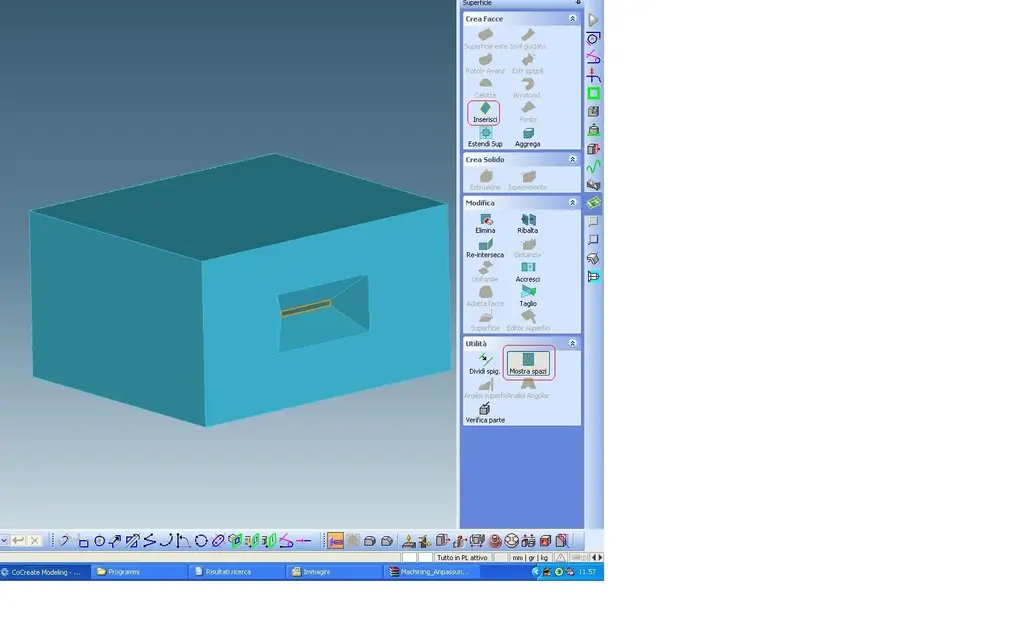
If I don't know a German word and I've never tried it on the net I found this lisp http://osd.cad.de/lisp_3d_31.htmusually the few times that I am facing a step converted into part face I try to repair it and turn it into solid with the two basic commands:Thank you for the explanation. Unfortunately, I think it's a pretty heavy bond.
"show spaces" that shows you the fouls in your part
"put face" that allows you to stop these fouls by inserting a face.
Finally as soon as the flaws are closed he automatically converts the part into solid, sometimes comes out a solid "default", but then making verification part he repairs it automatically providing you a solid on which to make all the changes of the case.
Attachments
Marco-70
Guest
I don't understand how cocreate can still be chosen by chicchessia... is not a work tool: it is a continuous obstacle to work