
• This forum is the machine-generated translation of www.cad3d.it/forum1 - the Italian design community. Several terms are not translated correctly.

connection of the part file to the axieme

  • Thread starter Thread starter qui
  • Start date Start date

qui

Guest
Hello, everyone.
I have a file management problem.
I try to be as clear as possible:
I made a set, consisting of various assembly, in turn made of various parts, typically flanges, folders and tubes.
the system is not made by piping, but the pipes are simply extrusions of a profile.

preparing the table of the general aid I find myself in the need to prepare a separate cut, which also refers to the subaxieme code.

If I create a separate table of materials I also insert the pieces that I do not care about (flangies and folders), and then I should delete them by hand (and this would be the minor problem), but I have to insert by hand the reference to the subaxieme... increasing the chances of error a lot.
Is there a command (or better links) that allows me to automatically view the membership of the part?

Thank you.
steak
 
Hello, everyone.
I have a file management problem.
I try to be as clear as possible:
I made a set, consisting of various assembly, in turn made of various parts, typically flanges, folders and tubes.
the system is not made by piping, but the pipes are simply extrusions of a profile.

preparing the table of the general aid I find myself in the need to prepare a separate cut, which also refers to the subaxieme code.

If I create a separate table of materials I also insert the pieces that I do not care about (flangies and folders), and then I should delete them by hand (and this would be the minor problem), but I have to insert by hand the reference to the subaxieme... increasing the chances of error a lot.
Is there a command (or better links) that allows me to automatically view the membership of the part?

Thank you.
steak
I don't know if I understand.
do you want to see only the sub-axioms without specifying any part of them?
then in the property manager of the distinct materials, in kind of distinct materials, you have to select only first level.

Hello
marco
 
I don't know if I understand.
do you want to see only the sub-axioms without specifying any part of them?
then in the property manager of the distinct materials, in kind of distinct materials, you have to select only first level.

Hello
marco
no, it is not so: in the "general" axieme I want to see all the components that make up the axieme, then in the separate table materials I choose "only the parts", but I would like there to be a column that specified me to which subassieme belongs that particular piece.

in practice:
general
- subaxis 1
* part a
* part b
* part c
- subaxis 2
* part
* part a
* part f

In practice I would like a table that told me:
part a - used in subaxieme 1 and 2 [e quindi 2 pezzi]part b - used in subaxieme 1
part c - used in subaxieme 1
part d - used in subaxieme 2
...
I'm afraid there's something more than standard sw.. .

steak
 
no, it is not so: in the "general" axieme I want to see all the components that make up the axieme, then in the separate table materials I choose "only the parts", but I would like there to be a column that specified me to which subassieme belongs that particular piece.

in practice:
general
- subaxis 1
* part a
* part b
* part c
- subaxis 2
* part
* part a
* part f

In practice I would like a table that told me:
part a - used in subaxieme 1 and 2 [e quindi 2 pezzi]part b - used in subaxieme 1
part c - used in subaxieme 1
part d - used in subaxieme 2
...
I'm afraid there's something more than standard sw.. .

steak
then you have to choose con rientranza, and try the three options without numbers, detailed numbering, flat numbering.

Hello
marco
 
no, it is not so: in the "general" axieme I want to see all the components that make up the axieme, then in the separate table materials I choose "only the parts", but I would like there to be a column that specified me to which subassieme belongs that particular piece.

in practice:
general
- subaxis 1
* part a
* part b
* part c
- subaxis 2
* part
* part a
* part f

In practice I would like a table that told me:
part a - used in subaxieme 1 and 2 [e quindi 2 pezzi]part b - used in subaxieme 1
part c - used in subaxieme 1
part d - used in subaxieme 2
...
I'm afraid there's something more than standard sw.. .

steak
I'd say you need a pdm if you want it automatic, paper and pen if you want it manual. . .
 
I'd say you need a pdm if you want it automatic, paper and pen if you want it manual. . .
for marco: I had tried this option too, but it did not inspire me.

for re_solidworks.... was the answer I feared to hear me say... I'll get a pen and paper.
 
for re_solidworks.... was the answer I feared to hear me say... I'll get a pen and paper.
Yes,
But instead of writing it "with the pen on the card" you can add properties to the parts/assiemes so as to create "manual references". in separate table add the column/s connected to those properties.
so that the drawing of the table becomes automatic. . even if the compute remains manual, depending on your previous compilation.

but if you put a "graphic" example of how you want it to be the table you would understand better.

greetings
Marco:smile:
 
Yes,
But instead of writing it "with the pen on the card" you can add properties to the parts/assiemes so as to create "manual references". in separate table add the column/s connected to those properties.
so that the drawing of the table becomes automatic. . even if the compute remains manual, depending on your previous compilation.

but if you put a "graphic" example of how you want it to be the table you would understand better.

greetings
Marco:smile:
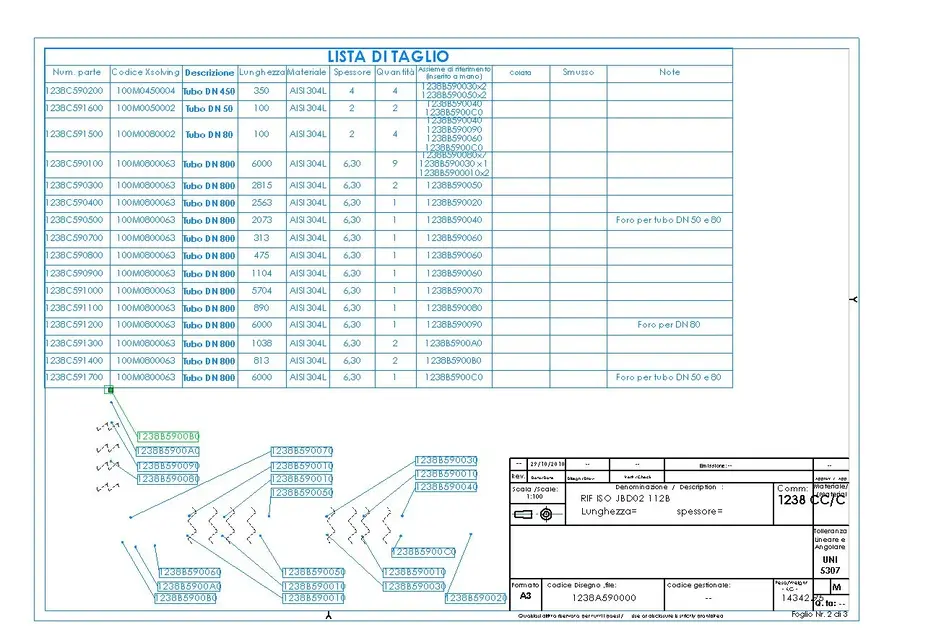
Here I am again. I'll put you a cut list as I wish it was.
to now the column "reference aids" is inserted by hand.
In practice I would like the above column to refer to the custom bubble (which I put automatically) of the axieme.

see attached file
 

Attachments

  • 1238A590000.webp
    1238A590000.webp
    135.7 KB · Views: 18
a question: are you sure that the same tube cannot be used in another set? if you want to manage it?
 
a question: are you sure that the same tube cannot be used in another set? if you want to manage it?
The 1238c591600 tube is used for 4 times, in the assemblies 1238b590040 1238b590060 and 1238b5900c0.

can not be used on another group, belonging to another isometry. if you have to use an identical tube, change the code (eg if the axieme will be 1238b6900a0 the part will be 1238c690100, although formally identical to 1238c591600)
 

Forum statistics

Threads
44,997
Messages
339,767
Members
4
Latest member
ibt

Members online

No members online now.
Back
Top